
While the Lenovo Yoga Pro 9i Aura Edition isn’t part of the manufacturer’s professional ThinkBook or ThinkPad series, it performs like a highly capable workstation that will appeal to many video editors.
The Lenovo Yoga Pro 9i Aura Edition is perfect for freelancers or small businesses looking for a powerful PC with a beautiful display for demanding creative work.
The Lenovo Yoga Pro 9i Gen 10 Aura Edition is a somewhat unusual laptop. The 16-inch device officially belongs to Lenovo’s Yoga family, which is consumer-oriented. This is reflected in the pre-installed operating system: Windows 11 Home. However, the Yoga Pro 9i looks like a ThinkBook laptop and has everything on board to serve as a professional workstation.

The build quality of this substantial device is phenomenal. The Lenovo Yoga Pro 9i Aura Edition feels very solid and robust, even in the middle of the keyboard. That keyboard types just as fantastically as all other Lenovo keyboards and even comes with a numeric keypad on the right side. The touchpad is spacious, precise, and has a pleasant click.
Internal Components
Inside, this device also shows professional qualities. Lenovo claims that the Lenovo Yoga Pro 9i Gen 10 Aura Edition is suitable for professional creation and provides the hardware to support that claim. Under the keyboard hums an Intel Core Ultra 9 285H. That’s a robust chip combining six P-cores with eight E-cores and two additional ‘low power’ E-cores, totaling sixteen cores and as many threads. The cores of this Arrow Lake edition don’t support multithreading.
De CPU krijgt gezelschap van een Nvidia GeForce RTX 5070 en 64 GB RAM-geheugen. Een SSD met een royale 2 TB aan opslagruimte vervolledigt de specificatielijst. In theorie knutselt Lenovo met die componenten een pc in elkaar die zowel heel krachtig als erg gebalanceerd is, met de juiste hoeveelheden RAM en opslag om de capaciteiten van CPU en GPU te complementeren.
Performance
The benchmarks confirm this analysis. The Intel Core Ultra 9 285H isn’t just powerful on paper. The chip performs at the level of the AMD Ryzen AI Max+ Pro 395 in the HP ZBook Ultra.
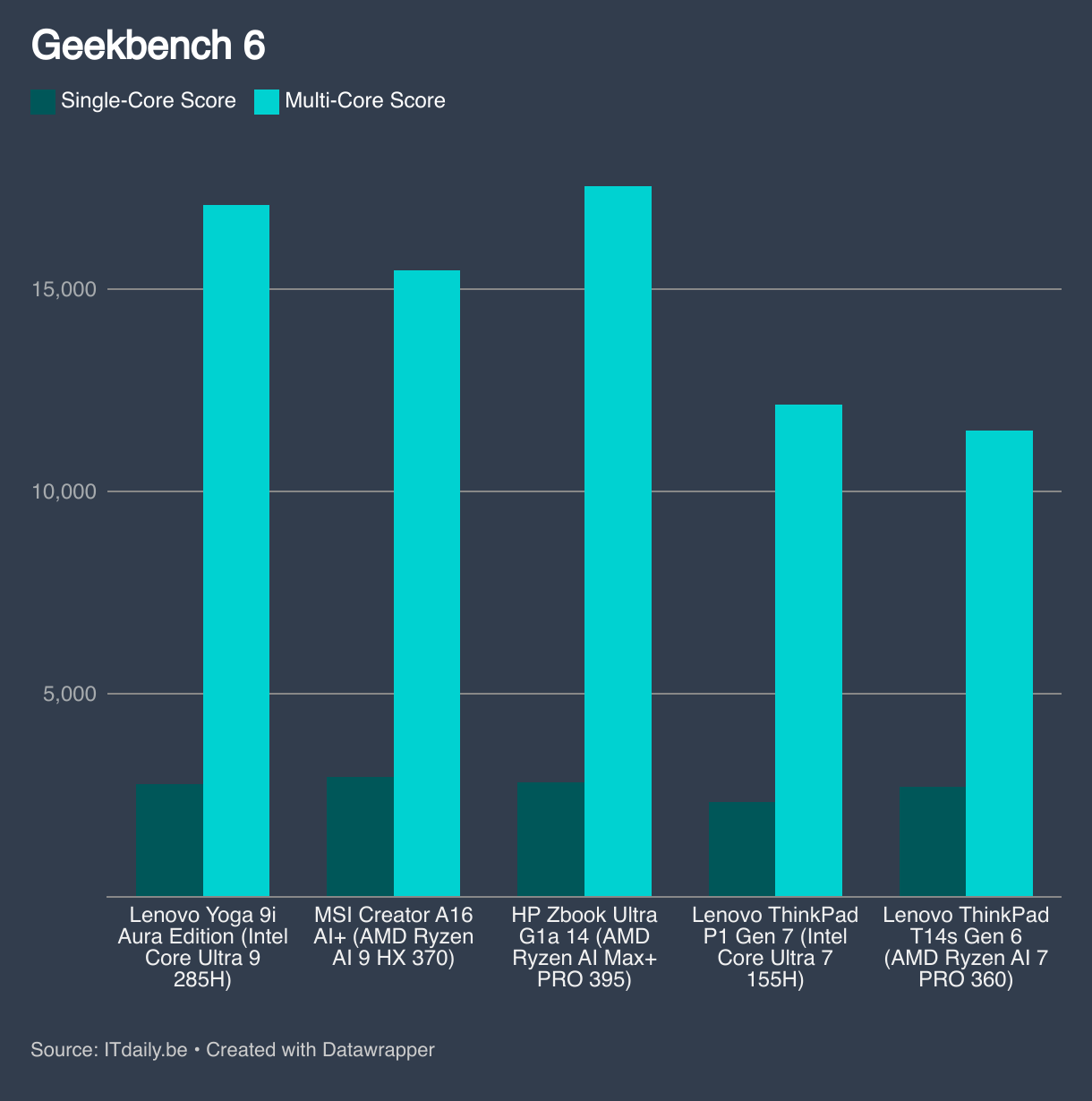
Other equally capable devices lag behind. The MSI Creator A16 AI+ with its AMD Ryzen AI 9 HX 370 is a muscular laptop, yet the Lenovo Yoga Pro 9i performs better.
In this Lenovo laptop, the chip reaches a peak frequency of 4.7 GHz. It never reaches the theoretical maximum of 5.4 GHz, but that’s hardly surprising. The peak frequency that Intel communicates for its laptop components rarely matches reality in a normal chassis anymore.
The cooling of the Lenovo Yoga Pro 9i Aura Edition is excellent. Only after about a minute and a half does the chip need to throttle back. The frequency then drops to a still impressive 4.4 GHz, which remains sustainable. That’s good news for long rendering tasks.
Lenovo targets creators like video editors, photographers, and 3D specialists with these specifications. The powerful chip makes the laptop a rendering champion, while the GPU supports complex visualizations.
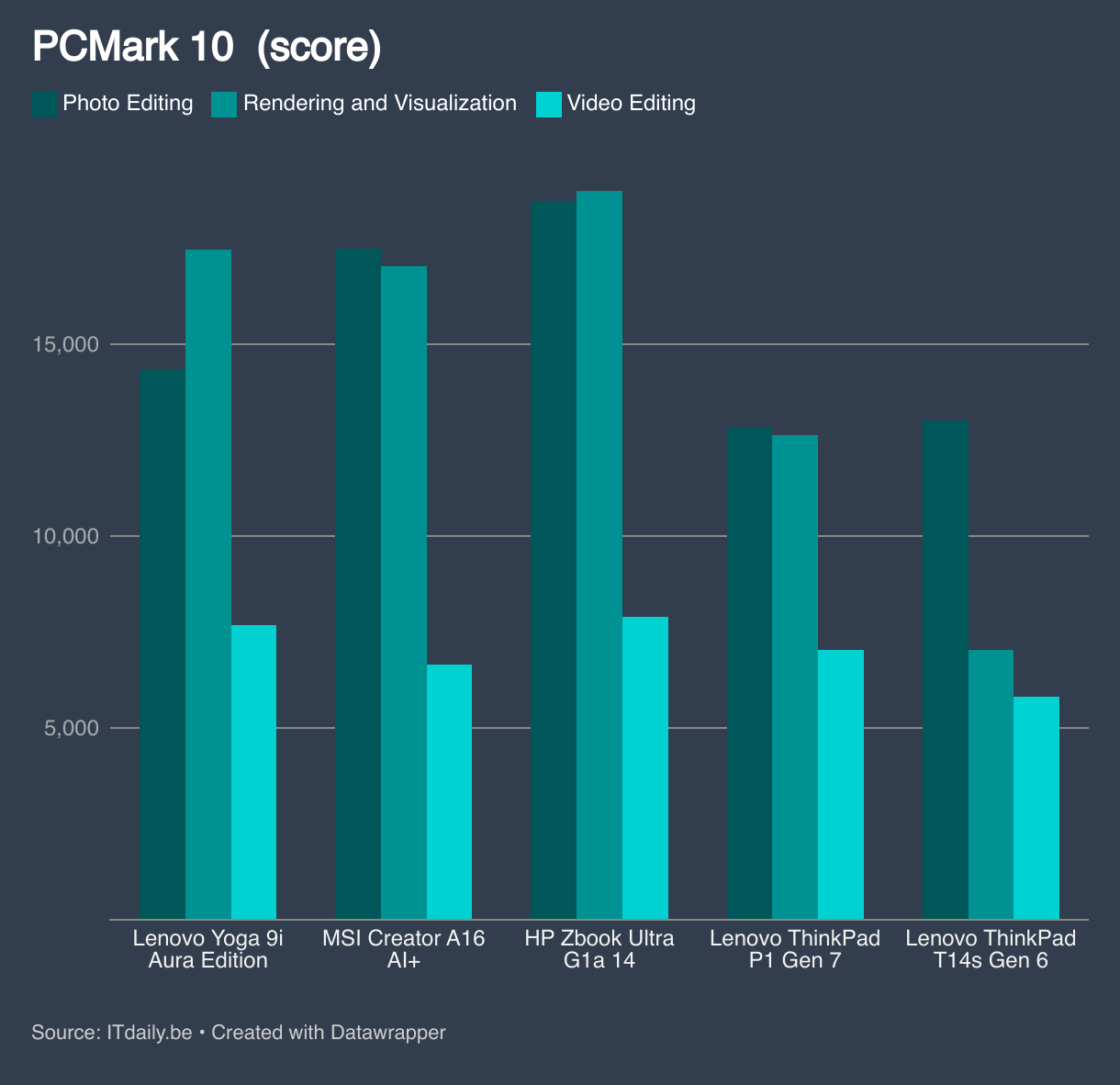
In our tests, the Lenovo Yoga Pro 9i Gen 10 Aura Edition performs well, though we see that the gap with the slightly less powerful MSI Creator A16+ narrows. This is surprising, as that MSI comes with a slightly older GPU (an Nvidia RTX 4070). However, the generational difference between RTX 4070 and RTX 5070 isn’t that significant, as clearly shown here.
The HP Zbook Ultra G1a, on the other hand, has a special chip where CPU, GPU, and 128 GB memory are linked together. This approach works slightly better than the classic architecture with discrete CPU and GPU, but here too the differences are small.
It’s clear that this laptop is suitable for the workloads Lenovo envisions. If you need to open heavy spreadsheets, you’re also in the right place. Yet here too it’s noticeable that MSI’s laptop achieves slightly higher scores, despite having less RAM (32 GB).
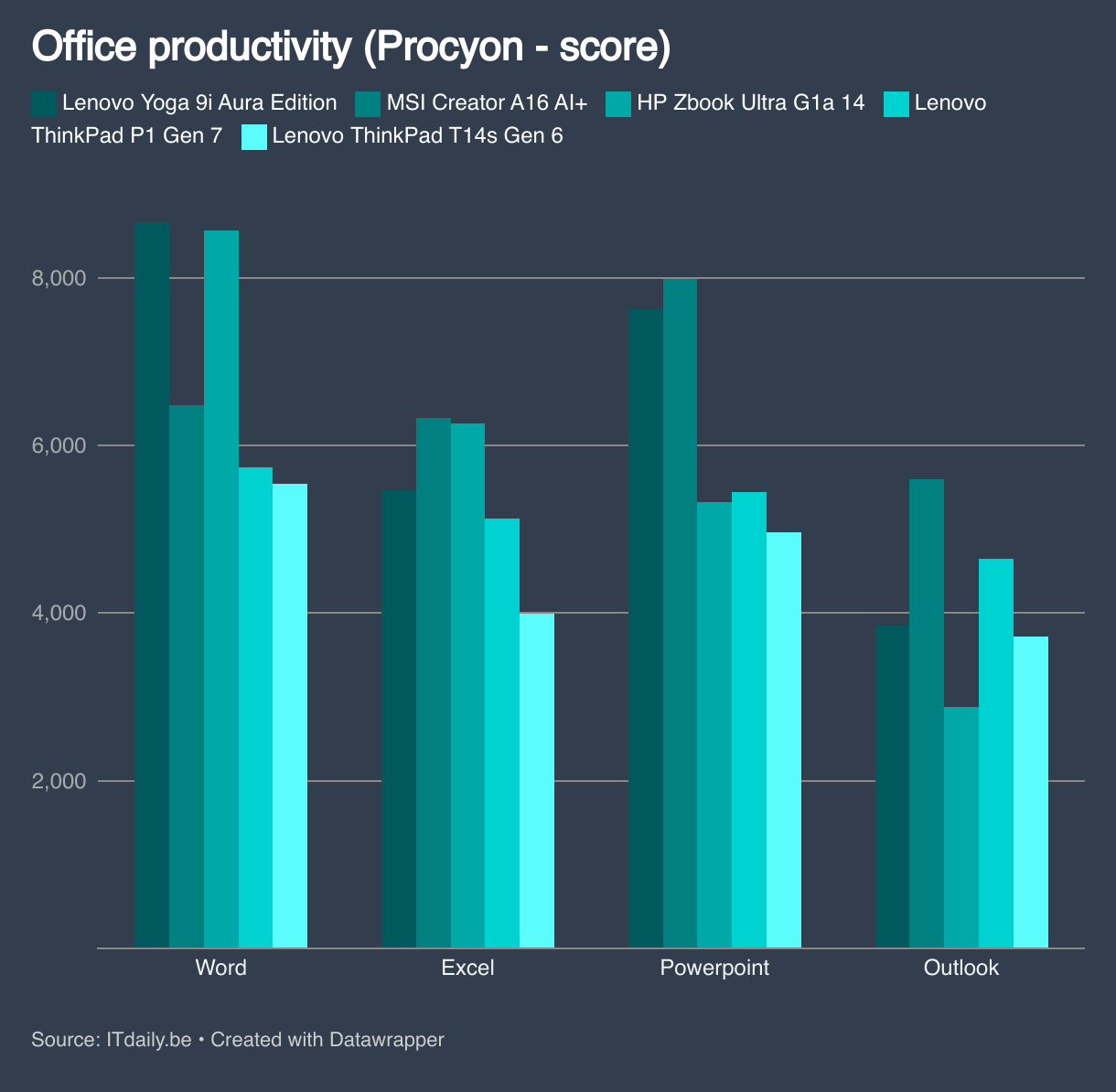
For other office workloads, the Lenovo Yoga Pro 9i Aura Edition won’t test your patience either. The numbers here give a rather abstract picture: in this class, it matters little which laptop scores best. All devices clear the bar marking ‘more than fast enough’ with margin to spare.
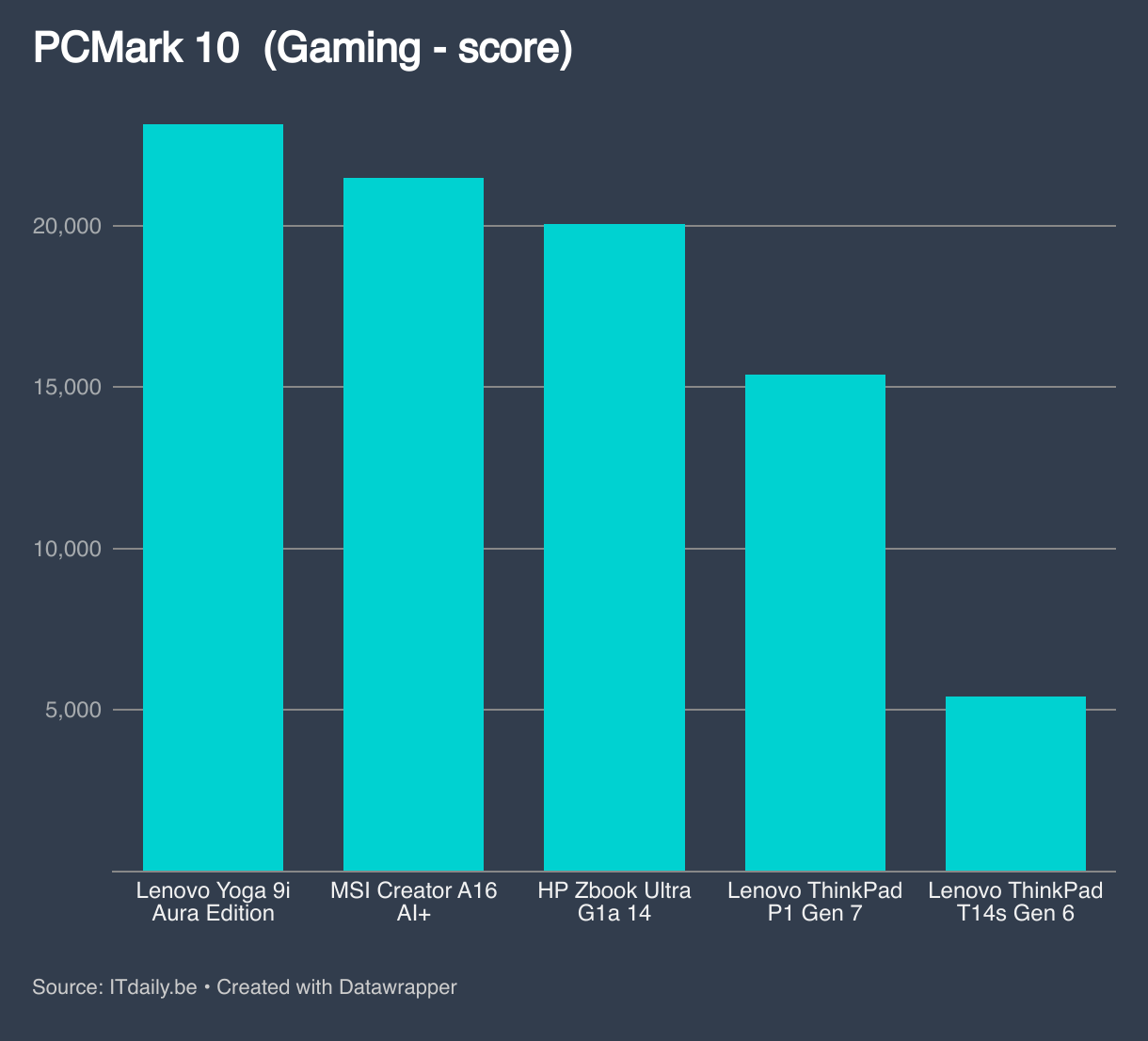
The combination of CPU and GPU also lends itself to entertainment. This laptop can run the latest games for those who want to have fun after work hours. In this, the Lenovo Yoga Pro 91 surpasses all other devices in our comparison.
We also note that the laptop is generally quite frugal with its fans. Even during benchmarks, they rarely ran very loud. Only during specific tests for sustained maximum load did we get them running at full speed.
Not a Marathon Runner
It won’t surprise anyone that such powerful hardware requires quite a bit of power. The battery capacity at 84 Wh is also lower than the 99 Wh that isn’t uncommon for this type of laptop. Lenovo thus manages to keep the weight (just) under 2 kg, but the reality is that you can never use this laptop far from a power outlet for too long.
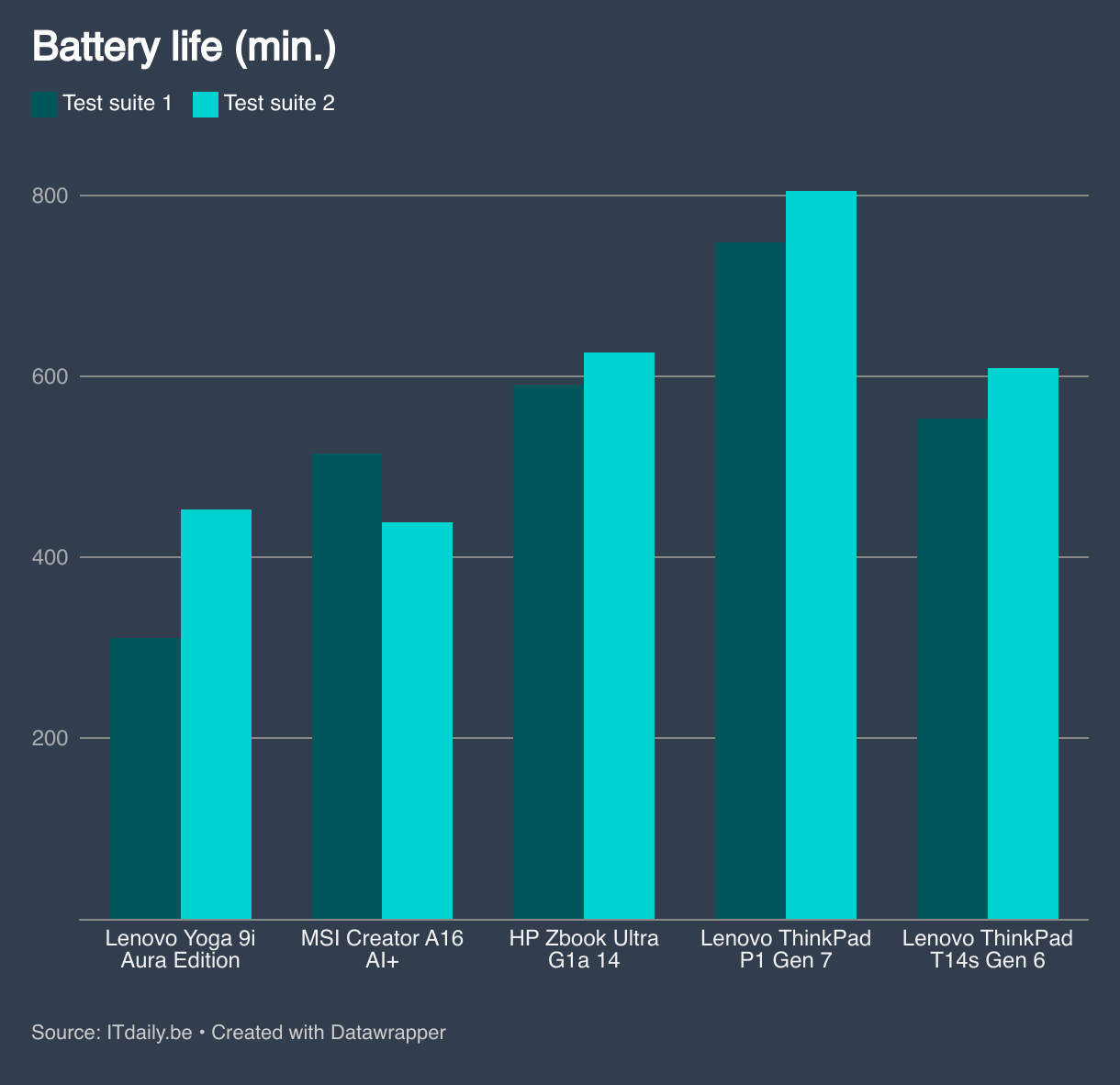
With conservative use, you might get about six hours, but think very light office work here. As soon as you effectively utilize the hardware, the battery drains in a few hours. Even by mobile workstation standards, that’s not very good.
Strange Charging Choices
Lenovo tries to compensate for the weak battery performance by enabling fast charging. The box includes a 170-watt charger, which unfortunately only works via its proprietary connector. That’s a shame, since USB-C PowerDelivery 3.1 should be sufficient to enable a USB-C connection for the charger.
Lenovo Yoga Pro 9i Gen 10 Aura Edition charges according to very specific rules. The device is half-full again in 24 minutes and back to 80 percent in 48 minutes, but only if you completely shut down the device while charging.
If you continue working while plugged in, charging takes significantly longer (38 minutes and 62 minutes).
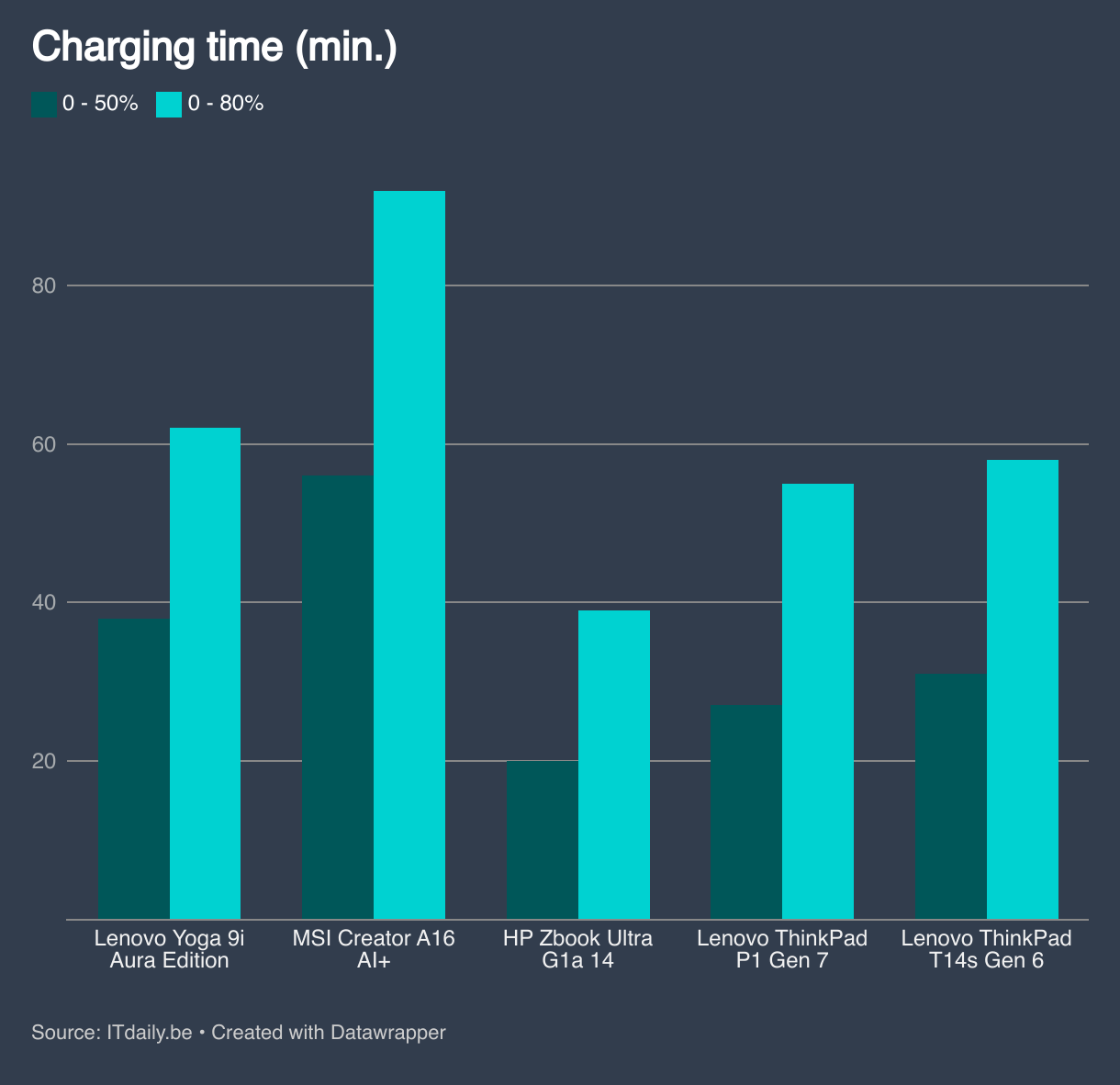
We find this an incomprehensible choice: fast charging is especially important when you’re at risk of running out of power while working. Then you look for a spot near the outlet and continue working while the laptop recharges. Lenovo sees it differently: if you want to charge quickly, you must take a substantial break. The combination of the proprietary connection instead of USB-C and the strange necessity to shut down the laptop for fast charging make the battery management of the Lenovo Yoga Pro 9i Aura Edition perhaps its weakest point.
Beautiful screen
The display is definitely a strength. The 16-inch OLED panel counts 3,200 x 2,000 pixels and has a phenomenal maximum brightness of no less than 1,011 cd/m². Brightness is typically a weakness of OLED panels, but not with the Lenovo Yoga Pro 9i Aura Edition.
This means the laptop has uncompromising high contrast with absolute black values and bright white values. Lenovo also manages wonderfully to keep color reproduction accurate. We measure an average DeltaE (color deviation) of 2.8 in sRGB, where anything under DeltaE 2 matches the level of hardware for graphic professionals and anything under four is very good.

The blue tints show the strongest deviation in this spectrum, with DeltaE 5.1. The laptop covers 170% of the sRGB spectrum but also supports Adobe RGB and DCI-P3. In Adobe RGB, the average deviation is slightly lower (2.7) but red’s deviation is highest (7.4). The DCI-P3 display is the least accurate but still very good, with an average DeltaE of 3.1 and a maximum deviation of 5.6 for the grayscales.
In summary, the display of the Lenovo Yoga Pro 9i Aura Edition falls just short of professional graphic monitor level, but it’s still very high quality. Photo and video editors can work on it with peace of mind.
Ports
The port selection is fairly standard. Lenovo gives you two USB-C/Thunderbolt ports, an HDMI port, space for a 3.5mm audio jack, and finally the port for the proprietary charger on the left side.


On the right side, we unfortunately don’t find USB-C or Thunderbolt. This makes the laptop somewhat less flexible when you want to connect an external display. Two USB 3-A ports are present, along with a full-size SD card reader. This again shows that Lenovo is indeed targeting creative professionals with this Yoga device.
Audio and Video
On that right side, we also find a small slider to enable and disable the camera. Lenovo integrates a 5 MP camera in a small protrusion, as we’ve come to know from other Lenovo laptops. This protrusion makes it extra convenient to open the display.
The camera supports infrared and Windows Hello. The quality is high, even in backlight. Video conferences have the technical level we’re accustomed to from the ThinkBook series.
Aura Marketing Label
This laptop’s full name is Lenovo Yoga Pro 9i Aura Edition. Aura Edition doesn’t really mean anything, except that the marketing departments of Intel and Lenovo had a nice team building exercise together. At startup, you’ll see in large letters “Lenovo Aura Edition Imagined with Intel“.
According to Lenovo, Aura Edition also has something to do with AI, but it’s not much more than what you now find on all new laptops. Think of settings that might adjust to your usage, and camera experiences during video calls.
Software
Finally, Lenovo is wonderfully sparse with pre-installed software. Although Yoga operates under the consumer flag, Lenovo doesn’t succumb to the temptation of bloatware like many other manufacturers in this segment. So we don’t have to remove unwanted antivirus adware like Norton or McAfee.
Lenovo Vantage is present, but that’s a small management tool for tweaking PC settings. In this app, Lenovo does provide some third-party functions, but we’ll let that slide.
read also
Lenovo AI Now Shows What an AI PC Could Be (But Isn’t Yet)
Lenovo AI Now is Lenovo’s versie van een ongevraagde AI-tool die zogezegd lokale AI-functionaliteit belooft, maar in de praktijk niet werkt zonder dat je online inlogt. Heel nuttig vinden we deze applicatie niet, maar storen doet ze evenmin. Experimenteer er eens mee, misschien vind jij één van de AI-functionaliteiten wel handig.
Verdict
We’re impressed by the Lenovo Yoga Pro 9i Gen 10 Aura Edition, and not because of AI or Aura. Looking past the flashy Intel Aura advertisement at startup, we see a phenomenal laptop that might not have such a good battery, but otherwise performs exceptionally well. In 2023, we saw how Lenovo can add a meaningful ‘Pro’ label to a Yoga device, and today they’ve almost perfected that practice.
From build quality to display to performance: everything about this device is high-level and balanced. Despite the Yoga badge, we’re dealing with a computer tailored for the creative professional.

The laptop isn’t cheap – you pay 2,478 euros excluding VAT for our test configuration – but you get value for money. This device is extremely suitable for creatives looking for a powerful device that needs to support video editing or 3D animation.
The fact that this isn’t a pure ‘pro’ laptop might be problematic in a larger business context. Windows 11 Pro with all its management functions would come in handy there. For smaller businesses or freelancers looking for a powerful computer for creative work, the Lenovo Yoga Pro 9i Aura Edition is nearly perfect in our opinion.
Tested configuration: Lenovo Yoga Pro 9i Aura Edition 83L0003TMB – Intel Core Ultra 9 285H, Nvidia GeForce RTX 5070, 64 GB RAM, 2 TB storage, 16 inch glossy OLED display (3,200 x 2,000 pixels), Windows 11 Home – 2,478 euros excl. VAT.
The Lenovo Yoga Pro 9i Aura Edition is perfect for freelancers or small businesses looking for a powerful PC with a beautiful display for demanding creative work.
.pro’s
- Beautiful display
- High performance
- Quality keyboard and touchpad
- Good webcam
- Adequate port selection with Thunderbolt
.contra’s
- Limited battery capacity
- No USB-C charger
- Shutdown required for maximum charging speed