


When you think of a business office laptop, you think of the Lenovo ThinkPad X1 Carbon. The thirteenth generation isn’t built to steal the show, but to simply do its job.
The Lenovo ThinkPad X1 Carbon has always been the flagship of Lenovo’s business laptop portfolio. The fact that we have now reached the thirteenth generation speaks for itself. Every device bearing the X1 Carbon name must stand for sleekness, slimness, and performance.
The laptops still meet those three criteria today, although the twelfth generation was a minor slip-up. With the thirteenth generation, Lenovo returns to the basics of what the manufacturer believes a business laptop should be.
Sleek and slim
The Lenovo ThinkPad X1 Carbon hasn’t lost any of its professional appeal. The laptop is housed in a sleek and elegant black suit. Sleek also means slim: the laptop weighs just over one kilogram (1.188 kg), making it a great companion to take with you. The recently announced fourteenth generation even drops below one kilogram. Typical Lenovo elements like the red trackpad nub in the middle and the LED indicator on the back haven’t grown old after all these years. If you look closely, you can see the ‘Aura Edition’ label: a hollow marketing term invented by Lenovo itself.

As always, the keyboard is a joy to type on, and the trackpad is very responsive. However, there are a few minor flaws. The laptop’s casing is prone to smudges, and dust or crumbs easily find their way into the edges of the keyboard and the engraved ThinkPad logo.
The two USB-C ports are once again placed on the same side, which may limit you when connecting an external display that supports that standard. We would prefer the power button on the keyboard rather than on the side, but that’s just nitpicking. Furthermore, USB-A, HDMI, and an audio jack are present for various connectivity options. SIM support is a nice extra for those who commute a lot and want to stay connected at all times.
Understated screen
Lenovo is playing it much safer with the display. An IPS panel with a resolution of 1,920 x 1,200, a 60 Hz refresh rate, a maximum measured brightness of 441 nits, and a matte finish: more than sufficient for average office work, but little for pixel enthusiasts to get excited about. On sunny days, you might even be able to sit outside with this device.
The screen’s color calibration has been adjusted. The X1 Carbon Gen 12 missed the mark a bit too much there. A deltaE value of 3.3 is again excellent for average office work, but on the edge of acceptable for a graphics professional. The absence of color seems the most difficult: we measured remarkably high deviations for white (7.7). You can sometimes even see this with the naked eye: the white fields of an Excel spreadsheet appear a dull gray.
Efficiency over performance
Lenovo is also playing it safe on the inside. The tested configuration features an Intel Core Ultra 7 255U processor from the 2025 Lunar Lake family. Lunar Lake marked Intel’s comeback in the CPU landscape. The X1 Carbon Gen 13 performs significantly better than its predecessor.
In this case, the type of processor says a lot about the manufacturer’s goals for the device. If an Intel processor number ends in ‘U’, the focus is more on efficiency cores than performance cores: we count ten E-cores compared to 2 P-cores. After a very short turbo, the processor quickly reaches a stable level of 2.8 GHz.
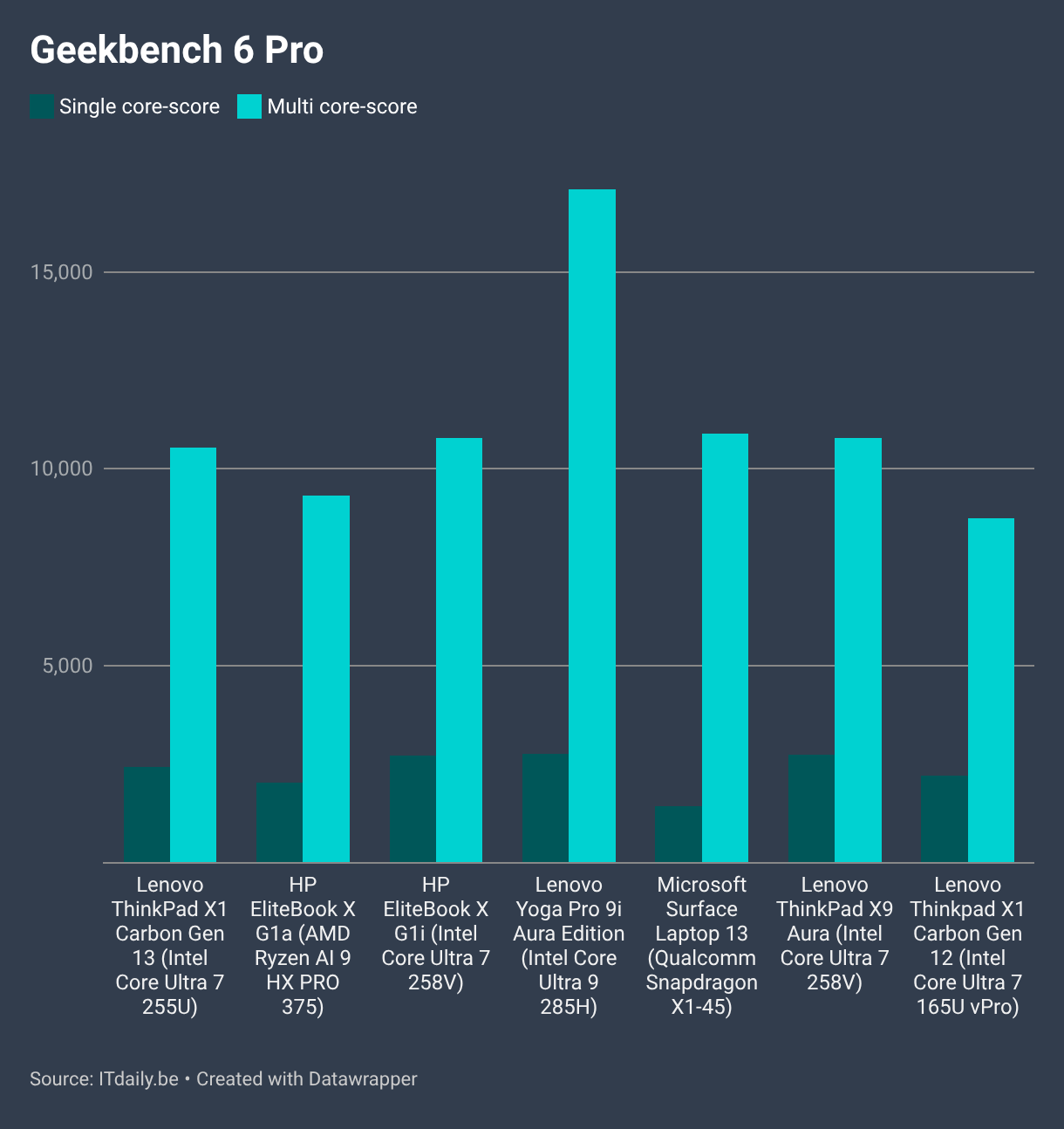
In a comparative test, we see that the ThinkPad X1 Carbon is a capable mid-range performer, but also that Intel has more powerful processors in its lineup.
Powerful where it counts
The Lenovo ThinkPad X1 Carbon doesn't need to have the most powerful internals. The laptop is built to shine in everyday situations—and that's exactly what it does. In simulations for Office applications, the Intel chip achieves similar or even better figures than its relatives or counterparts from Qualcomm and AMD.
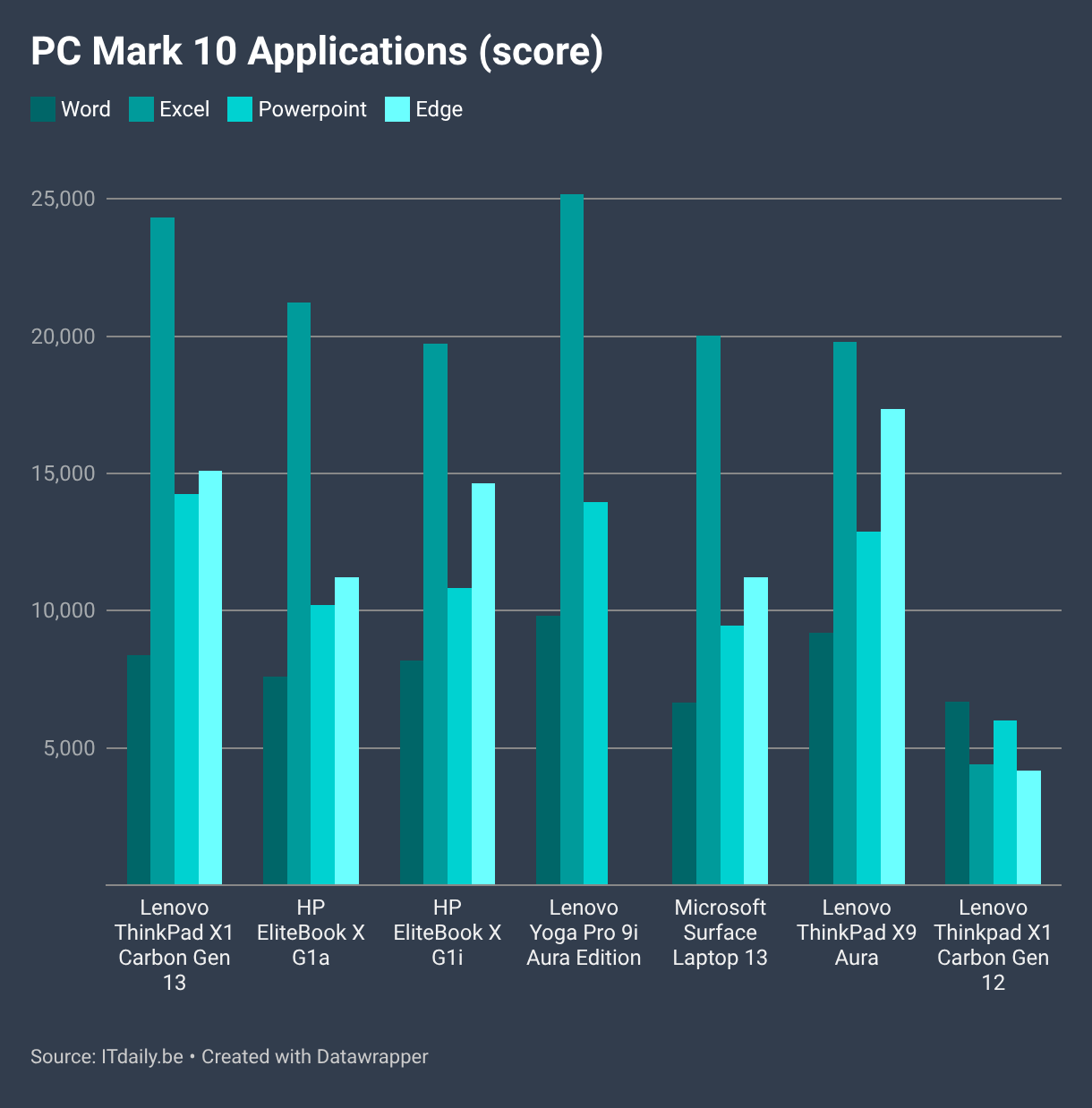
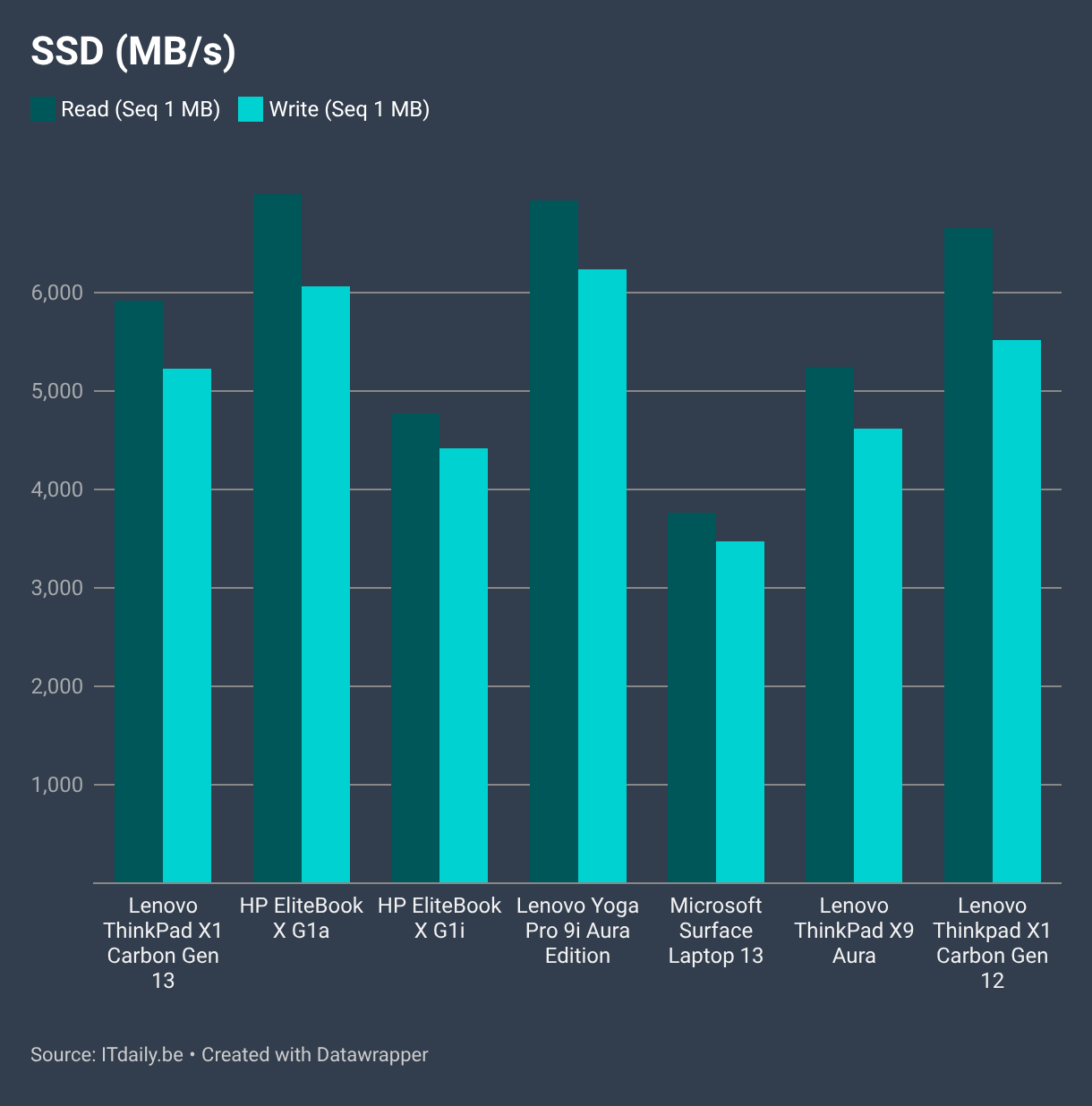
The processor plays a major role in how a laptop behaves in daily life, but the amount of RAM (16 GB) and the speed of the SSD also play a part. The SSD in the ThinkPad X1 Carbon Gen 13 isn't exceptionally fast, but it proves to be very high-performing. Lenovo has chosen a balanced package tailored to daily workloads.
Over the TOPS
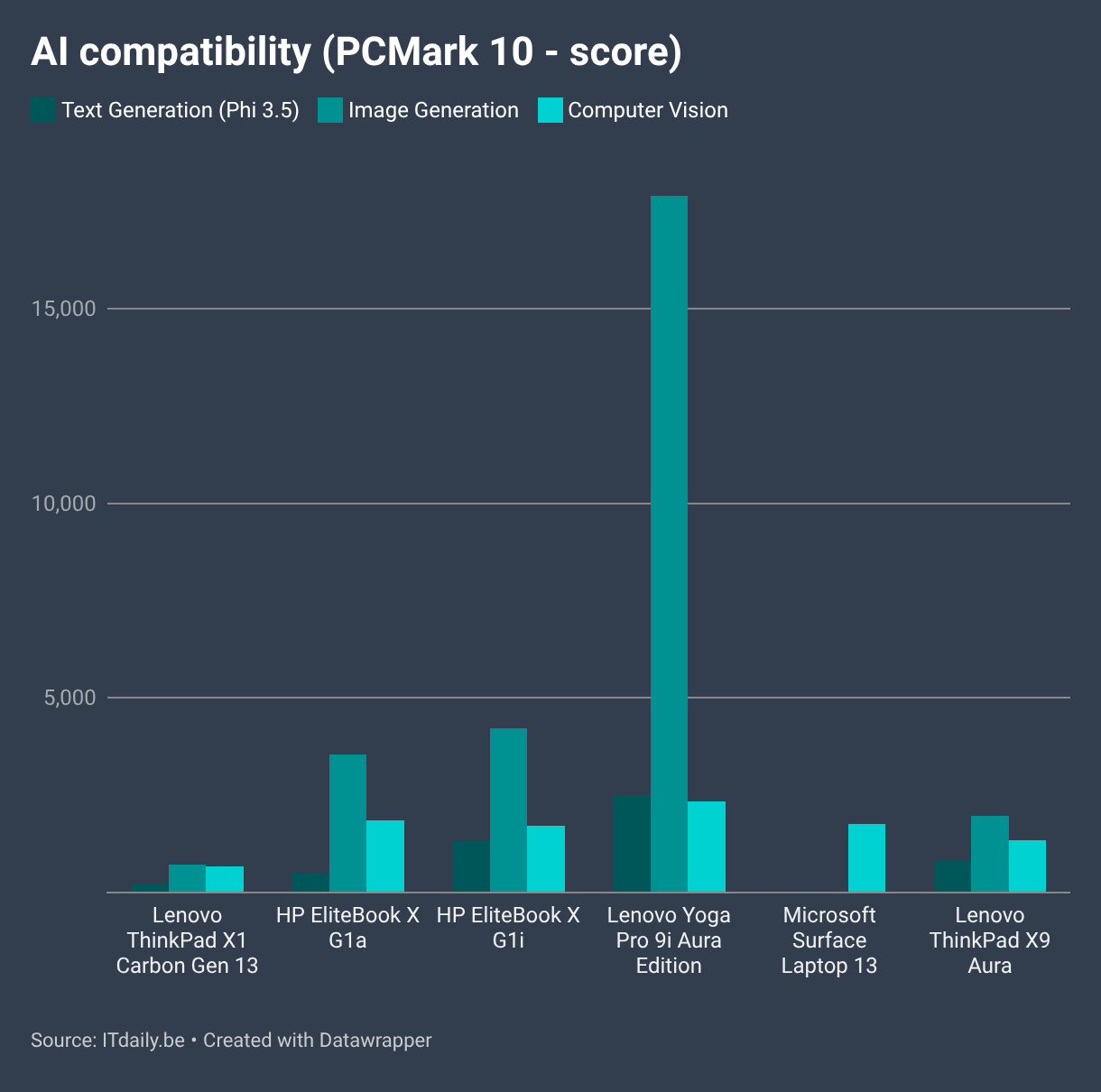
Are you one of the few IT professionals for whom local AI compatibility is a decisive specification? Then you've come to the wrong place. The NPU in the processor delivers a meager 12 TOPS of computing power for AI workloads. Lenovo's own AI Now assistant is not present. The laptop barely clears Microsoft's bar to get the Copilot key on the keyboard, but it does not receive a Copilot+ label.
Several AI-based simulations clearly show the lack of computing power. Laptops like the Lenovo ThinkPad X9 Aura or Yoga Pro 9i have much more muscle to flex. Lenovo may call this model an AI PC, but the ThinkPad X1 Carbon is at the bottom of that spectrum. The question is whether you should really lose sleep over it. Even with an average office laptop, you can rely on AI assistance via cloud apps.
Steady battery life
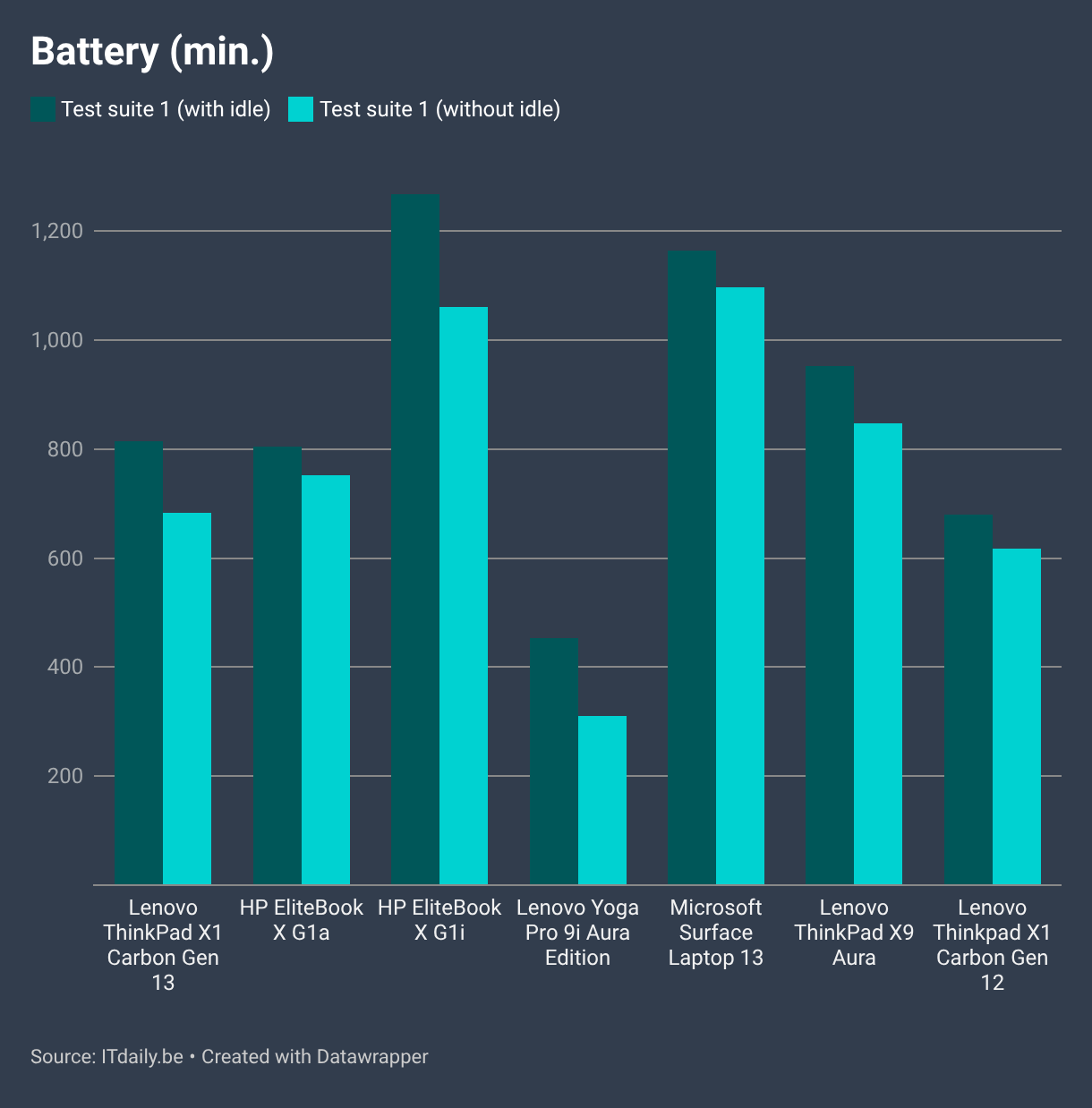
The Lenovo ThinkPad X1 Carbon Gen 13 continues the trend of moderation with its battery life. At 57 Wh, the battery capacity is rather limited on paper, perhaps to keep the device light overall, but the efficiency-oriented chip architecture works in its favor. In a comparative battery test, the laptop sits comfortably in the middle of the pack. Even under constant load, making it to the end of the workday should be just about achievable. The Yoga Pro 9i is living proof that more computing power sometimes comes at the expense of battery life.
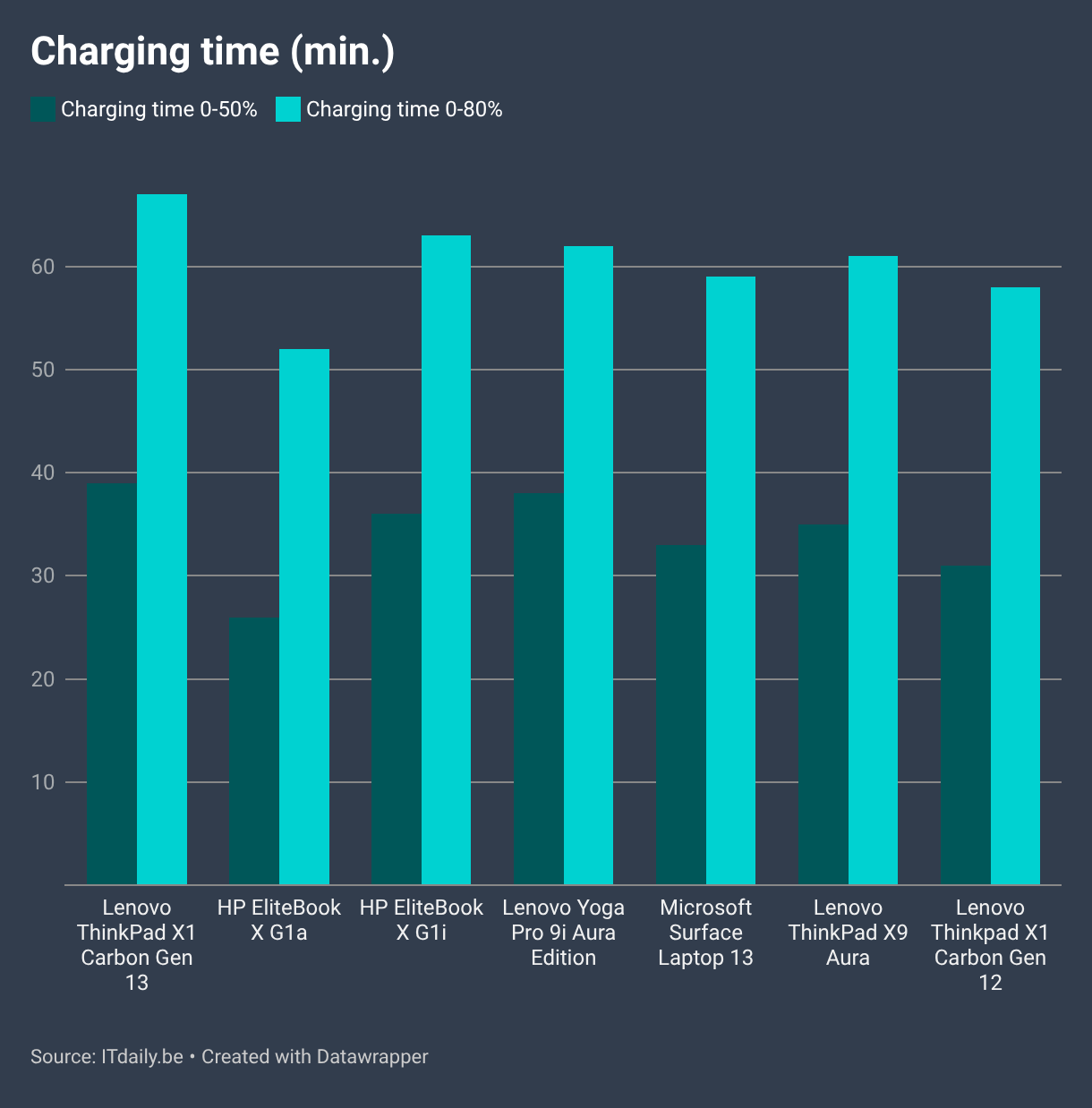
Charging happens at a rather leisurely pace. The laptop supports a charging capacity of up to 65 W. This gets you to 50 percent in 39 minutes, and the battery is recharged to eighty percent in just over an hour. This puts the laptop slightly above average.
Business DNA
Lenovo has a business audience in mind with the ThinkPad X1 series and knows that it cannot neglect the secondary features. The built-in webcam provides a sharp image without strange distortions of your skin tone. The speakers and microphone also perform more than adequately. You might sound a bit better with professional headphones, but you can confidently hold a video meeting using just this laptop.
The included software is also tailored to the professional user. The laptop can be delivered with Windows 11 Home or Pro depending on your needs, or with Linux Ubuntu for the adventurous. Through Lenovo Commercial Vantage, you can easily find your device's technical specifications or download firmware updates. It is a piece of bloatware, but one that at least serves a practical purpose. Furthermore, Lenovo does not stoop to the level of intrusive bloatware.
The average laptop
The Lenovo ThinkPad X1 Carbon Gen 13 might be one of the most boring laptops we've tested in a long time, and that doesn't have to be an insult. The laptop is so balanced and correctly tuned for what it needs to do that nothing stands out positively or negatively. If the 'average office laptop' existed, the ThinkPad X1 Carbon Gen 13 would fit that description perfectly.
However, no laptop exists in a vacuum. For those looking for that little bit extra, other Lenovo laptops are increasingly emerging as more interesting alternatives. The ThinkPad X1 Carbon Gen 13 remains true to its family traditions but lacks the advantages to be the flagship. This is partly a result of the overall strength of the Lenovo portfolio.
Tested configuration: Lenovo ThinkPad X1 Carbon Gen 13 21NX-005XIX, Intel Core Ultra 7 255U, 16 GB RAM, 1 TB SSD, 14-inch IPS screen (1,920 x 1,200, matte), 1,524 euros excl. VAT
Pros
- Slim and sleek design
- Excellent keyboard
- Capable performance for office work
- Solid battery life
- Tailored for professional use
Cons
- Smudge-prone chassis
- An 'AI PC' on paper only
- Slower charging
- A bit boring