


Google introduces Skills in Chrome, a feature that allows users to save their AI prompts and reuse them with a single click.
AI is increasingly being used to work more efficiently on the web, for example to compare information or clarify concepts. Until now, users had to enter the same AI prompts over and over again. Skills in Chrome changes that by making workflows easily repeatable. This new tool streamlines repetitive tasks and offers a library of ready-made workflows for various applications. Skills in Chrome is rolling out starting today in Gemini in Chrome on desktop.
One click for reusable AI workflows
Skills in Chrome allows users to save a frequently used prompt as a so-called ‘Skill’. This can be done directly from the chat history. Next time, they simply select that skill by typing a forward slash (/) or via the plus button (+) in Gemini in Chrome. The selected skill then appears on the current webpage, along with any other open tabs.
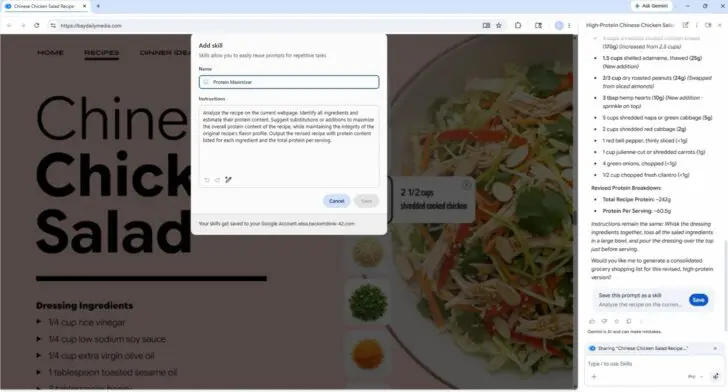
Users can edit their saved Skills or create new ones at any time. These workflows help with a wide range of tasks, from calculating protein macros in recipes to comparing products or scanning documents for key information.
Ready-made
In addition to creating your own skills, Google is also introducing a library of pre-made Skills. These ready-to-use workflows focus on common tasks, such as analyzing product ingredients or comparing gifts based on budget and interests. Users can add these Skills and customize them to their personal preferences if needed.
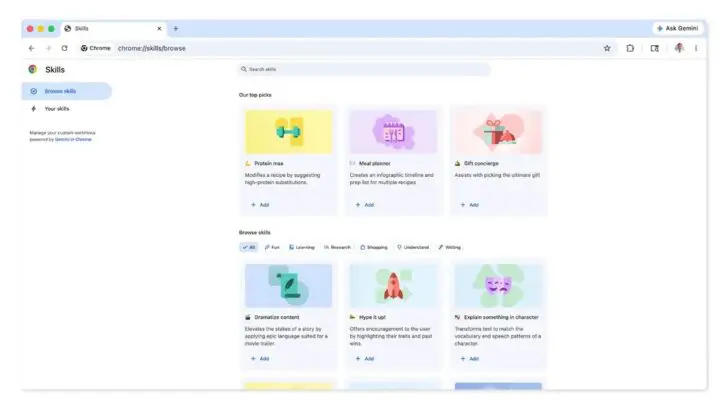
Skills in Chrome use the same security layers that Google applies to Gemini prompts, such as asking for confirmation before performing actions like adding a calendar item or sending emails. There are also automatic updates and automated red-teaming to prevent misuse.
Skills in Gemini in Chrome is now generally available in Gemini in Chrome for desktop. Earlier this month, Salesforce brought similar AI skills to Slack, where the AI agent redeploys previously created skills without you having to ask.