

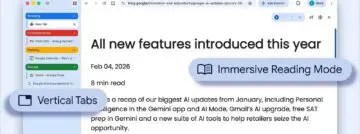
Google is finally bringing the option for vertical tabs to Google Chrome.
After years of waiting, the moment is finally here. Google has announced the arrival of vertical tabs in Chrome, where tabs appear on the side of the browser. For users who often have a series of tabs open in their browser, it can sometimes be difficult to find the right ones. The vertical tabs option gives users a better overview.
Vertical tabs are not new, however. Every other major browser has offered this for a long time. It took a while for Google to bring the feature to Chrome.
Vertical tabs
To set up vertical tabs, right-click on a Chrome window. Then select “Show tabs vertically.” Because the tabs are on the side of your browser window, you can read the full page titles and manage tab groups more easily. Once vertical tabs are enabled, they remain the default when opening new windows until the user disables the option.

Along with the rollout of the new vertical tabs, Google is also announcing an improved ‘Reading Mode’ that offers a full-page interface. To use it, right-click anywhere in the browser and select ‘Open in reading mode.’ This reduces visual distractions and provides a text-focused reading experience.