

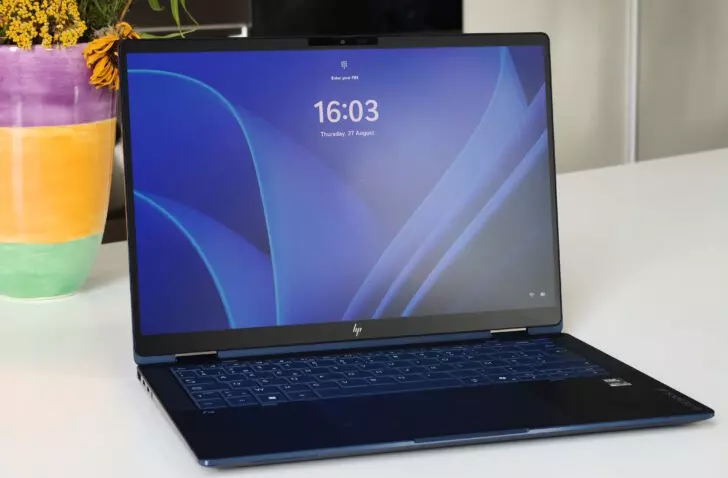
A gorgeous touchscreen, a fantastic keyboard, high performance, a good battery and a sleek design adorn the HP EliteBook X Flip G2i. It’s a shame that HP ruins the touchpad.
HP, what are you doing? The HP EliteBook X Flip G2i (€2,699 excl. VAT) is a fantastic laptop in almost every respect, and then the manufacturer decides to fit it with a large but terribly haptic touchpad. Let’s get straight to that, because anyone who can’t get past it doesn’t really need to read on.
False click
HP equips its beautiful 14-inch convertible laptop with a touchpad that doesn’t really click. Instead, you get haptic feedback that is meant to simulate a click. A vibration motor does the work. In itself, there is nothing wrong with that, as Lenovo proves with the ThinkPad X1 Carbon Gen 14. The illusion of a click is so convincing there that we didn’t see through it right away.
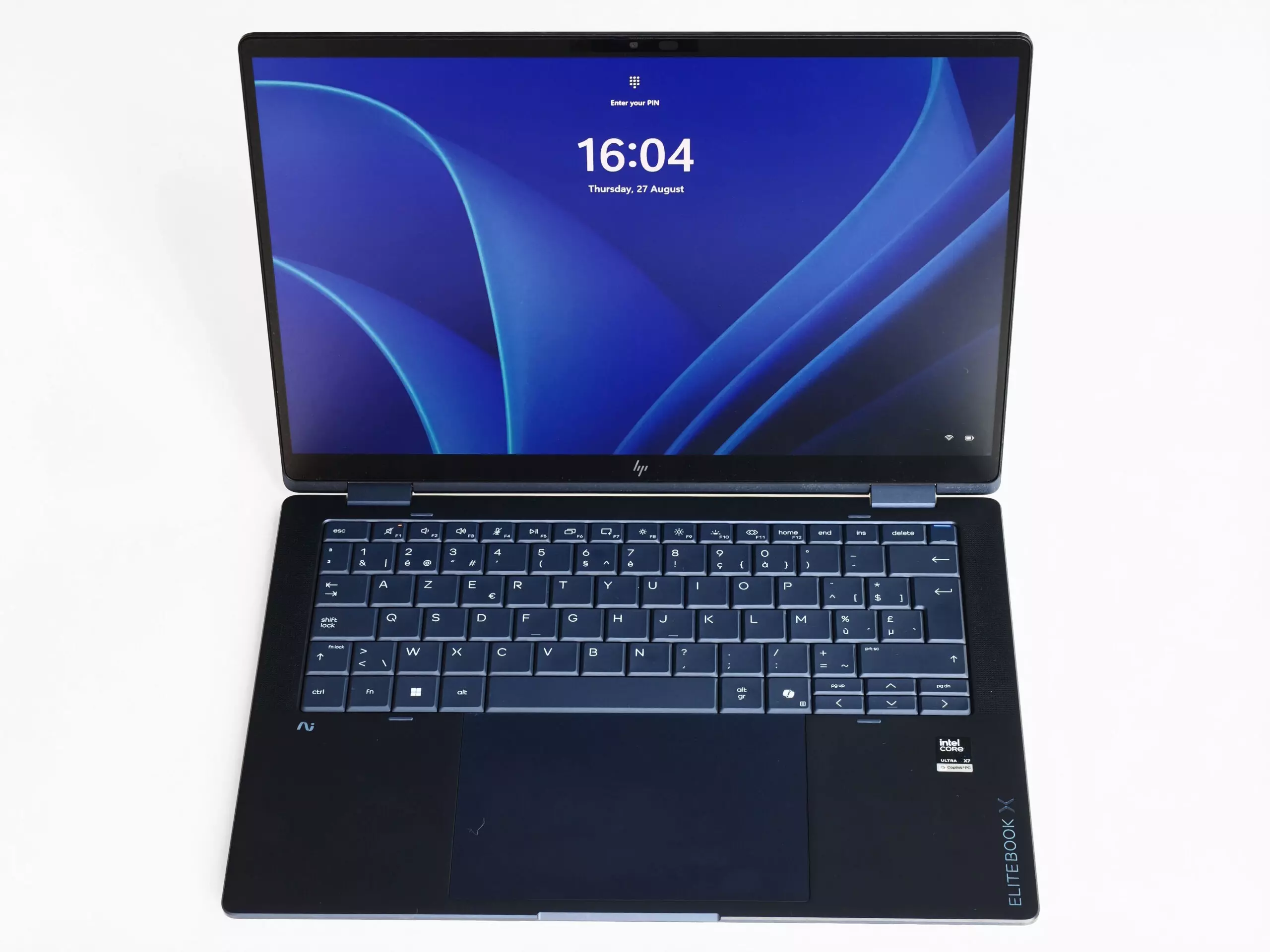
Not so with this HP EliteBook X Flip G2i. Using the touchpad is simply unpleasant. The haptic technology never simulates clicks convincingly. The sensitivity is also inconsistent. Anyone who mainly wants to use this laptop on the move, without an extra mouse, will have to live with that. HP sends this top performer into the field with a handicap.
Compensation on all fronts
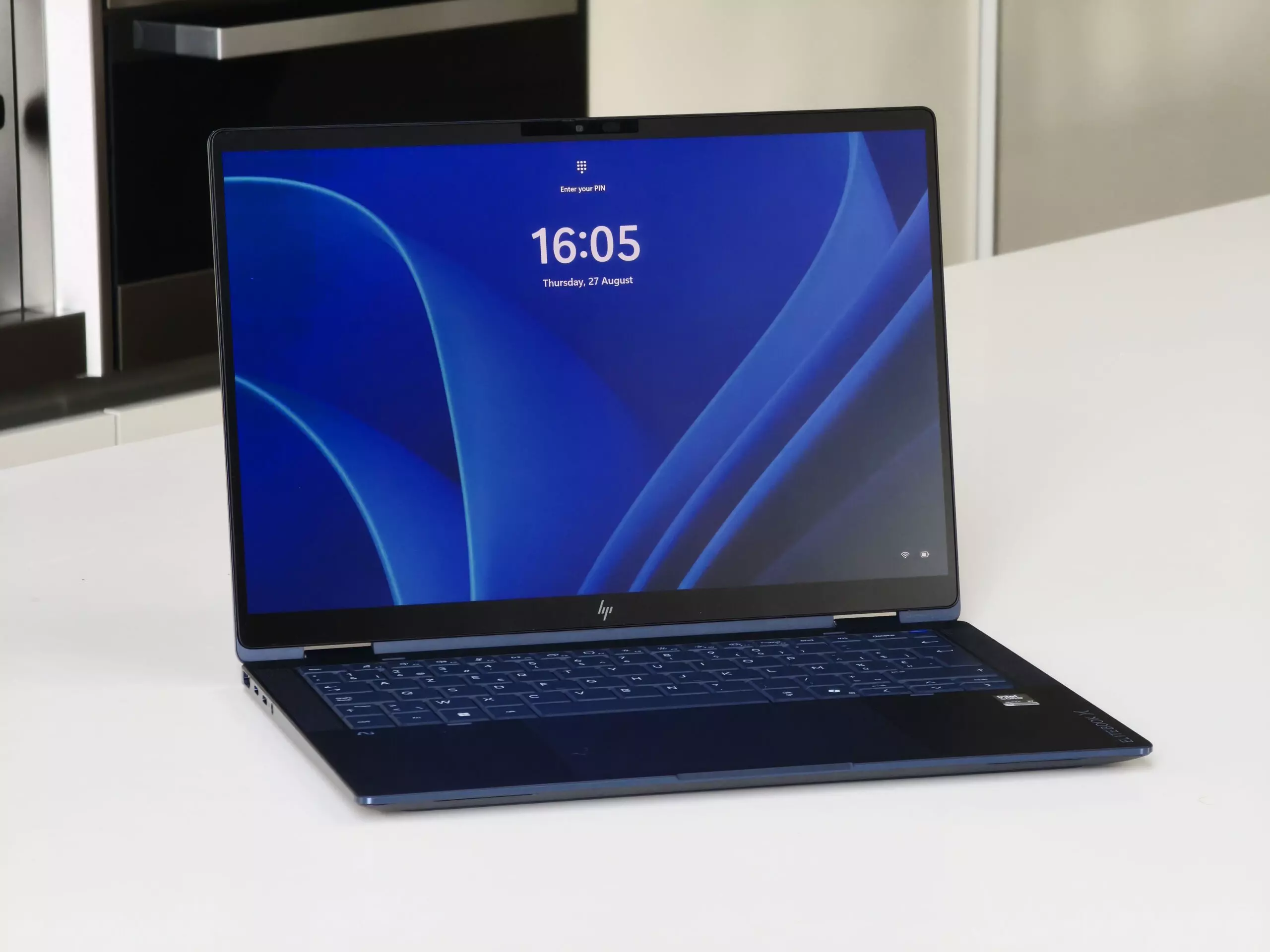
All the other specifications do their utmost to make up for the subpar touchpad, and they almost succeed. HP has overhauled the keyboard, for example. It types better, with a clear but refined keystroke. Visually, too, it is a step forward: the design no longer looks like a device from the 1980s, as the previous edition did.
At 1,369 grams, the laptop itself is not the lightest of its kind, but we don’t see that as a problem. On the contrary: the device feels very sturdy. And it is, as confirmed by the necessary MIL certificates. HP makes a few smart design choices. Warm air, for instance, exits at the back rather than ending up on your lap.
Colour-accurate in every mode
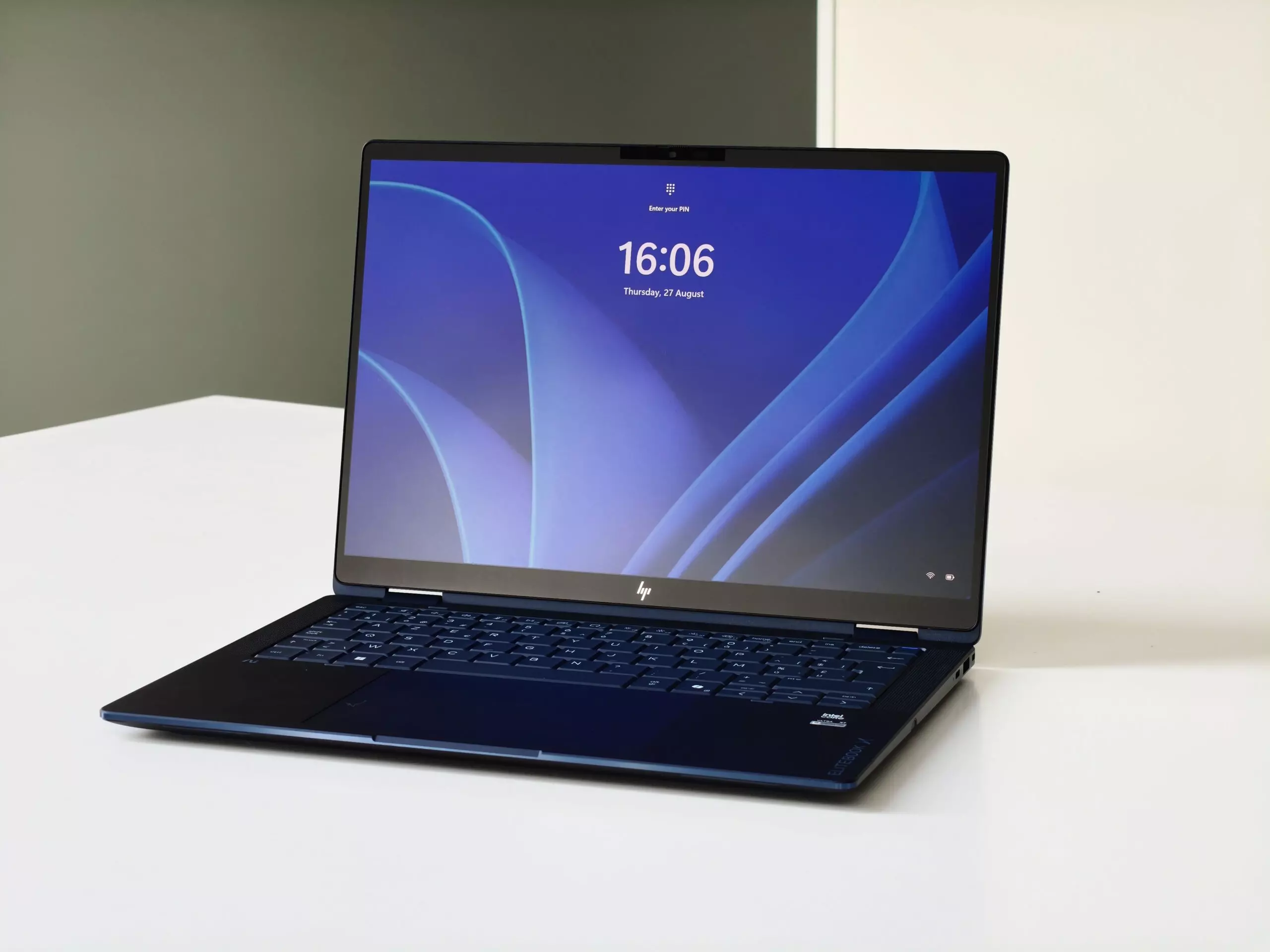
The laptop has ‘Flip’ in its name for a reason. You can fold the screen all the way back and use the laptop as a heavy tablet, or set it up on a table in presentation mode. A small pen, which has a home in the laptop’s chassis, lets you make full use of the touch functionality.
The screen of the HP EliteBook X Flip G2i is not only flexible, but also beautiful. Despite the OLED technology used, this device reaches a maximum brightness of 676 cd/m². That is enough to sit by a window and even to use the laptop outdoors. Black is truly black on OLED, so the contrast is spot on.
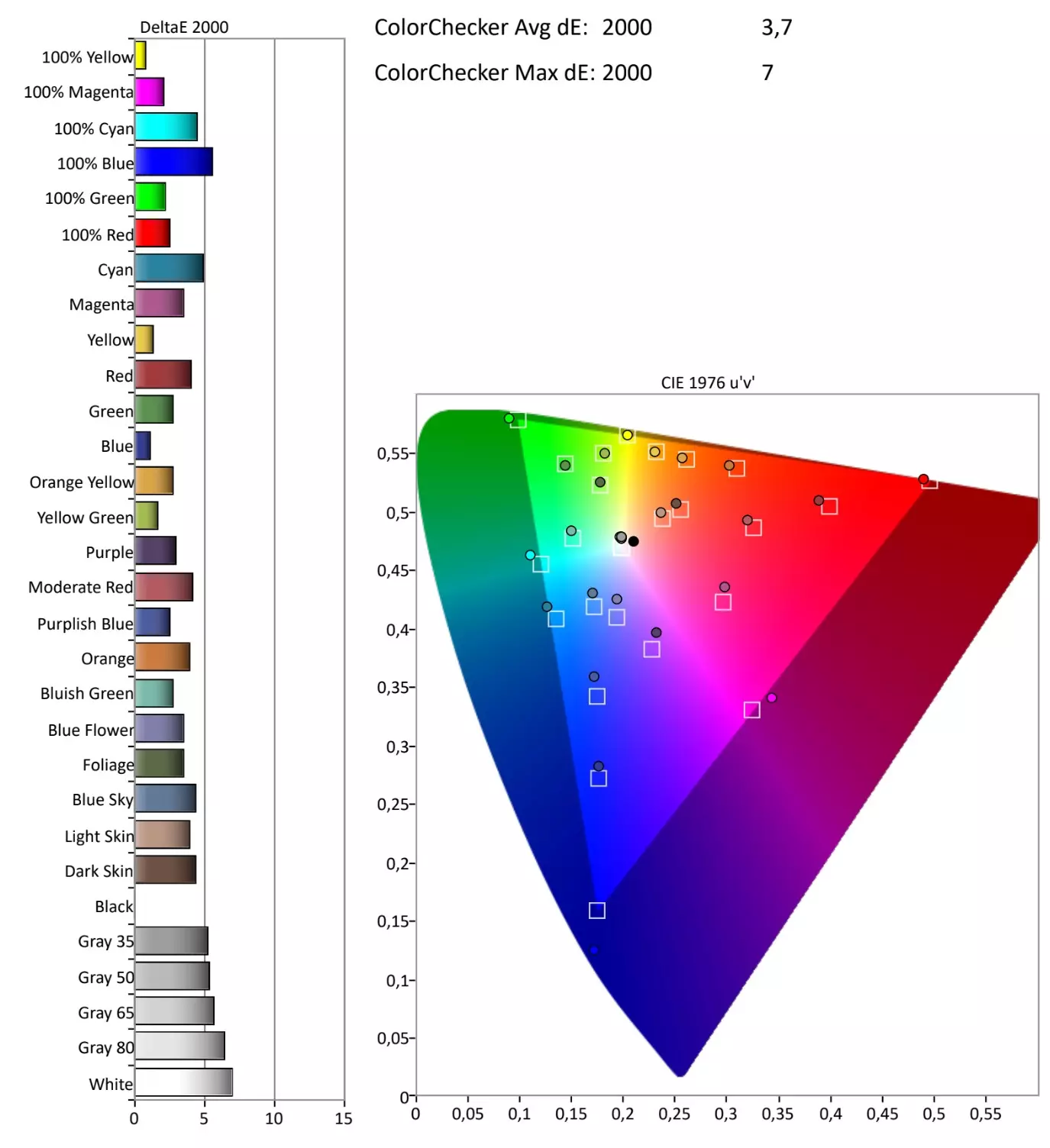
We are also positive about the colour reproduction. An average DeltaE of 3.7 is quite acceptable for a laptop that is not explicitly aimed at graphics professionals. We measure the biggest deviations in dark blue and light greys. The screen covers 100 percent of the sRGB spectrum.
The laptop has a 5 MP camera at the top (infrared for Windows Hello included). It is spectacular, especially when it comes to colour reproduction. During video meetings, we look better on screen than our colleagues.
Internals put to the test
Under the hood, the positive story continues. With an Intel Core Ultra X7 358H, HP has equipped the EliteBook X Flip G2i well. The chip has 16 cores: four P-cores, eight E-cores and four low power cores.
CPU: above average
Intel advertises a maximum turbo clock speed of 4.8 GHz, and we measure a respectable 4.5. The laptop can sustain that for about a minute, after which the clock speed steadily drops towards 3.4 GHz. By minute five, we note a sizeable dip to 2.9 GHz, after which the chip keeps running stably. The cooling never gets loud. We do notice that the device stays very cool on the right, but can get quite warm on the left, where your wrist rests.
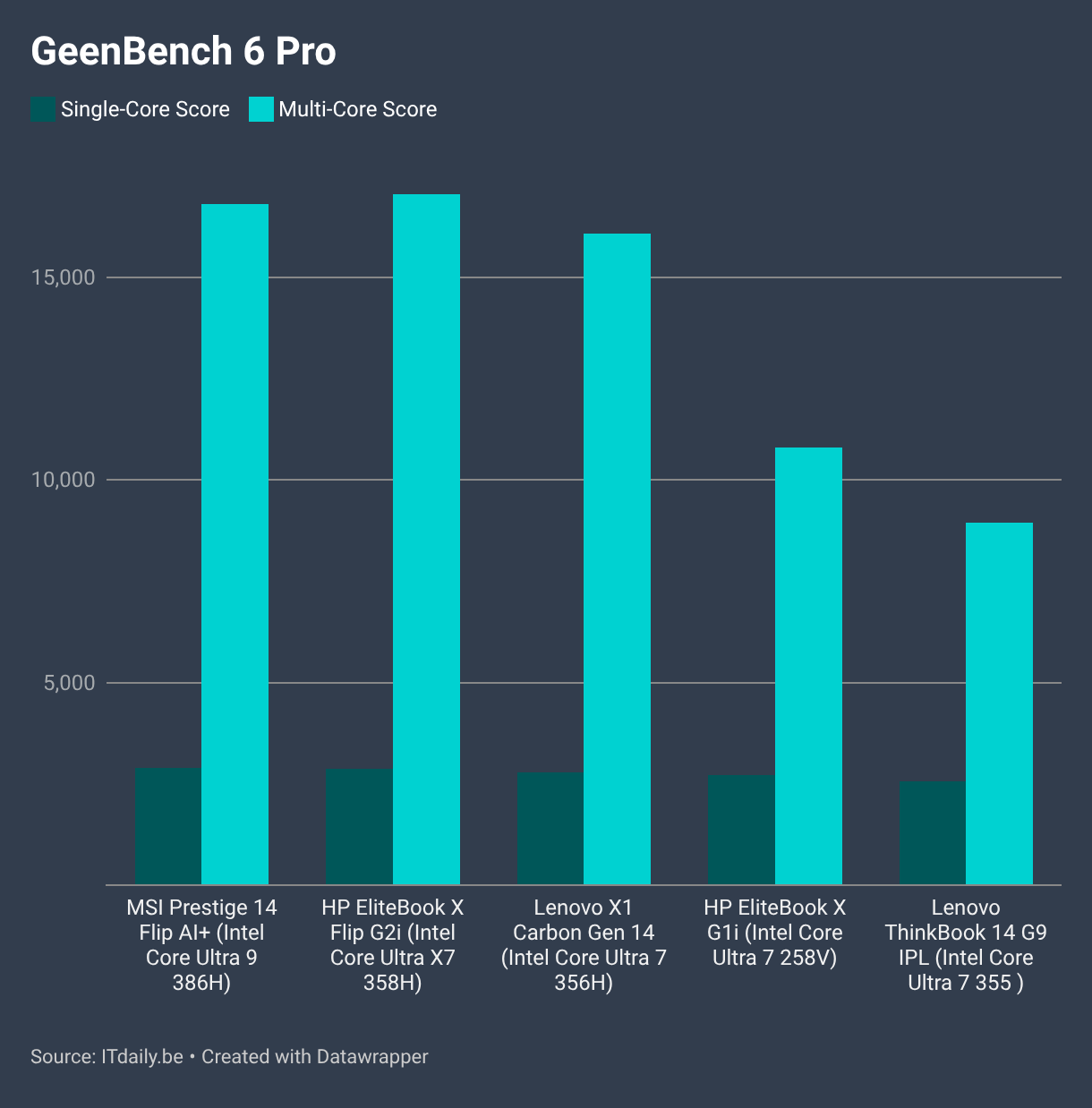
The CPU doesn't just score well on paper. In our comparative test, the chip in this laptop holds its own against the Intel Core Ultra 9 386H in the MSI Prestige 14 Flip and outperforms the Intel Core Ultra 7 365H in the Lenovo X1 Carbon Gen 14.
SSD: blazing fast
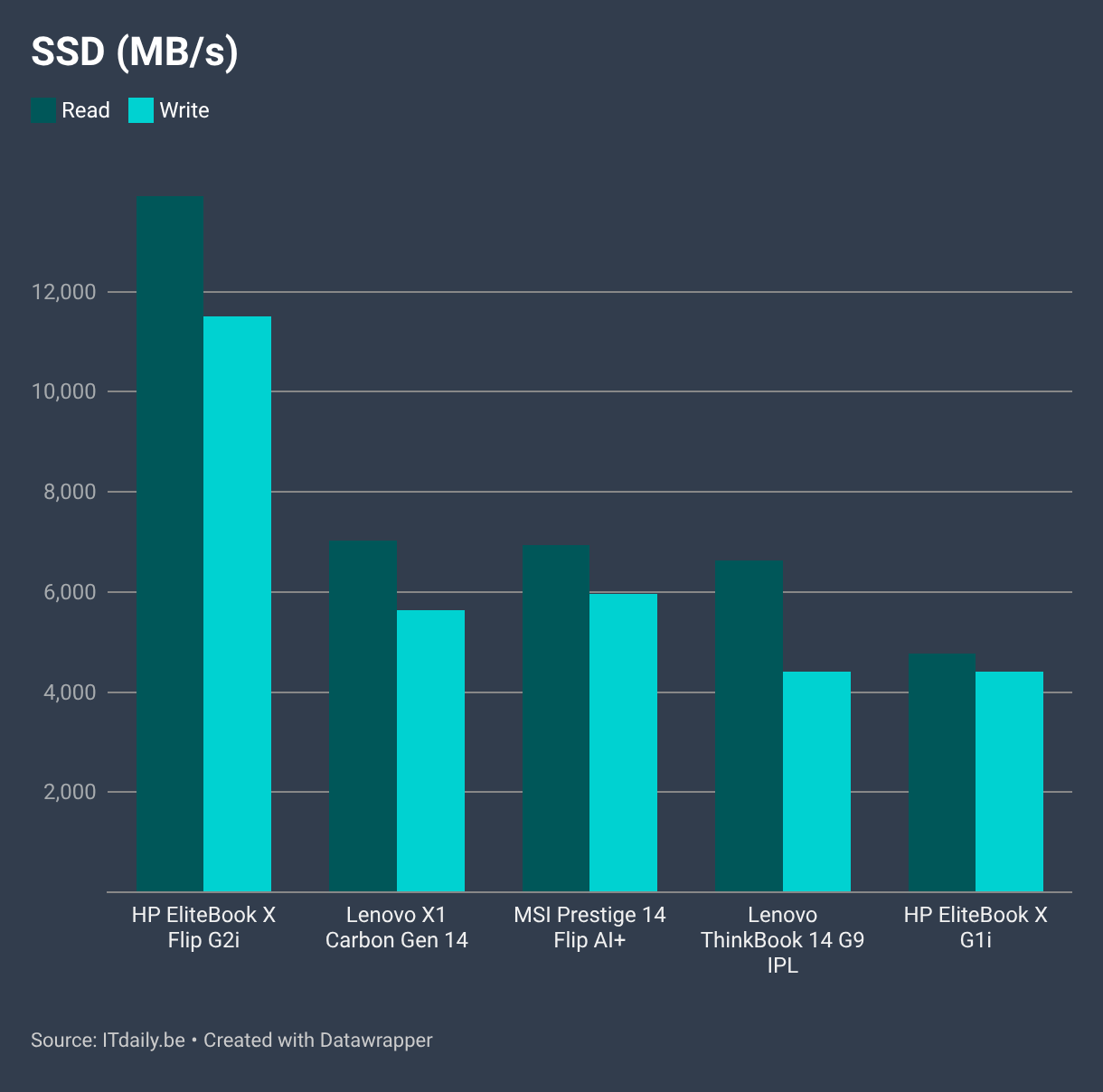
HP also equips our test model with 32 GB of RAM. That suits this premium device, but it partly explains the hefty price tag. The 1 TB SSD also adds to it. It is blazing fast, by the way. We measure a sequential write speed of around 11 GB/s, and reads even reach 13 GB/s. In the comparison below, you would almost forget that the SSDs in the other devices also post fast read and write speeds.
Performance: office work and more
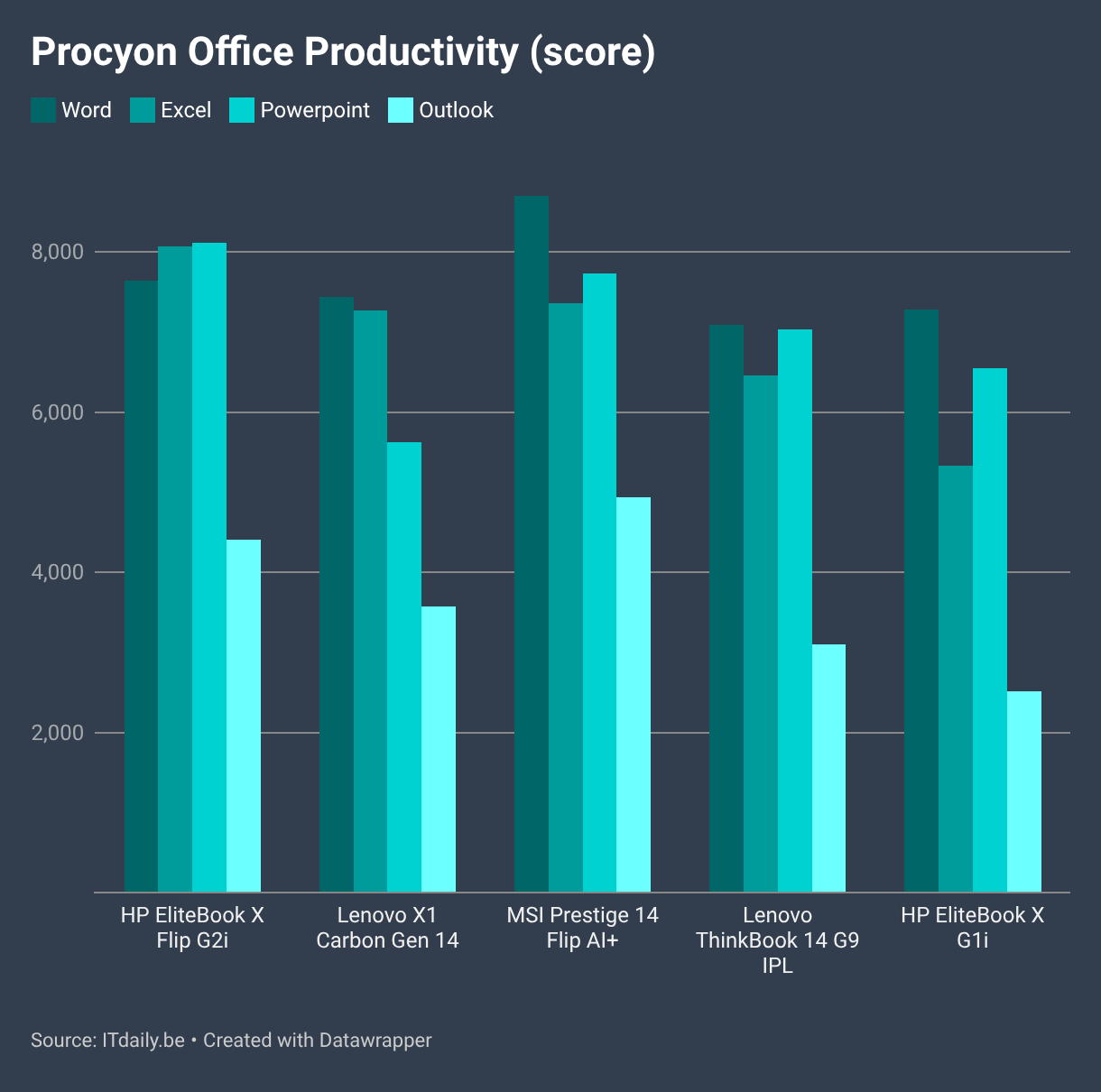
It is no surprise that this laptop is responsive and handles office work with ease. The office application comparison below illustrates that, although we note that all the laptops in the comparison are comfortably fast enough to handle such workloads effortlessly.
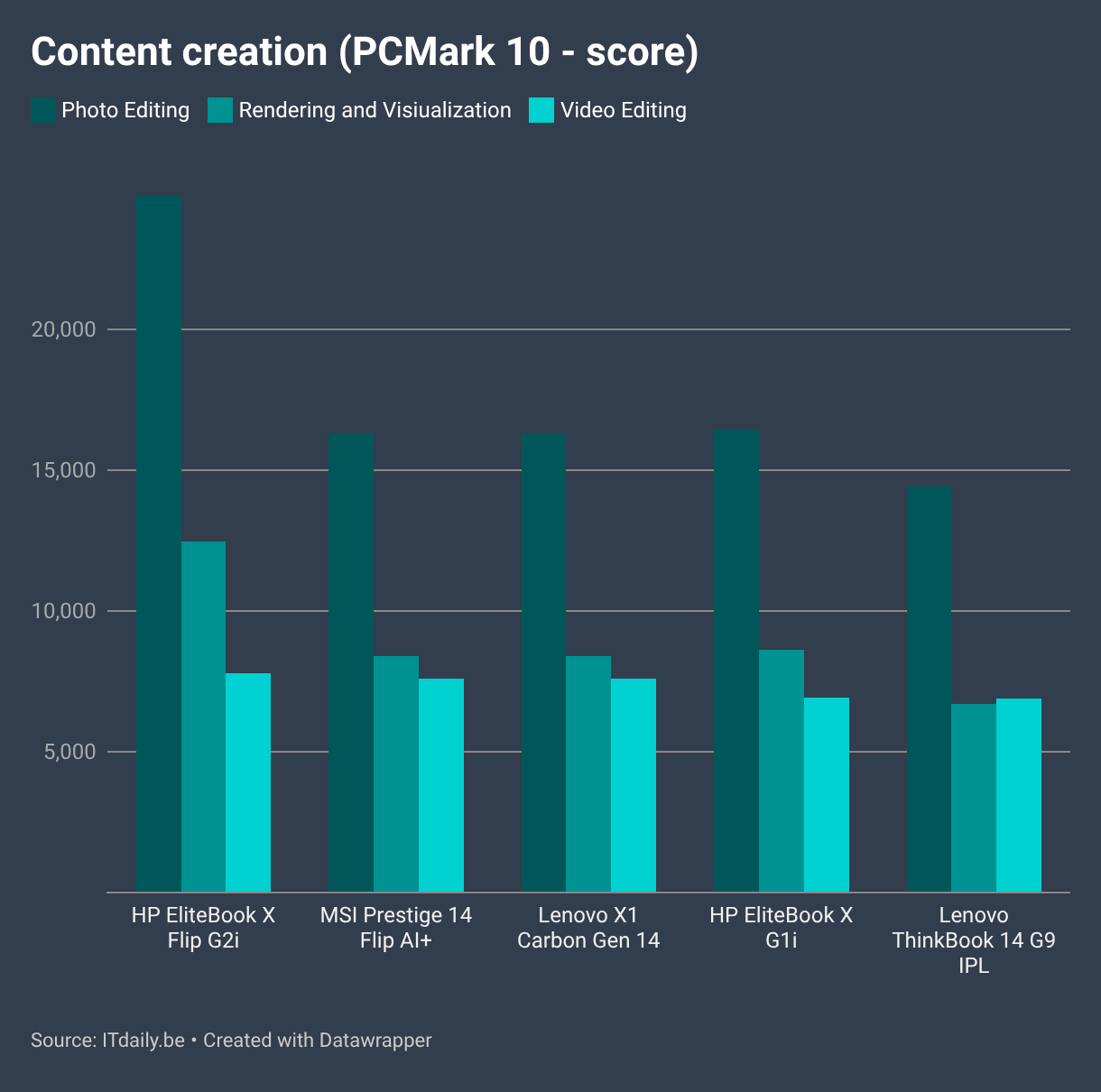
Heavier work, such as content creation, suits this device better. The 'X' in the CPU's name gives away that the chip has a somewhat more powerful graphics component. In this case, it is an Intel Arc B390 chiplet. It works neatly with the CPU, RAM and SSD to support photo and video editing.
Although local AI workloads are not that relevant on a device without a GPU and tons of RAM, all laptops today have an NPU on board. It works together with the GPU and CPU to handle AI tasks.
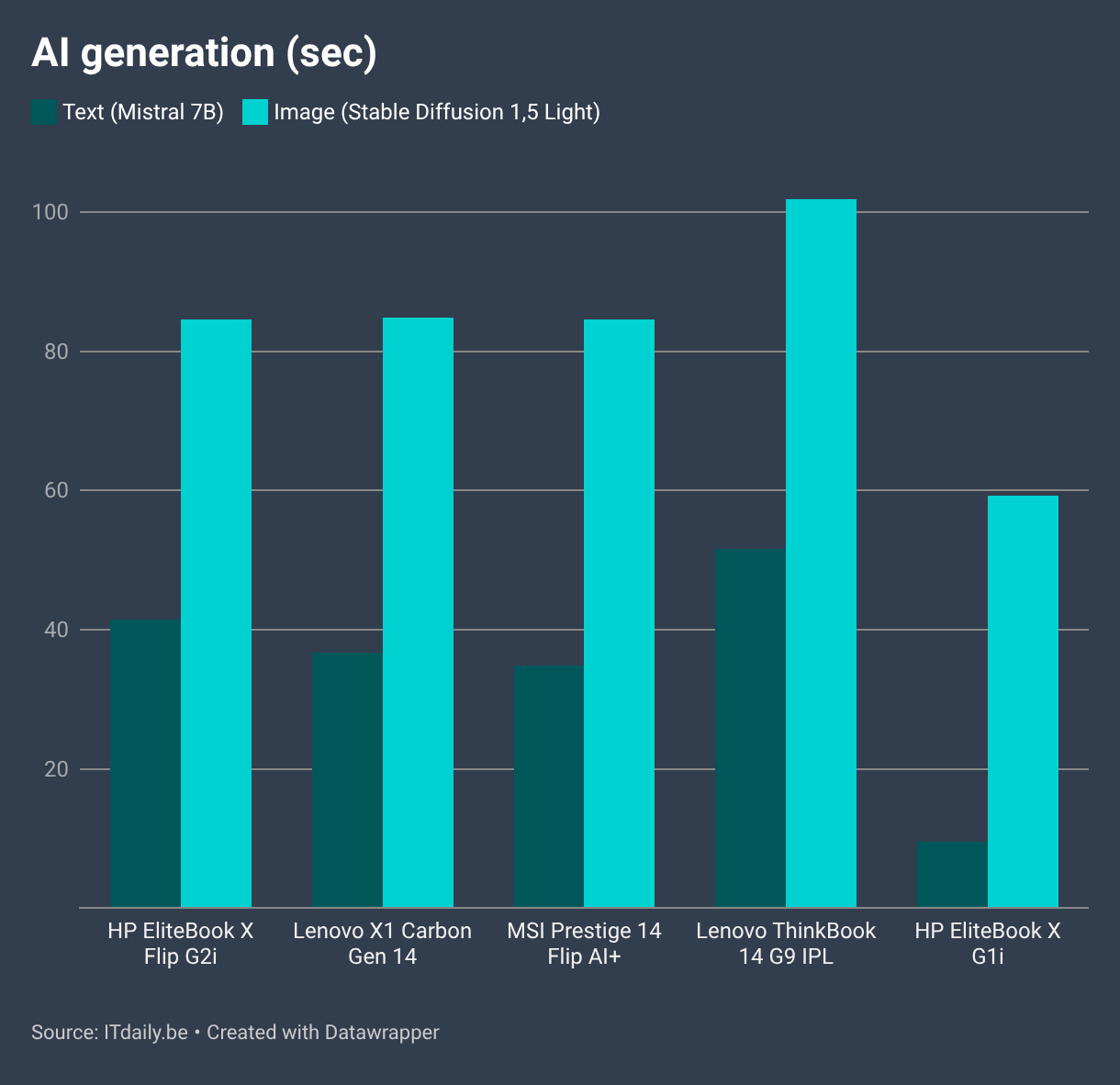
Lower is better in the chart above, but the HP EliteBook X Flip G2i performs no differently from its competitors in this segment.
Battery: does what it should
HP equips the powerful laptop with a 68 Wh battery. That is enough for competitive battery life. You will easily get through the working day on a single charge.
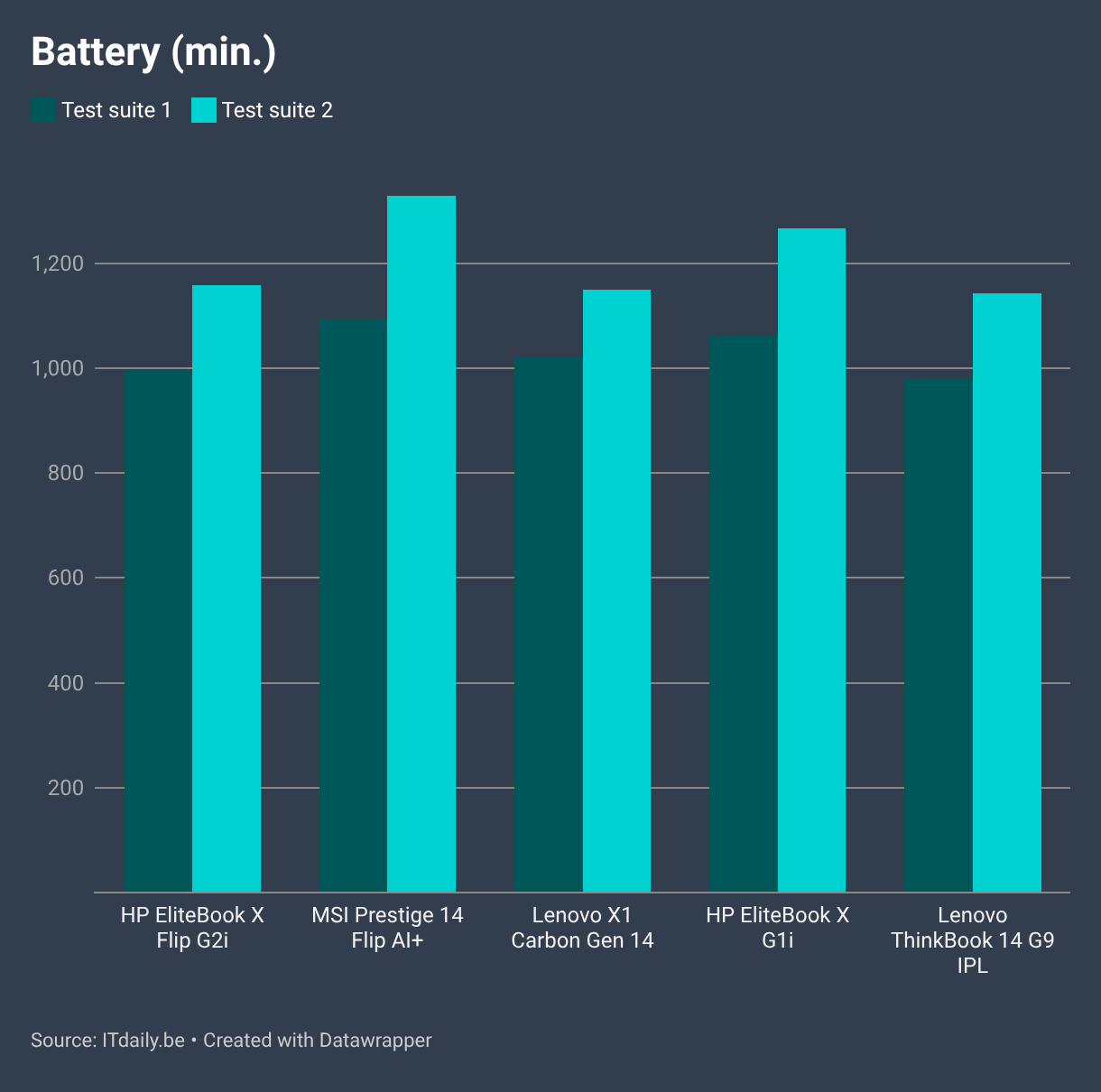
Other devices do slightly better, but the difference is not that big. What stands out is that the (regular) HP EliteBook X G1i can work longer on a single charge. That device has a previous-generation Intel Core Ultra 7 258V on board and pairs it with a battery of the same size.
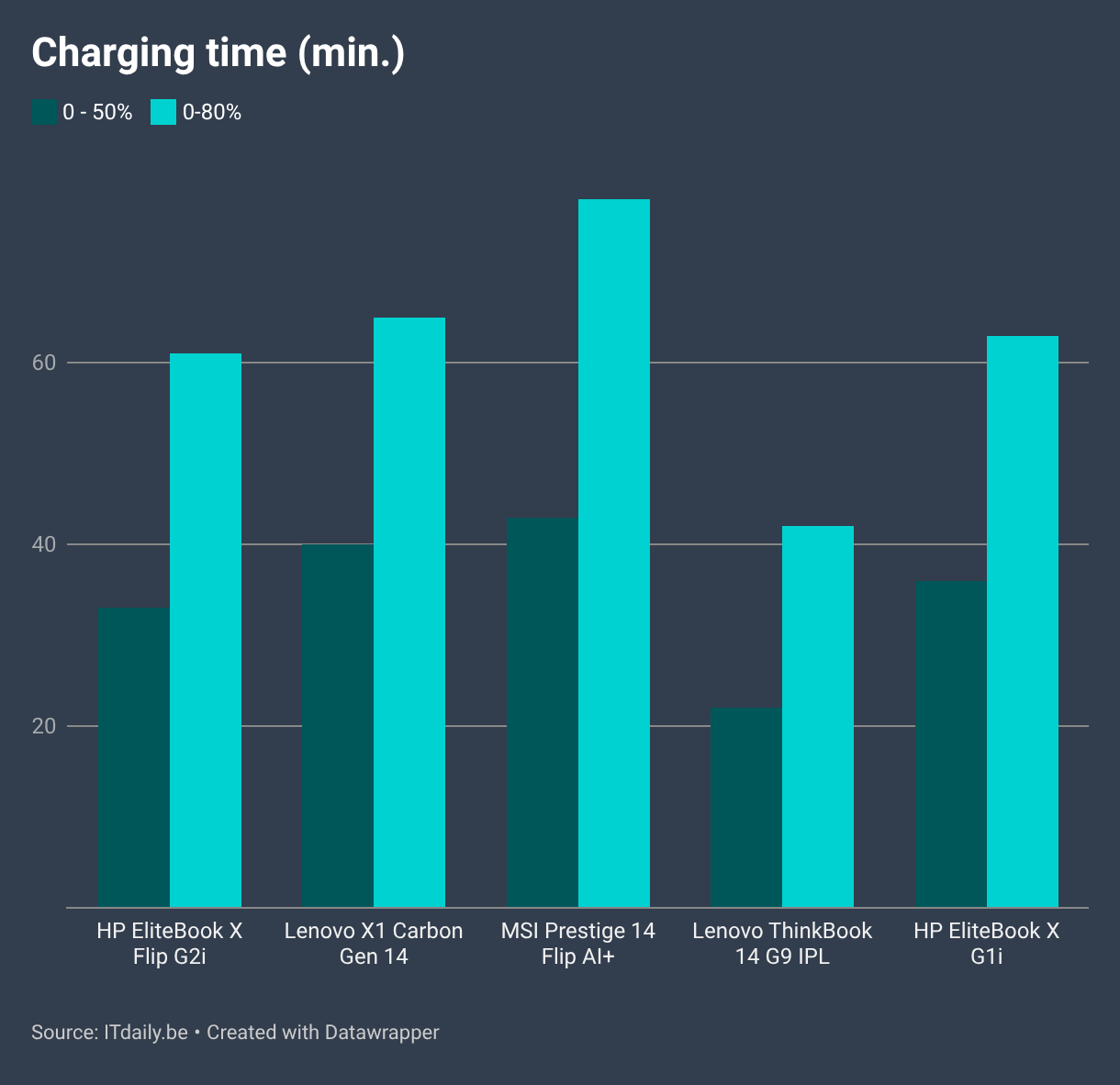
We wrap up the performance discussion with charging capacity. With the bundled 65-watt charger, you charge the laptop to half in about half an hour, and fully in about an hour. Those are good figures that will ensure you always have a working laptop at hand.
For completeness, the port selection deserves a mention. To our delight, one USB-A port is still present. We also see three USB-C ports, two of which support Thunderbolt 5. Finally, HP makes room for an HDMI port and a 3.5 mm audio jack.
Brilliant on paper, but the click is missing
It should be clear: almost everything about the HP EliteBook X Flip G2i is above average, and virtually nothing falls short of good. The exorbitant price is the norm in these days of RAM and flash shortages, and given that, the HP EliteBook X Flip G2i is almost a brilliant device. It's a shame about that poor touchpad.
Configuration tested: HP EliteBook X Flip G21 D8UX1ES, Intel Core Ultra X7 358H, 32 GB RAM, 1 TB SSD, 14-inch matte touchscreen (2,880 x 1,800 pixels, OLED), Windows 11 Pro: €2,699 excl. VAT.
Pros
- Bouwkwaliteit
- Prestaties
- Beautiful OLED screen
- Battery life and fast charging
- Toetsenbord
Cons
- Terrible touchpad
- Gets noticeably warm under the left palm