


As usual, Synology delivers a rock-solid NAS where DSM 7.3 steals the show. The latest operating system eliminates a major pain point and is meant to make you forget about the older hardware and modest network capabilities.
The Synology DS925+ (631 euros incl. VAT) is a 4-bay NAS from Synology. That’s the most important thing to say: those who have been following the brand for a while now know more or less what they’re dealing with. However, this model deserves some extra explanation in today’s review. The timing of this test is important, as before October this NAS was much less attractive.
(Too) Far-Reaching Integration
This has everything to do with the launch of DSM 7.3. DiskStationManager is Synology’s major asset for all its NAS devices. The operating system combines simplicity and power and is so neatly finished and polished that it essentially has no equal. Alternatives such as QTS from Qnap or open-source systems may offer more flexibility or control, but if you want a ready-to-use server operating system that is both beginner-friendly and offers advanced capabilities, DSM is definitely worth a good look.
Last year, however, Synology decided to further integrate hardware and software. In the name of high reliability and convenient support, Synology suddenly decided to give the majority of its NAS models an extremely limited compatibility list for hard drives. List is a big word: the only manufacturer with suitable drives was Synology itself with its HAT portfolio. The Synology DS925+ was launched with this limitation.
From Limitation to Freedom
Although Synology can present figures that effectively support the claims of higher reliability and fewer problems, the drastic limitation of freedom of choice did cause consternation among enthusiasts. In that respect, the DS925+ was a step backward compared to its predecessor, the Synology DS923+. After all, a multitude of drives from Western Digital and Seagate fit in that one.
With DSM 7.3, that limitation disappeared. Synology still recommends using its own drives, and the additional reliability that comes with them suggests that’s not a bad idea. But the customer buying a NAS now at least has the choice. With its biggest limitation removed, the Synology DS925+ suddenly becomes a considerably more flexible NAS.
Finally 2.5 GbE
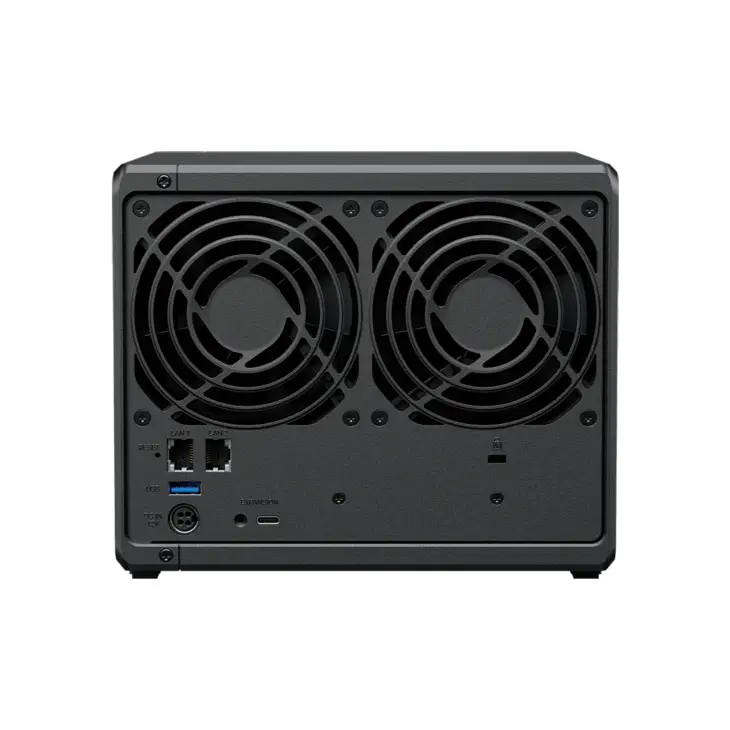
Moreover, the DS925+ has several major advantages over its predecessor. Synology finally embraces 2.5 gigabit ethernet. Two 2.5 GbE RJ45 ports are present on the back. That’s good news, even though Synology is very late with the standard implementation of 2.5 GbE.

Competitors like Qnap have been integrating such ports for years. But still: they are present on this NAS, which implies that the Synology DS925+ can make optimal use of somewhat more modern networks. The fact that you can no longer integrate a 10 GbE PCIe card is a strange downside to the improvement.
CPU with Kindergarten Diploma
In terms of hardware, Synology has never felt the need to lead the pack, and this applies not only to the RJ45 ports. The processor in service is an AMD Ryzen V1500B. Although this Ryzen Embedded CPU is supported for a long time, it was already released in 2018. At that time, Trump had just become president in the US, for his first term, the coronavirus still had to evolve into Covid, and Nvidia was still a company that mainly made gaming GPUs. In other words, the chip is from a different era.
Yet the CPU is an improvement over the one in the DS923+, even though the AMD Ryzen Embedded R1600 is a chip of the same generation. That processor had two cores with multithreading, the V1500B has four.
Stingy with Memory
The doubling of cores and threads is good news for those who want to use the NAS for more than just network storage, which is probably the majority of buyers. The DS925+ with DSM 7.3 is indeed a full-fledged server, which supports containers and virtualization in addition to storage and backup. The extra horsepower is welcome for such use, even though we’re not really impressed.
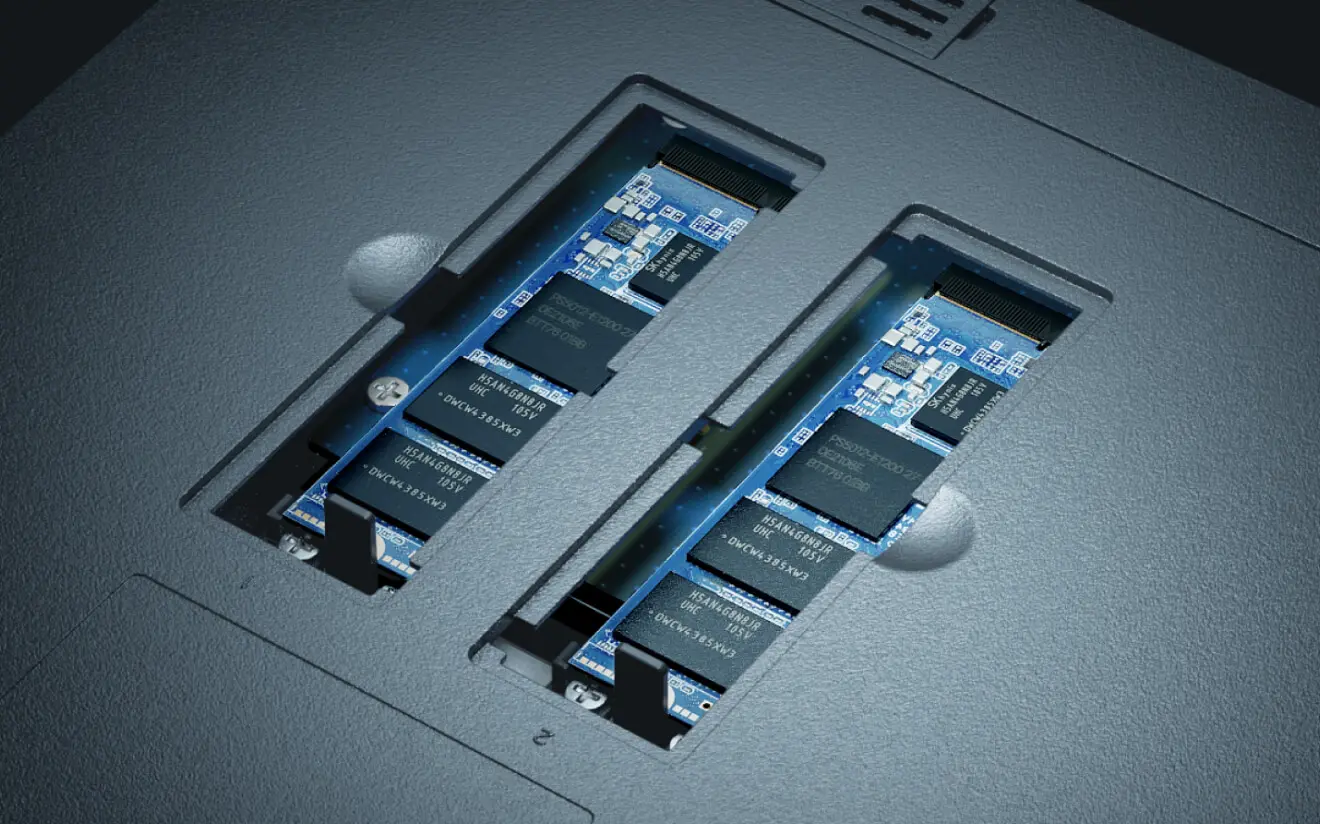
Synology also remains stingy when it comes to memory. You get 4 GB included. This is ECC memory that is resistant to bit flips and thus guarantees extra stability. The memory is expandable to 32 GB (2x 16 GB), although you’ll have to get your hands on increasingly rare DDR4 memory for that. If you want to run VMs and containers, it’s best to provide an upgrade to 8 GB in any case. It’s a shame that Synology doesn’t provide that amount as standard.
Build Quality and Connections
The housing of the Synology DS925+ looks like that of just about every other Synology NAS and the build quality is equally high. On the front, you get status lights and a USB 3.2 Gen 1-A connection to connect, for example, an external HDD or USB stick. The four bays for HDDs click out easily and placing or replacing a hard drive is easy, as always.
On the back are the power connection, an extra USB 3.2-A port, the two RJ45 connections and a USB-C expansion slot. Less accessible, you’ll find two spots for M.2 NVMes at the bottom. You can configure the SSDs as a storage pool and as cache.
More than just hardware
Purely based on hardware, Synology wouldn’t win any prizes. The manufacturer does offer quality, but works with slightly older technology. Moreover, competitors such as Qnap offer
When we put the specification list aside and actually start using the NAS, most doubts disappear. DiskStationManager 7.3 ensures that we can use the server as a real cloud alternative, both personally and in an SME environment.
Management and Functionality
Configuring shared storage, creating users and assigning rights can be done easily. DSM 7.3 supports advanced rights management at the level of groups and individual users, with the option to dig deep per folder. You can personalize the login screen, which is nice in a business context where both internal and external users see the company’s branding.
There’s no shortage of applications developed by Synology. Although Synology has launched ActiveProtect as a solution specifically for backups, HyperBackup and ActiveBackup remain powerful software. For example, you can quickly secure files on the NAS in the cloud, or conversely back up professional Microsoft 365 on the NAS.
Synology provides other relevant functions such as Synology Photos (an alternative to Google Photos, including mobile app), a Virtual Machine Manager and even its own suite of office software, to name a few. The App Store also contains third-party applications, such as Plex for multimedia enthusiasts.
The older CPU and modest 4 GB RAM are sufficient for all these applications. It’s only when we configure multiple containers that we run into the limits of the memory. The CPU is generally powerful enough, but does lack transcoding capacity.
Years of Expertise
The Synology DS925+ with DSM 7.3 is an excellent NAS, grown from Synology’s years of experience. The hardware is adequate, with a sturdy and user-friendly housing that houses slightly older components. On paper, the NAS doesn’t seem to be the best choice for the budget, but Synology devices are more than just their hardware.
In combination with DSM 7.3, the Synology DS925+ once again offers an excellent user experience for those who want to use their NAS as more than just network storage. The extensive capabilities in the user-friendly and streamlined package still stand alone in the market. Technicians who want to tackle more puzzle work can turn to Qnap, but in a business context, the level of finish of DSM is really a hard-to-beat asset.

The limited HDD compatibility threatened to kill the DS925+ at launch and make the predecessor the more interesting device. Now that this issue has been resolved and Synology again allows choice, the Synology DS925+ is indeed an improvement over the DS923+ in almost all aspects. Only those who wanted to buy a 10 GbE expansion card are out of luck. For other users, the finally built-in addition of 2.5 GbE is indeed a step forward in terms of connectivity.
With the Synology DS925+, Synology is thus building further on an already very solid foundation. The company does what it needs to with this new version, and that’s more than enough to deliver an excellent device. Those looking for more modern and robust components, such as more (DDR5) RAM and a processor that hasn’t been in second grade yet, will traditionally still be left wanting a bit more.
Tested: Synology DS925+, DSM 7.3 – 631 euros incl. VAT VAT.
Pro's
- Management via unparalleled DSM 7.3
- Wide range of useful apps
- Robust and reliable hardware
- Space for M.2 NVMe
- Finally 2.5 GbE
Contra's
- Old CPU
- Minimal amount of RAM at purchase
- No more 10 GbE possible via PCIe