


The MSI Prestige 14 Flip AI+ impresses with powerful performance and long battery life, but forgets that visuals matter too.
With a 2-in-1 laptop, it is often all or nothing. These devices try very hard to be both a laptop and a tablet, and as a result, they often end up being neither. MSI takes a different approach with the Prestige 14 Flip AI+, ensuring that you primarily have a good laptop that you happen to be able to use as a tablet as well.
The Prestige 14 Flip AI+ is the smaller sibling of the Prestige 16 AI+, including the (unnecessary) AI+ addition in the name. We previously reviewed the 16-inch model.
Light and flexible
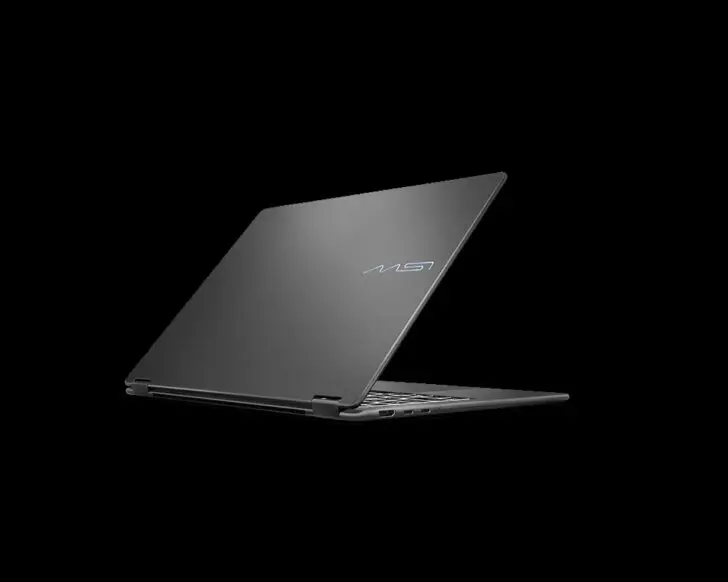
The compact 14-inch format makes this laptop pleasant to carry, and the light aluminum chassis helps keep the weight at an acceptable 1.3 kilograms. The Prestige 14 Flip AI+ otherwise looks almost identical to its 16-inch sibling. The only flourish is an artistic company logo on the back, though it takes a lot of imagination to recognize the brand name. The port selection is identical, featuring 2x USB-A, 2x USB-C Thunderbolt, HDMI, and a headphone jack.
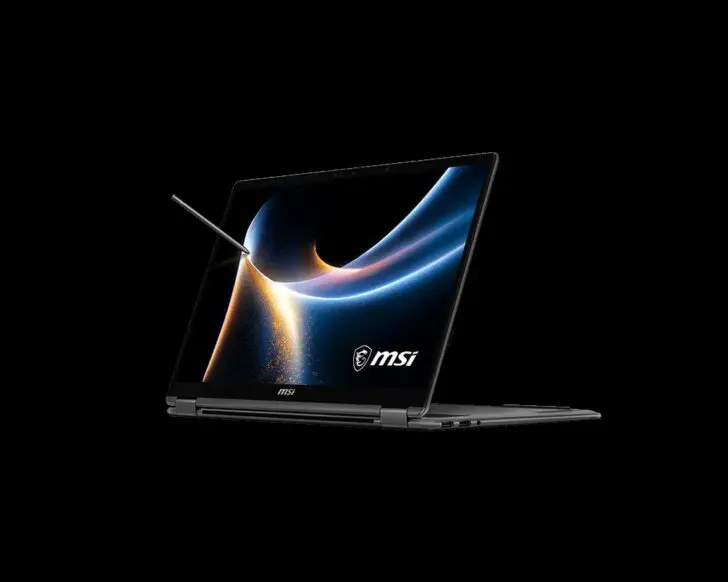
The Prestige 14 Flip AI+ only reveals its secrets when you pick it up. You can tilt the screen 180° or put it in ‘tent mode’ to use it as a tablet. You then have a fairly sturdy tablet in your hands, which certainly did not feel too heavy during our testing. The hinges fold smoothly, and we have confidence in their durability, despite the short testing period we had with this device.
Hidden pen
In a 14-inch laptop, the small-looking keyboard ‘disappears’ less than on the Prestige 16. It types just as smoothly and makes the laptop pleasant to work with. The trackpad comes with the same extra functions for controlling volume and screen brightness, which you can configure yourself via the MSI Center app (also accessible via the trackpad). It takes some time getting used to and results in accidental touches at first, but it is worth the learning curve.
The stylus is an extra. We initially thought MSI had forgotten the pen for our test model, until we discovered it was hidden inside the chassis. It is not the most refined tablet stylus we have worked with. MSI does deserve credit, however, as the stylus is included in the package by default and does not need to be purchased separately.
It can be useful for scribbling, but the tablet experience feels secondary to the laptop experience for us. Putting the pen back is very cumbersome. Make sure it is clicked into place before putting the device away, or you will lose the stylus in no time.
Dull screen
MSI equips its new Prestige laptops with an OLED screen. Compared to the 16-inch version, MSI scales back the pixel count (1,920 x 1,200) and the refresh rate (60 Hz). The low brightness (273 nits) and the reflective screen make this laptop unsuitable for working outdoors.
For office work, the specifications are sufficient, but when playing video, we still miss some depth and vibrancy. The speakers also seem somewhat restrained. One plus point: the screen is better calibrated; a deltaE value of 3.3 is more than decent for an office laptop. Only white (7.5) appears more like gray.
The webcam leaves us wanting more. The 1080p resolution is sufficient for a video call, but manufacturers like Dell and HP better understand that a webcam is not just an extra in a professional laptop.
Loud engine
With the new Prestige models, MSI once again pledges loyalty to Intel and makes the jump to the Panther Lake generation. The Intel Core Ultra 9 386H chip powering our test model is immediately one of the most powerful in the series. Add 32 GB of RAM to that, and on paper, you have a powerhouse of a laptop.
This is also evident in benchmarks. In terms of pure CPU power, the MSI Prestige 14 Flip AI+ is in the leading group. With Panther Lake, Intel is once again competing at the highest level. The Prestige 16 and Samsung Galaxy Book 6 Pro manage to squeeze a bit more out of the processor. This is likely because the processor has more breathing room in the larger chassis.
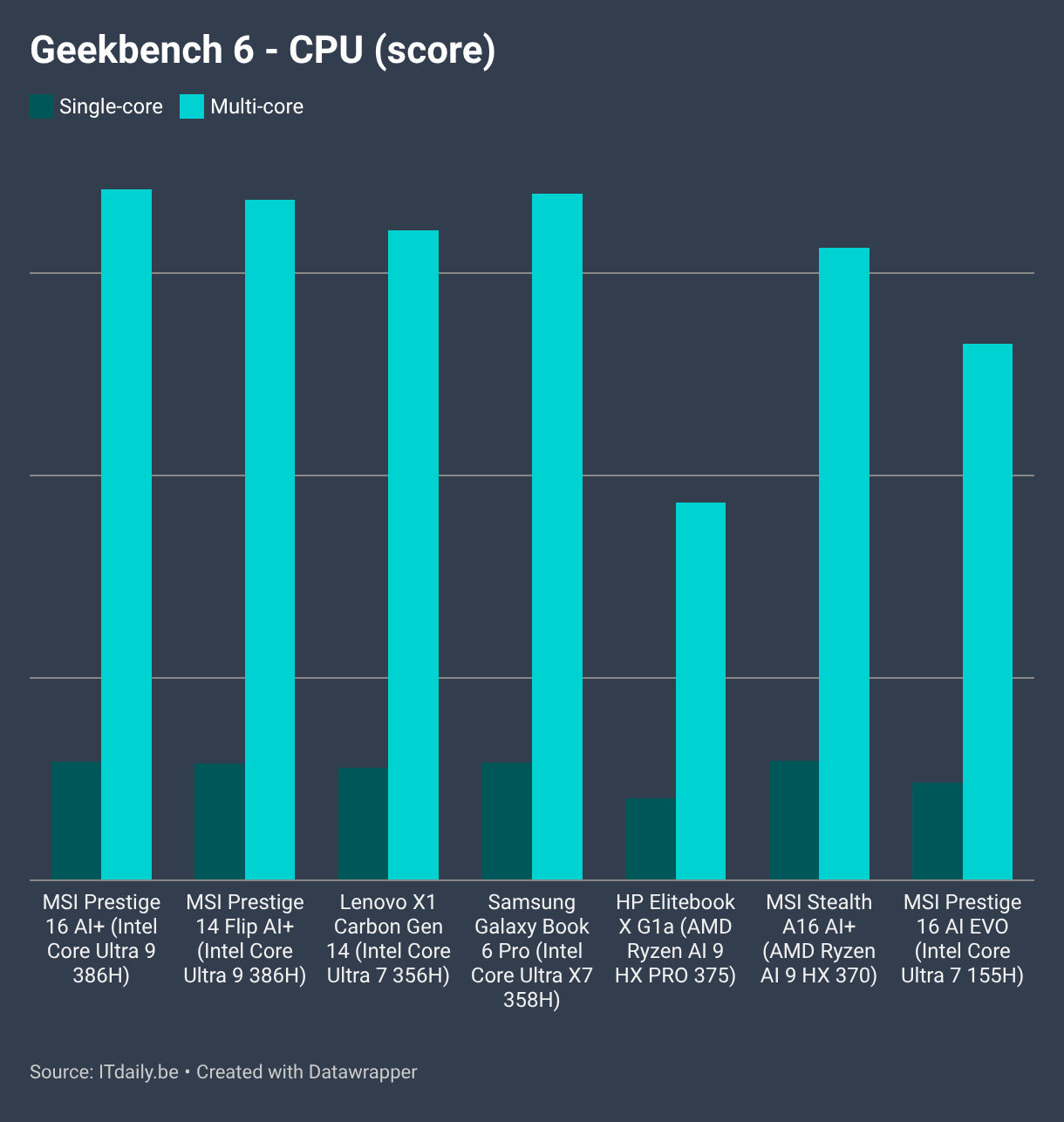
The laptop also shows its strength where it counts. In simulations of various Office applications, the Prestige 14 Flip AI+ scores well across the board, making it a more than capable work laptop. What is striking, however, is how hard the fans have to run to deliver that performance.
Even light workloads give the impression that the laptop could take off at any moment. It therefore doesn't hurt to keep an eye on the temperature and load if you want to perform heavier workloads. The Panther Lake processor seems to be in a cage that is too small, from which it wants to escape.

More TOPS for just as little AI
With a device that claims the 'AI+' label, we cannot help but talk about AI. With 50 NPU TOPS, the laptop theoretically has the necessary computing power to run very small local AI applications. But what is the practical benefit?
During the testing of the Prestige 16 AI EVO, we already noted that the laptop did little to justify its self-proclaimed AI label, and that has not changed yet. Via the MSI Center, you can entrust settings such as noise reduction and background blur to the NPU, but you don't need 50 TOPS for that. It does ensure that the CPU has to work less during a video call, and consequently, the battery is spared a bit more.
For those who don't care about their privacy, Windows Recall has been given a spot in the taskbar, and ironically, this is one of the few applications that actually requires local AI computing power. So don't be fooled by the marketing talk from MSI and Intel.
Excellent stamina
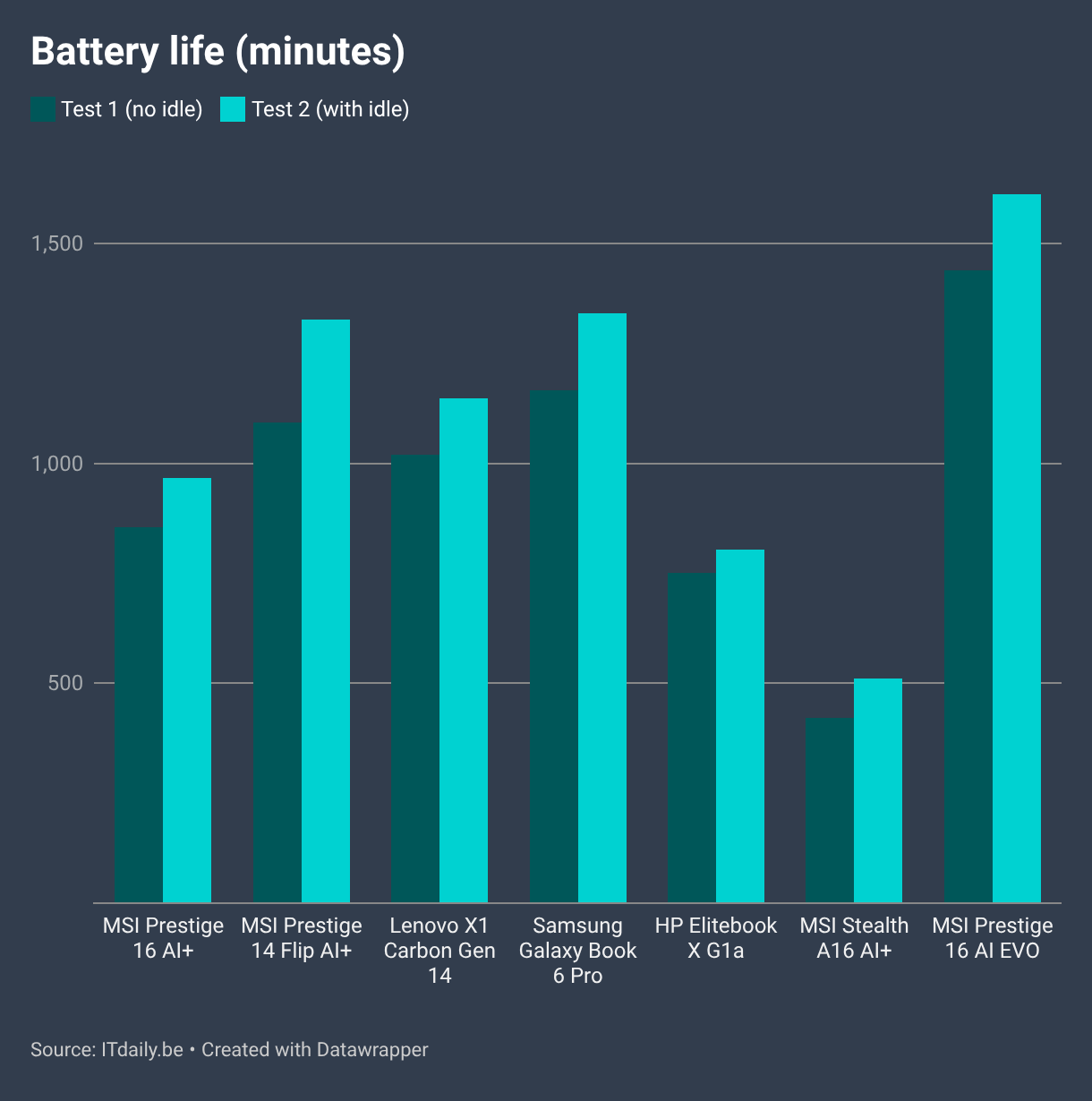
We noted with the Prestige 16 that muscle power took precedence over stamina. With the Prestige 14 Flip AI+, MSI manages to maintain the balance much better. The device comes with the same battery capacity (81Wh), but performs much better in battery tests with the same battery and processor. The smaller screen with the more limited resolution is an asset here.
The bar for Intel laptops is significantly higher than for the AMD laptops in this test. The Prestige 16 AI Evo remains the benchmark for battery life.
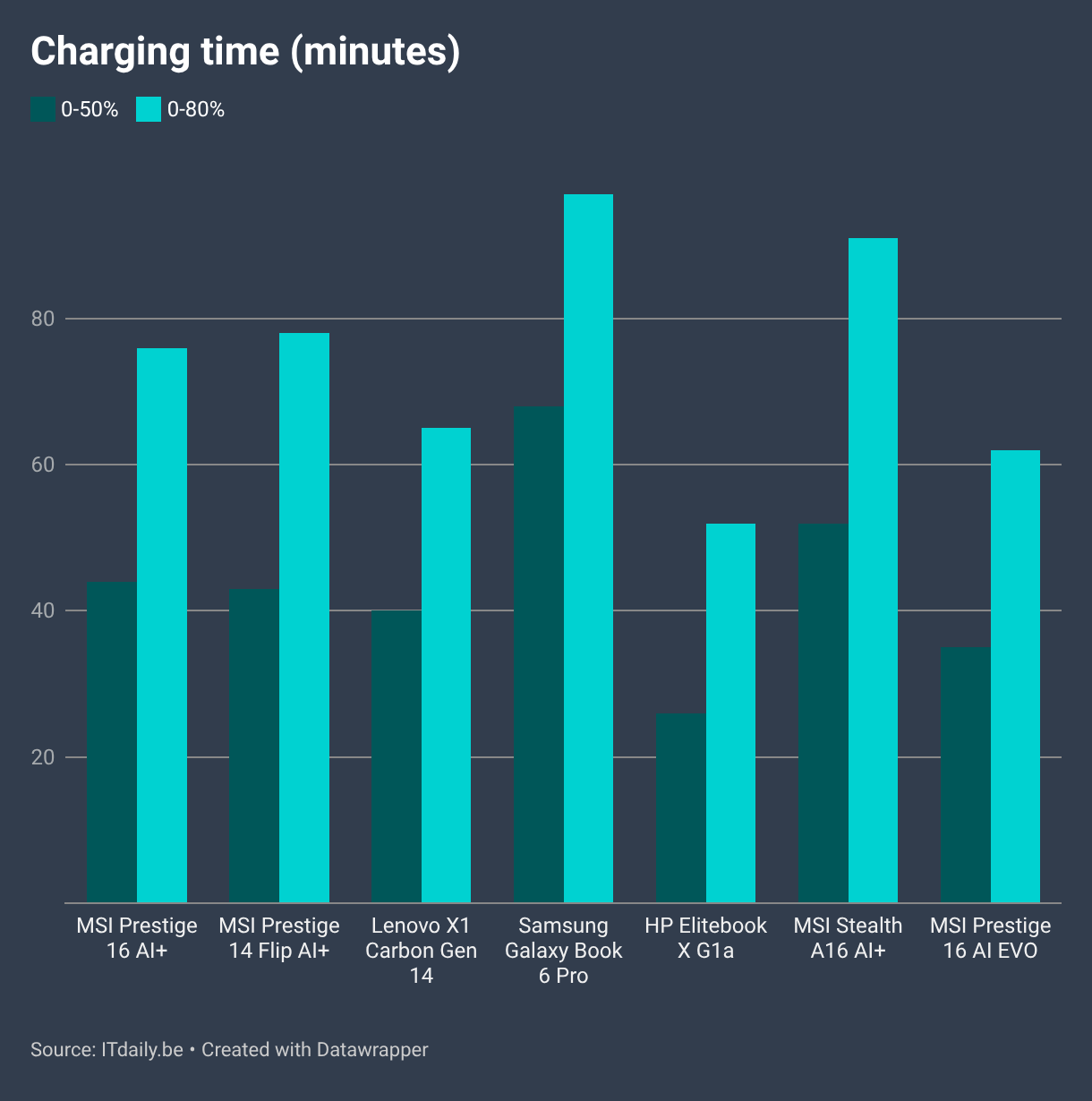
The laptop has to sacrifice charging speed. The Prestige 16 AI EVO could recharge at a capacity of 100 W, which meant its mega-battery was almost fully recharged in less than an hour. The new Prestige models take more time to charge a small battery. Since the laptop heats up so quickly, we think faster charging would not be good for the device.
Verdict: laptop first, tablet second
With the Prestige 14 Flip AI+, MSI delivers a 2-in-1 laptop that is primarily a laptop. The device doesn't have to compromise on performance and battery thanks to its robust internals. The Prestige Flip 14 AI+ does its job as a laptop so well that we actually forgot very quickly that we could also use it as a tablet.
The true beauty of this device lies on the inside. The rather dull screen and audiovisual peripherals do not invite using the device for applications where the tablet format might be handy, such as media consumption and video calling. Don't be misled by the vague AI label: in terms of AI applications, this laptop has nothing more to offer than devices that don't juggle marketing terms.
Tested: MSI Prestige 14 Flip AI+ D3MTG-049NL, Intel Core Ultra 9 386H, 32 GB RAM, 2 TB SSD, 14-inch OLED screen (1,920 x 1,200), Windows 11 Pro – 1,479 excl. VAT
Pros
- Handy trackpad with extra functions
- Powerful Intel Panther Lake processor
- Excellent battery life
- Versatile in use
Cons
- Tablet mode doesn't quite hit the mark
- Dull OLED screen
- Heats up quickly
- Meaningless AI label