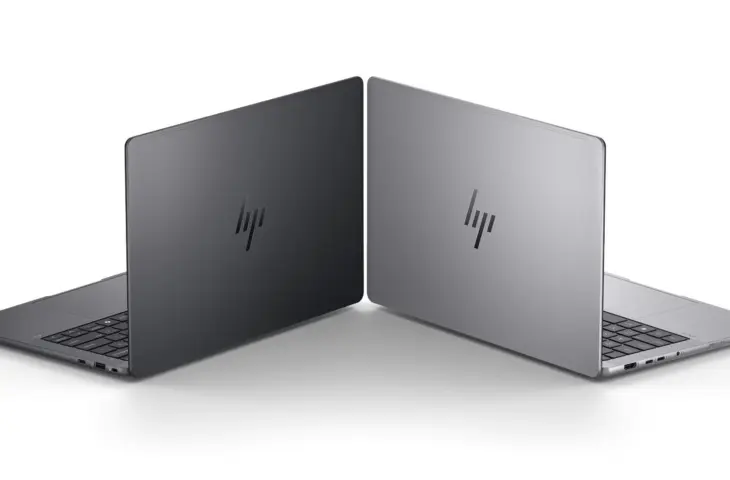
AMD Strix Halo is a unique chip that receives too little attention in the professional world. What makes the combination of this chip in a compact HP ZBook chassis so intriguing? Below is a selection, with a few clear caveats.
The HP ZBook Ultra G1a 14 (from 2,357.90 euros excl. VAT) is one of the few mobile workstations from HP with an AMD Ryzen Pro AI chip on board. Traditionally, Intel dominates the entire mobile line, with a small AMD alternative here and there.
The reason HP is pulling out all the stops here is the gamble that AMD Strix Halo can be successful. No other PC manufacturer has a workstation within its range with this chip. Lots of horsepower, combined in a thin chassis with a 14-inch screen: it seems too good to be true. And yet, the HP ZBook Ultra G1a 14 is not a device to overlook.
AMD Strix Halo
You’ve read it several times above: AMD Strix Halo. Officially, the product line is called AMD Ryzen AI Max Pro 300 Series, but almost everyone uses the more easily pronounced code name. We therefore also prefer it in this review. This chip series uses the latest AMD Zen 5 CPU cores, of which the top model has 16 cores (32 threads) on board. Integrated with the CPU is also a GPU (up to an AMD Radeon 8060S).
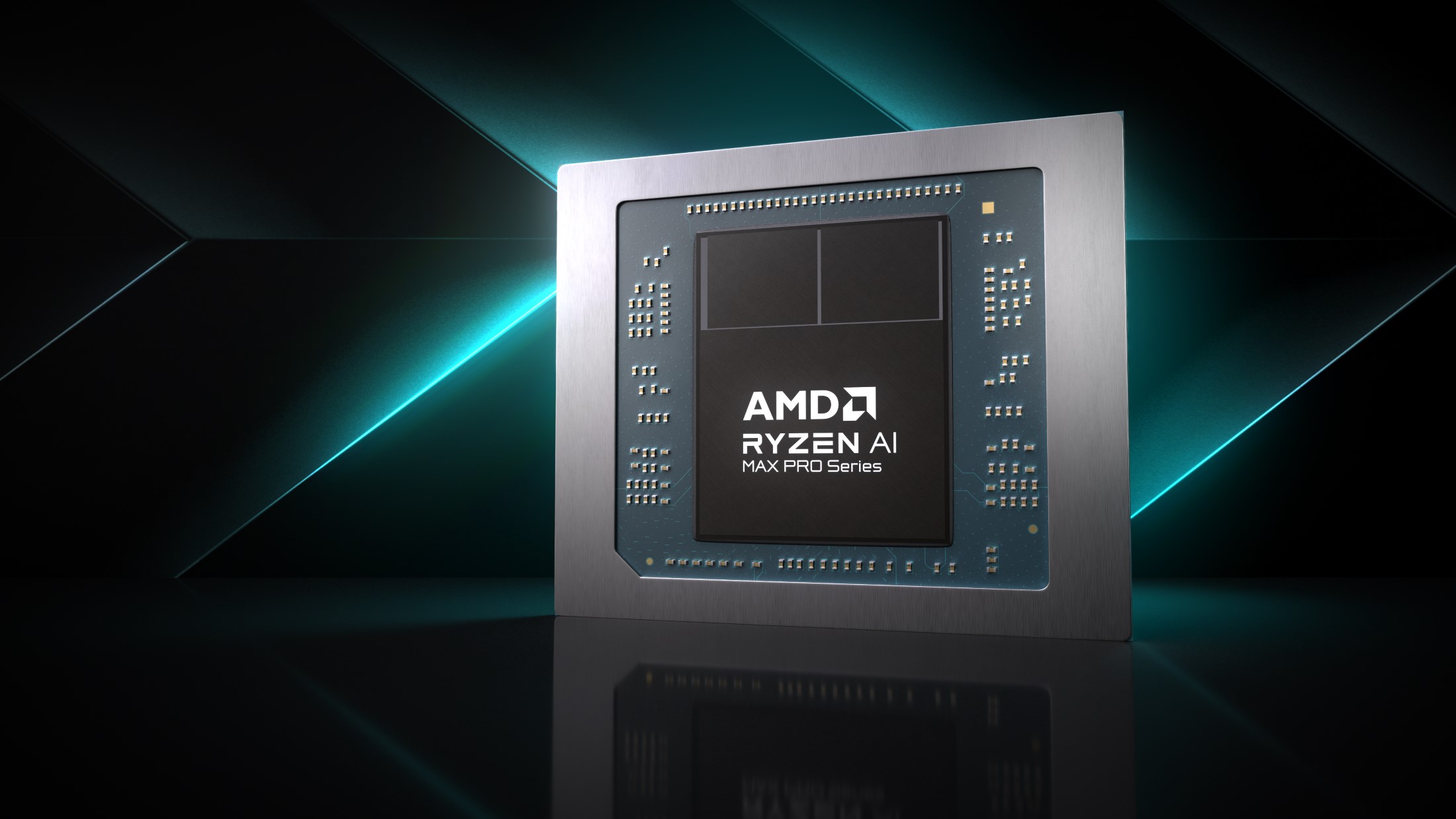
The biggest asset of Strix Halo is the universal memory (configurable up to 128 GB RAM, non-ECC, permanently soldered so not upgradeable). Of this, you can configure up to 96 GB as VRAM for the graphics card. This flexibility is currently only found in the Apple ecosystem with the Apple M-chips, and the brand new but considerably more niche Nvidia DGX Spark computers with GB10-chip.
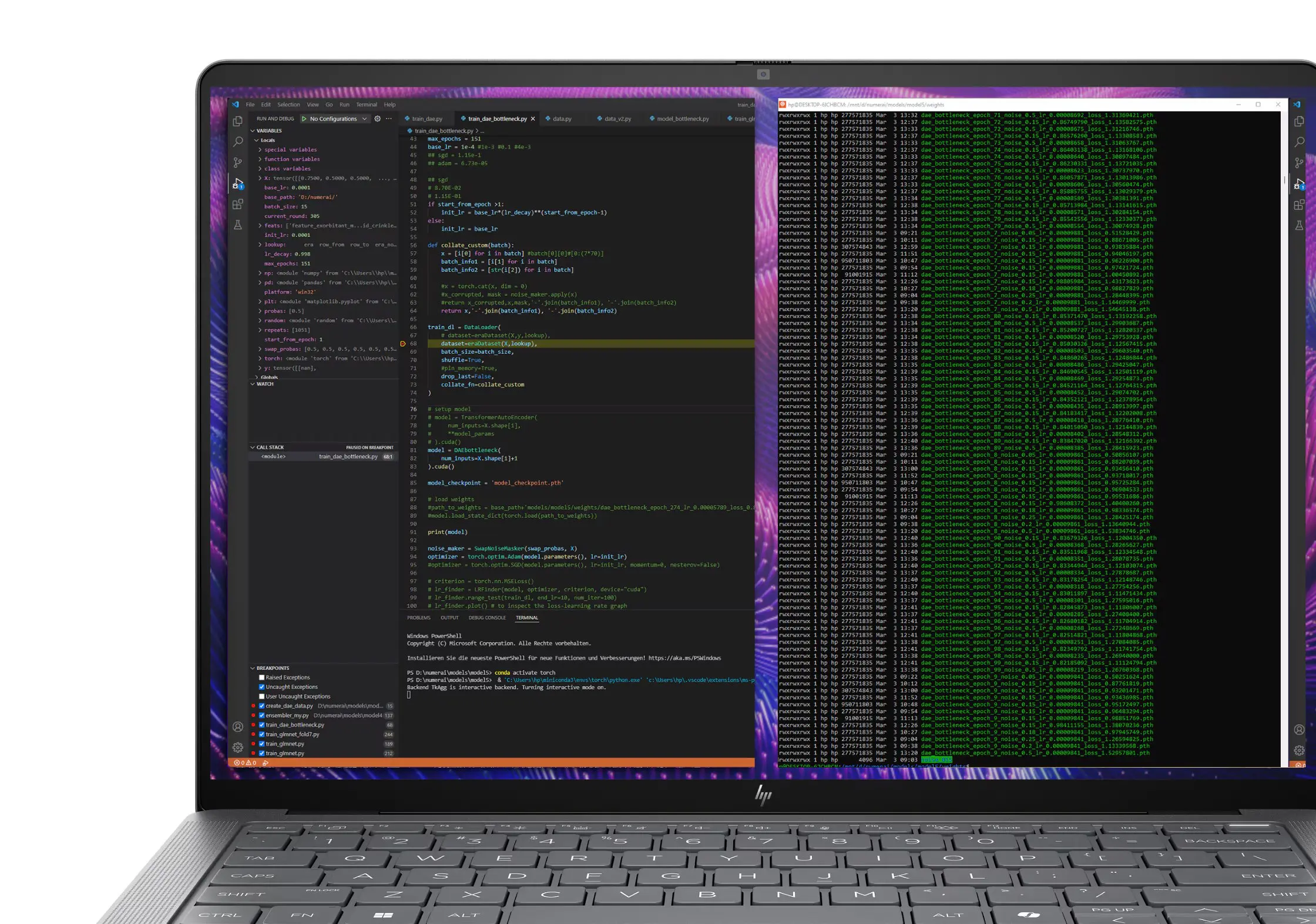
Thanks to the ability to configure up to 96 GB of VRAM, the HP ZBook Ultra G1a 14 opens the doors to locally running large LLMs or rendering complex 3D models. The machine is fully ISV-certified and configurable up to 4 TB of NVMe storage. The NPU on board delivers 50 TOPS, making this laptop Copilot+-compatible. In the segment about the benchmarks, we will immediately tell you more about the performance of Strix Halo.
Limited number of screen options
Although the HP ZBook G1a 14 can be configured very strongly and diversely, one of the two Achilles heels is a limited range of screens:
- 14″ WUXGA (1920 x 1200), UWVA, 60 Hz, anti-glare, 400 nits, 100% sRGB
- 14″ 2.8K (2880 x 1800), OLED, UWVA, touch, 48-120 Hz, BrightView, Low Blue Light, 400 nits, 100% DCI-P3
That first option is okay, but does little justice to the device. The OLED option is not the best choice for the battery. An additional disadvantage: for people who are sensitive to pixel grids, the OLED panel used is a problem. On a white background you see (depending on how sensitive you are to it) red dots and a grid. Working in dark mode fortunately solves this problem for those who suffer from it.
The OLED panel in our test device has a fairly high maximum screen brightness of 405 cd/m² and covers the entire DCI-P3 color range. Creative professionals need to adjust the screen a little. By default, we measure a DeltaE of 3.5 for white balance and a DeltaE of 6.2 for colors. Only with scores lower than two do you no longer see differences with the naked eye. The color temperature is on the warm side: 6,125 Kelvin (6,500 Kelvin is perfect).
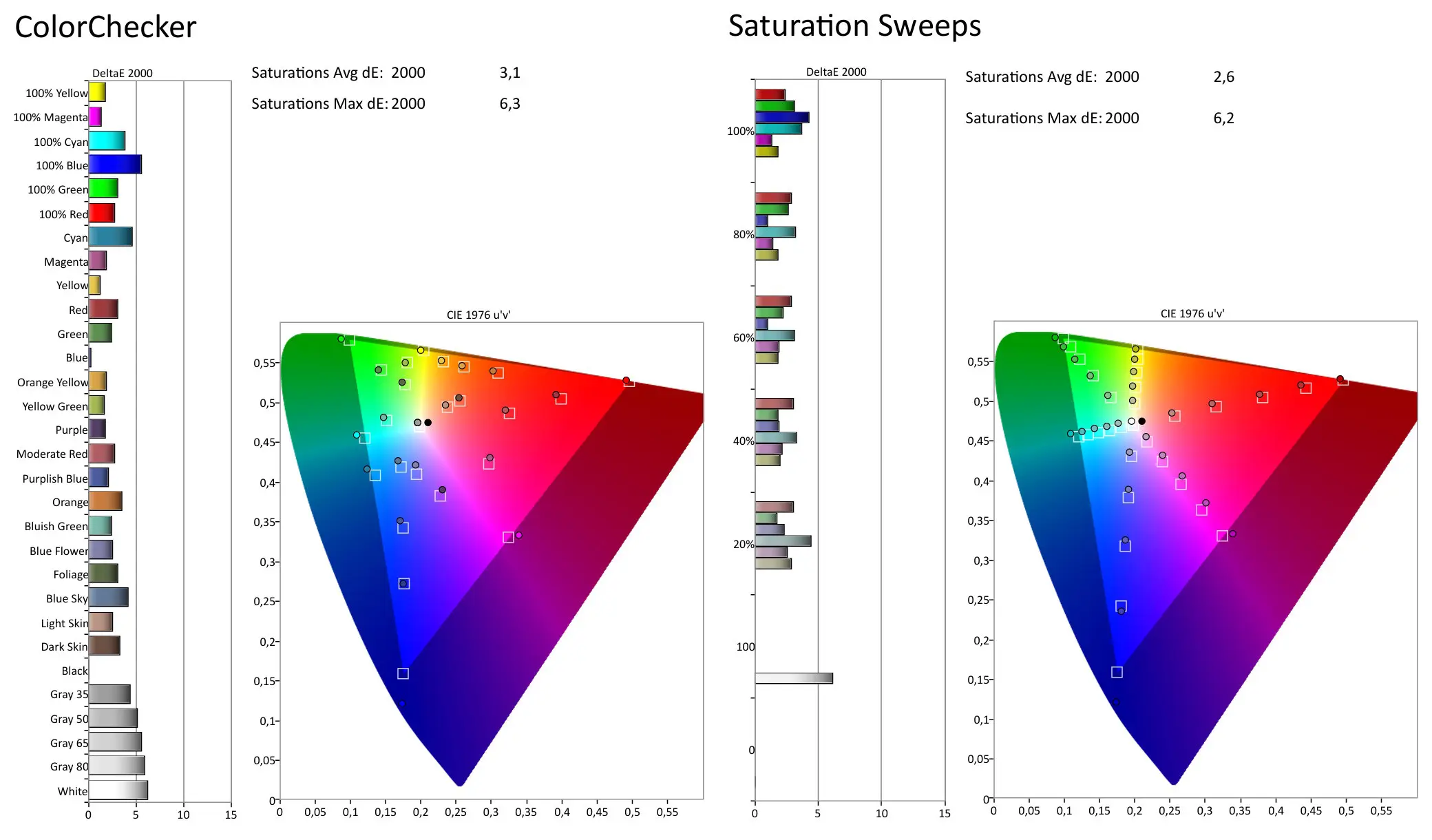
Our OLED panel is properly adjusted for green and red, but we are missing a lot in the blue tones. After a short calibration round, we quickly record DeltaE scores below two. The panel is of good quality, a shame about the pixel grid (if you are sensitive to it).
Solid chassis
The build quality of the HP ZBook G1a 14 is excellent, as is always the case within the ZBook line-up. The aluminum chassis feels strong (MIL-STD) and the keyboard (75% format) types very pleasantly. The large touchpad offers just enough friction to be pleasant and reliable to use.
To the left and right of the keyboard are four integrated stereo speakers that sound remarkably good for such a thin chassis. It also helps that they are pointed straight up, compared to most laptops today that are pointed downwards.
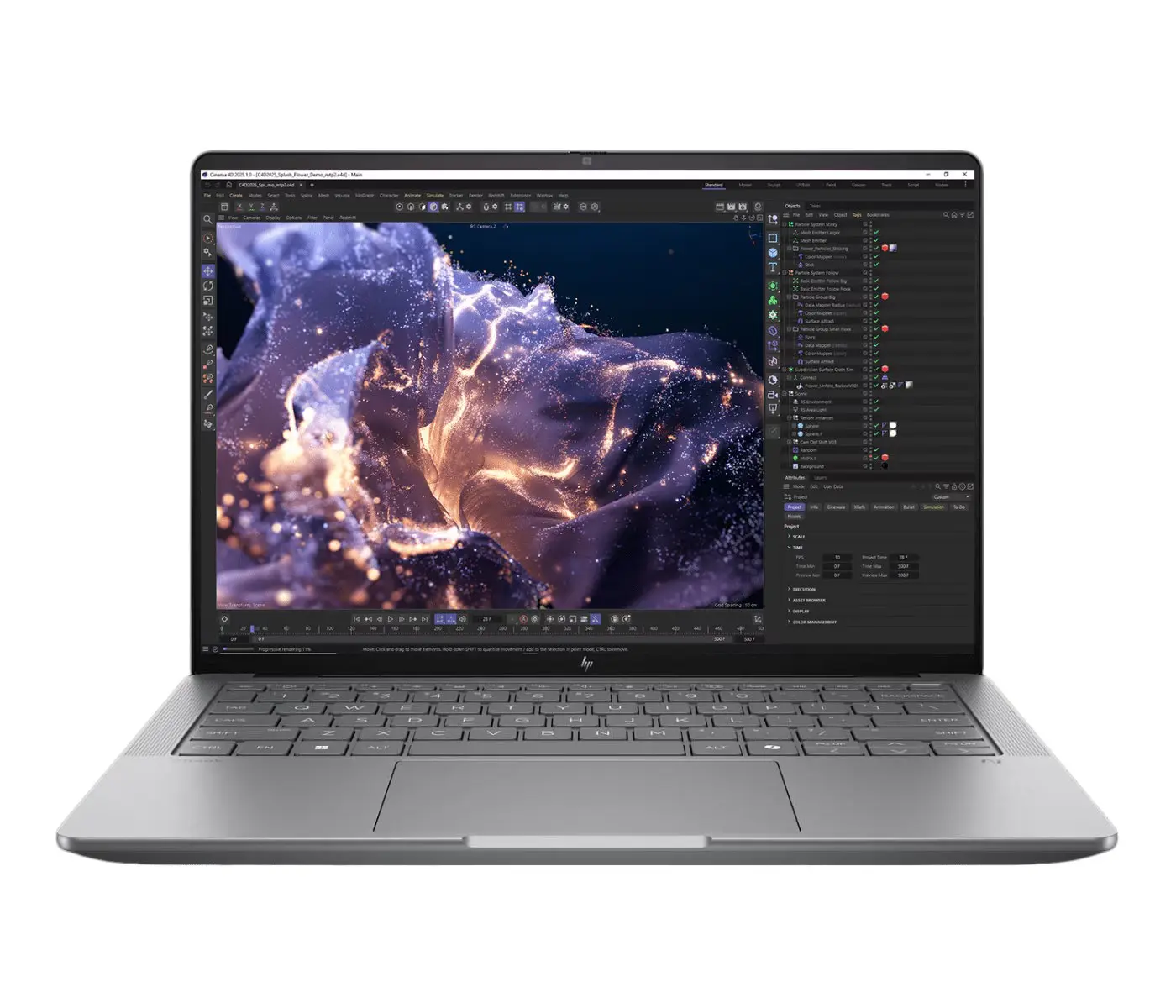
The 5 MP webcam supports facial recognition via Windows Hello (just like a fingerprint sensor on the power button). The quality of the webcam is excellent. In almost every situation you achieve a sharp and beautiful result. There are two microphones on the left and right to pick up your voice purely. Things can be tuned via the Poly Studio software.
Sometimes annoying: the cover that slides in front of the webcam is very close to the edge of the laptop. After a few months of use, it still happens regularly that when we open the laptop, we switch off the webcam in this way. A little more resistance on the slider would have been better. Now it slides too loosely and it happens so easily.
Solid package
A workstation usually has a lot of horsepower, which brings extra cooling requirements and extra weight. On the scales we measure 1,588 grams. That is a lot for a 14 inch laptop, but very little for a workstation. The HP ZBook G1a 14 feels like a solid block: the volume in the chassis seems to be used to the maximum.
As far as we are concerned, this device is thin and light enough to take with you comfortably everywhere. You hardly feel those extra 300 grams compared to other thin laptops (non-workstations). Keep in mind that the included 140 watt charger also weighs more than the standard 65 watt charger. All in all, your bag will be a little heavier, but it will still be within limits.
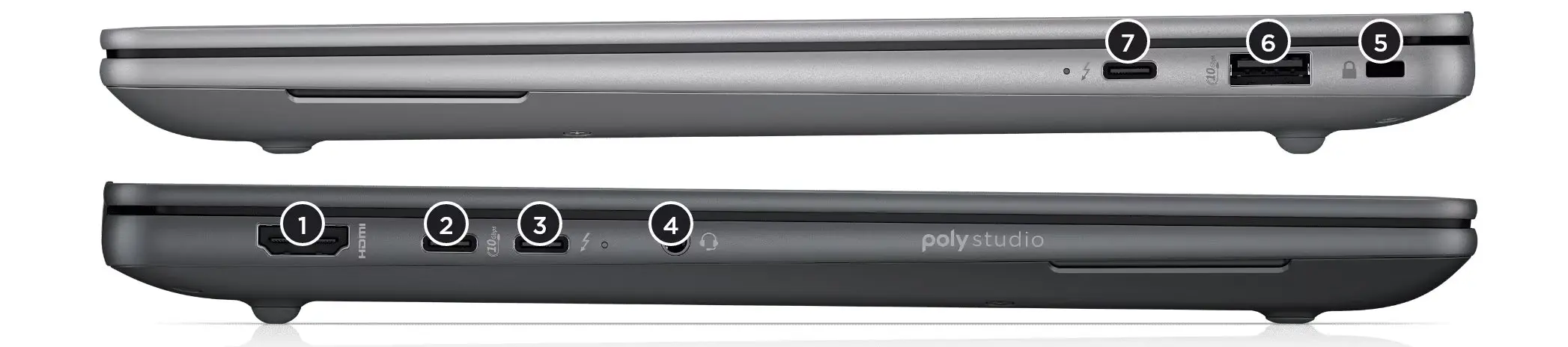
No shortage of ports: 1x USB-C (USB 3.2 10 Gbps, DisplayPort 2.1), 2x USB-C (Thunderbolt 4 40 Gbps, DisplayPort 2.1), 1x USB-A (10 Gbps), 1x HDMI (v2.1), 1x audio jack and 1x Kensington lock.
The addition of Thunderbolt 4 is special, because this is a technology that is traditionally only found in Intel chips. HP has made the effort to compensate Intel extra to guarantee top performance for peripherals in this configuration. Wifi 7 completes the picture.
Well cooled
In our test model, HP has provided the fastest AMD Strix Halo chip: AMD Ryzen AI Max+ PRO 395. Quite a mouthful. This chip has sixteen cores on board (32 threads) and has a TDP that is configurable up to 120 watts. That also includes the AMD Radeon 8060S, the integrated GPU.
To keep everything cooled, HP has provided two fans and several heat pipes. Fresh air is sucked in from below, while warm air is blown away at the front just behind the screen.
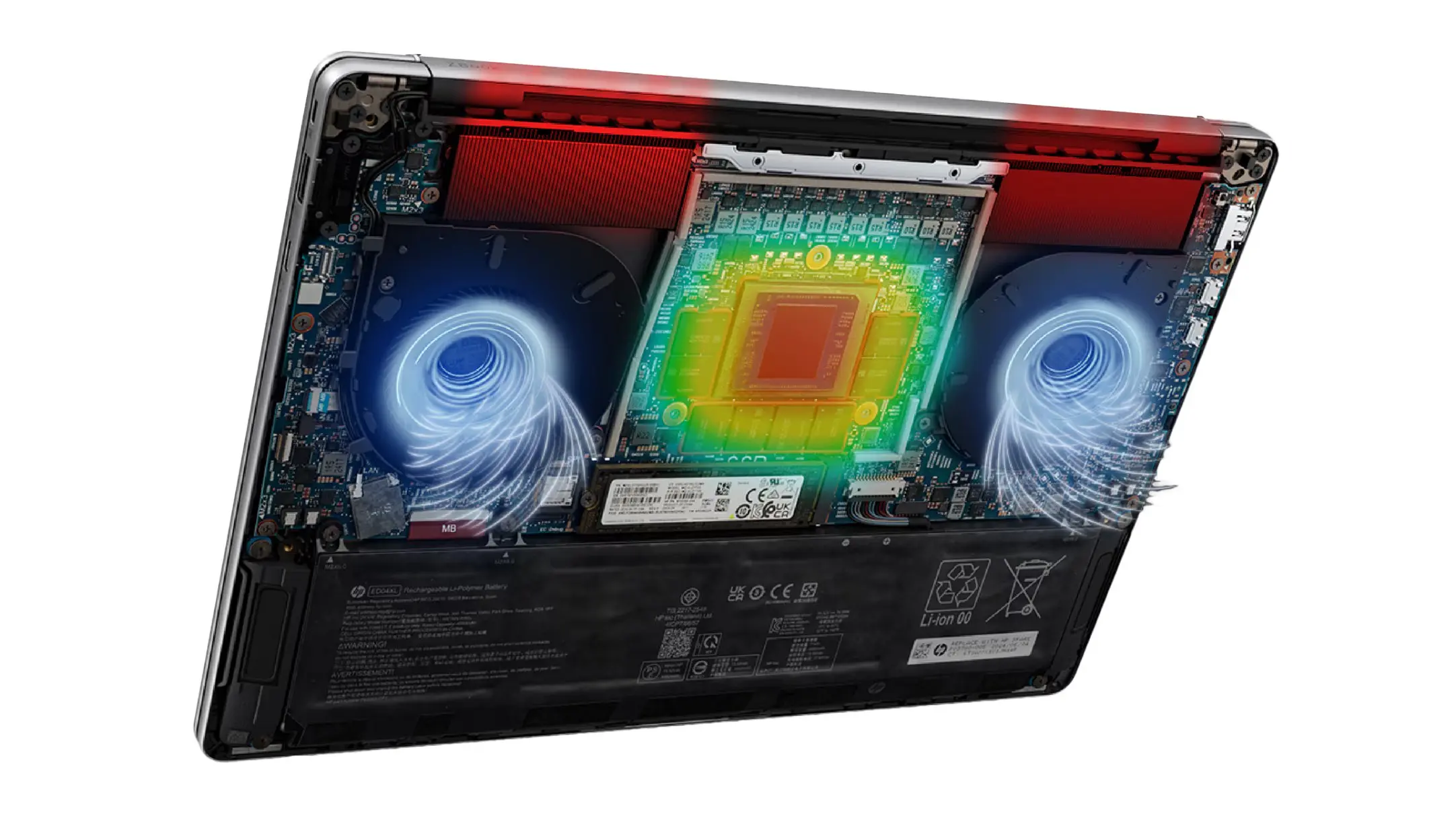
We were afraid that with so much horsepower in a compact chassis, the fans would turn on continuously. Nothing could be further from the truth. During daily office work, this machine does not flinch. It is only when you put a heavier load on the GPU or CPU (local LLM, 3D renders) that the fan is more clearly present.
Strong performance
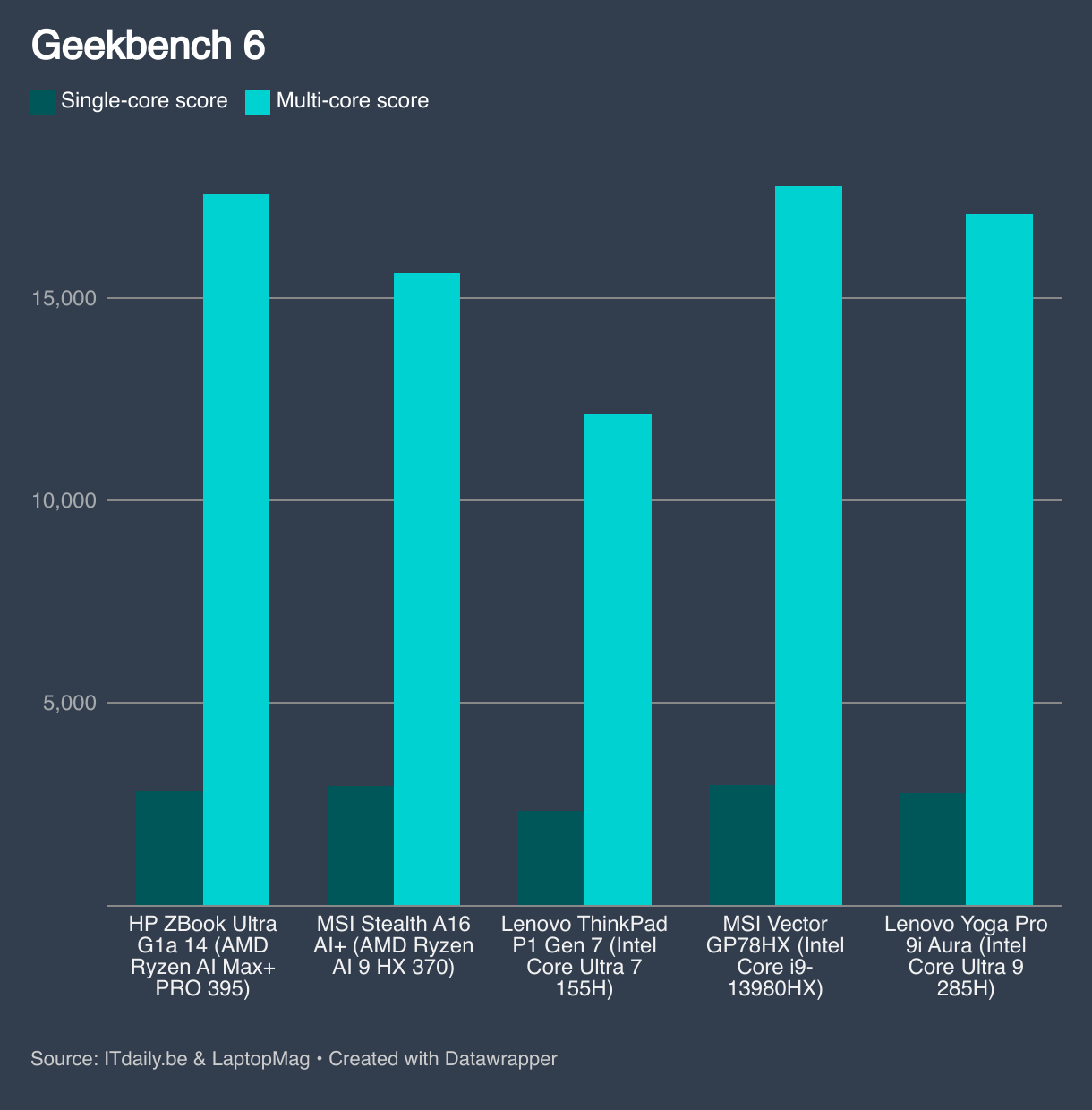
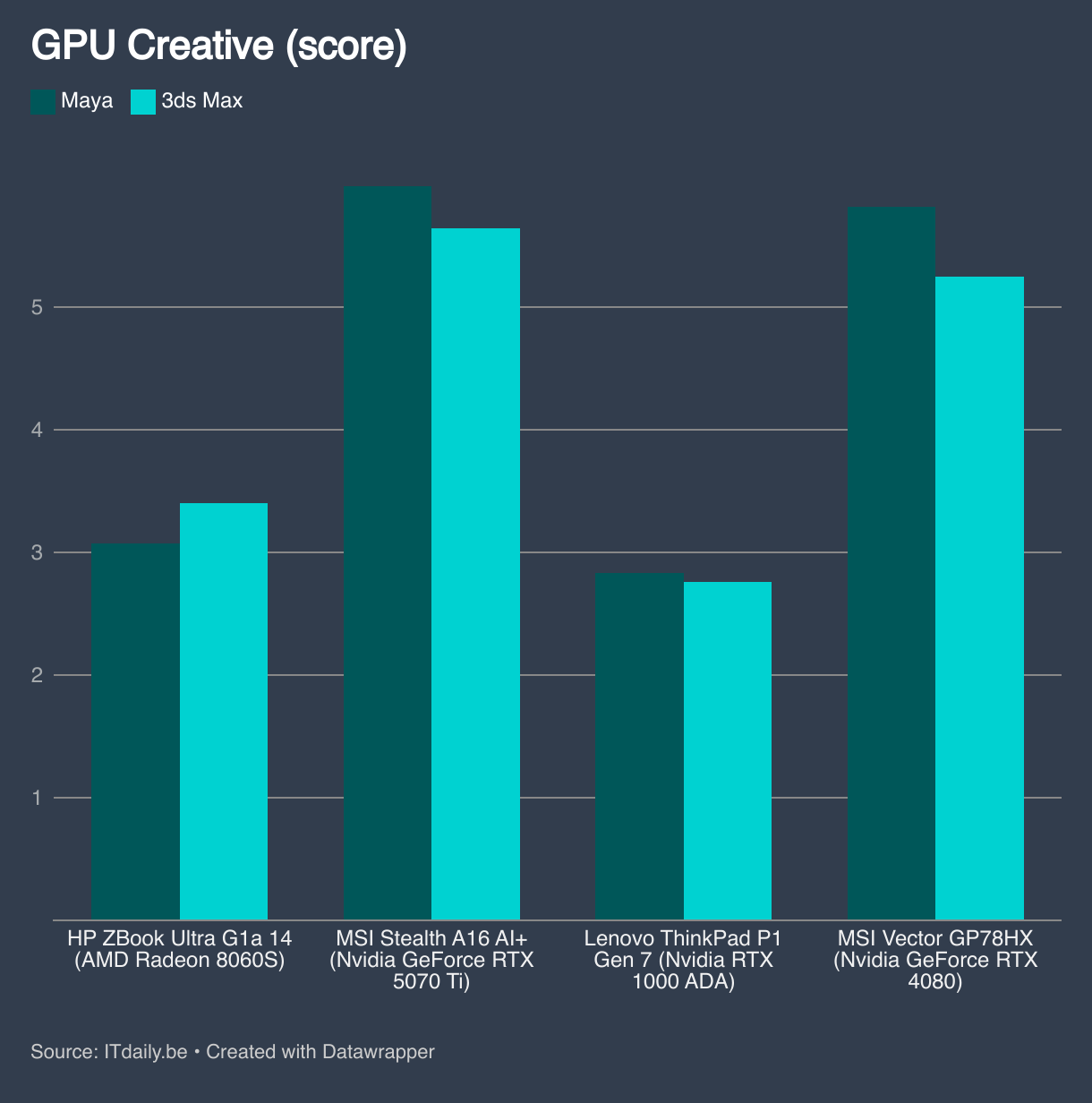
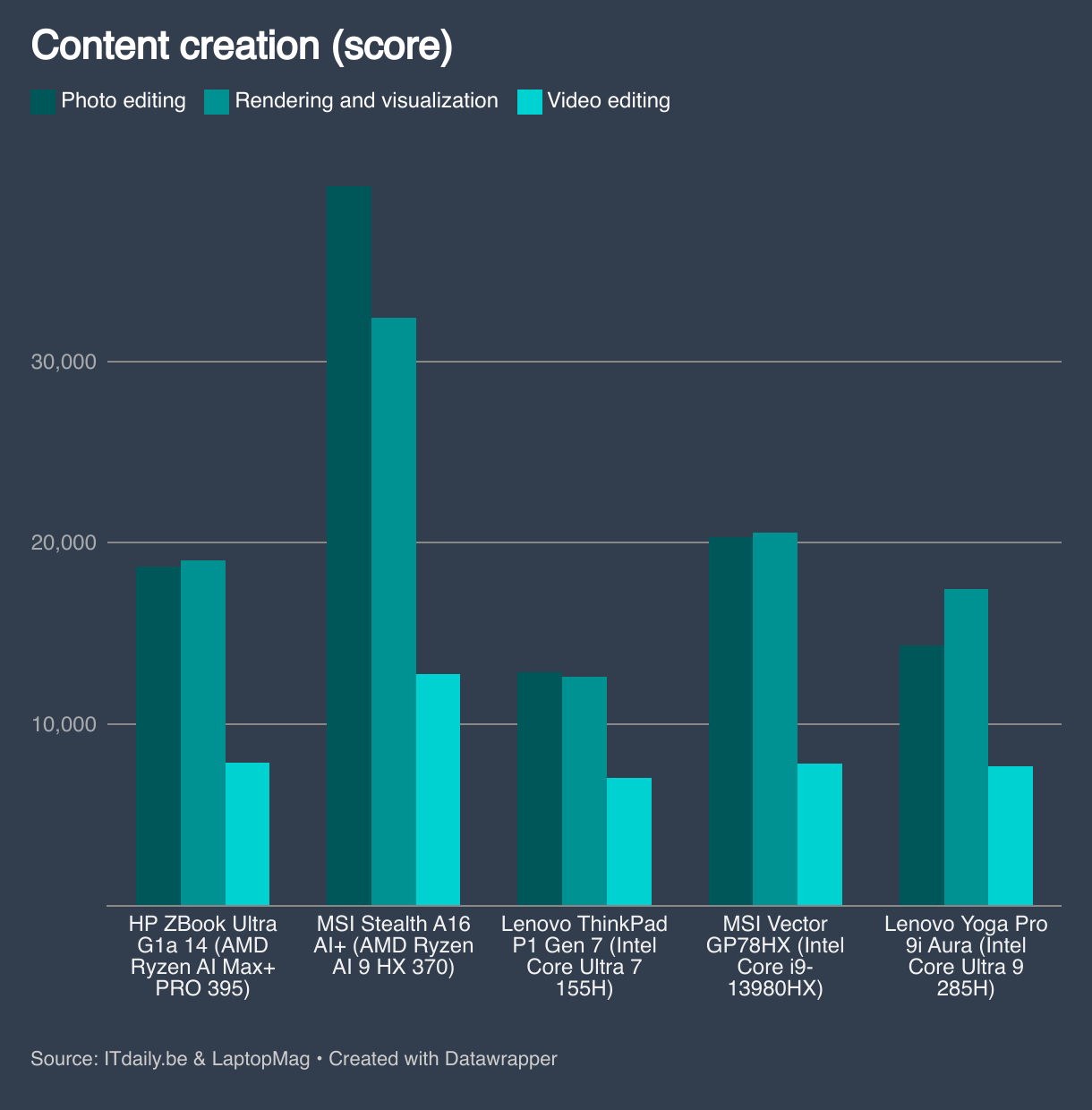
AMD Strix Halo, especially the top chip in our test machine with sixteen CPU cores and a Radeon 8060S, is a monster. There is currently no mobile Intel or AMD chip that comes close in terms of CPU performance in such a thin chassis.
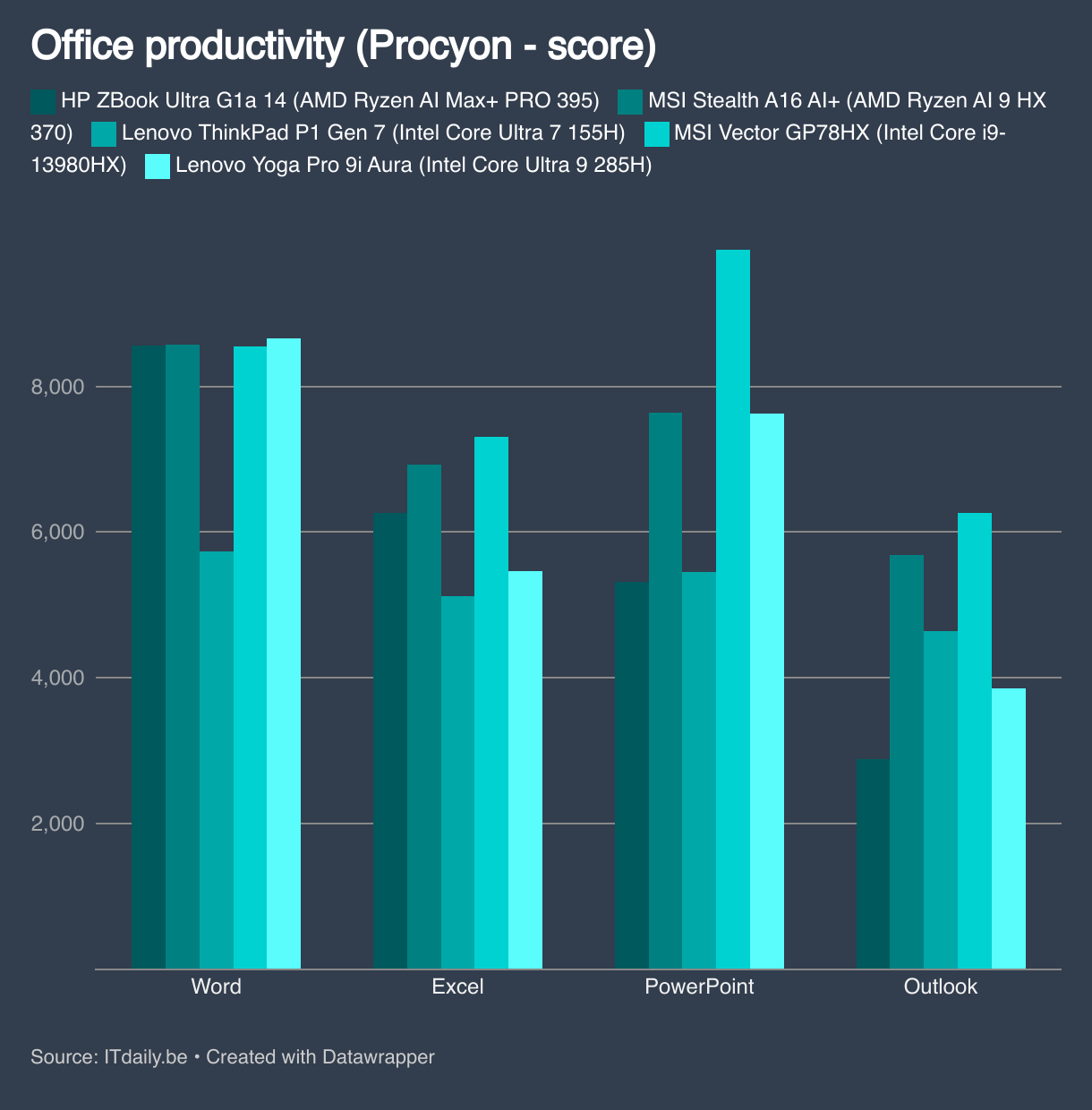
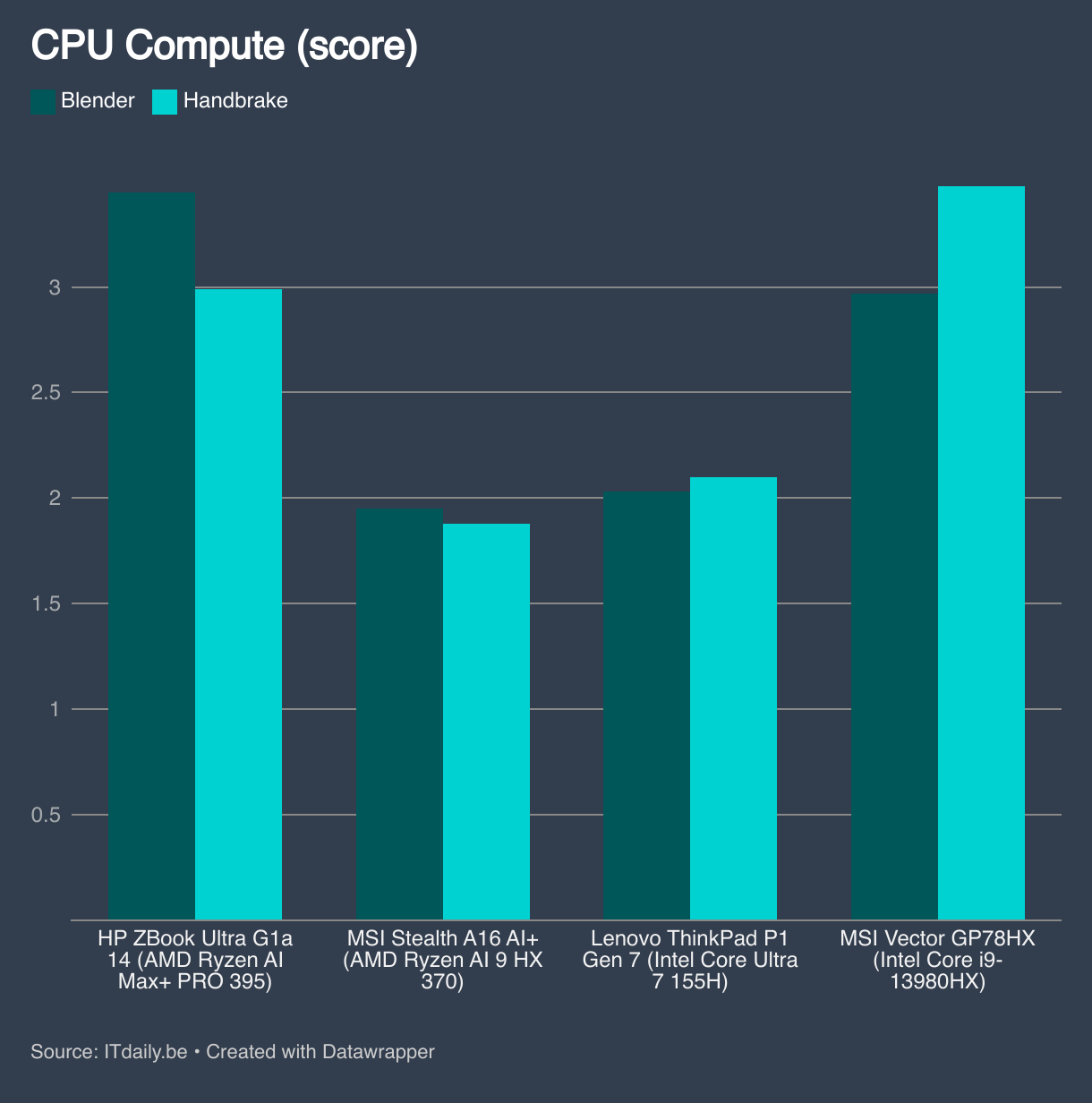
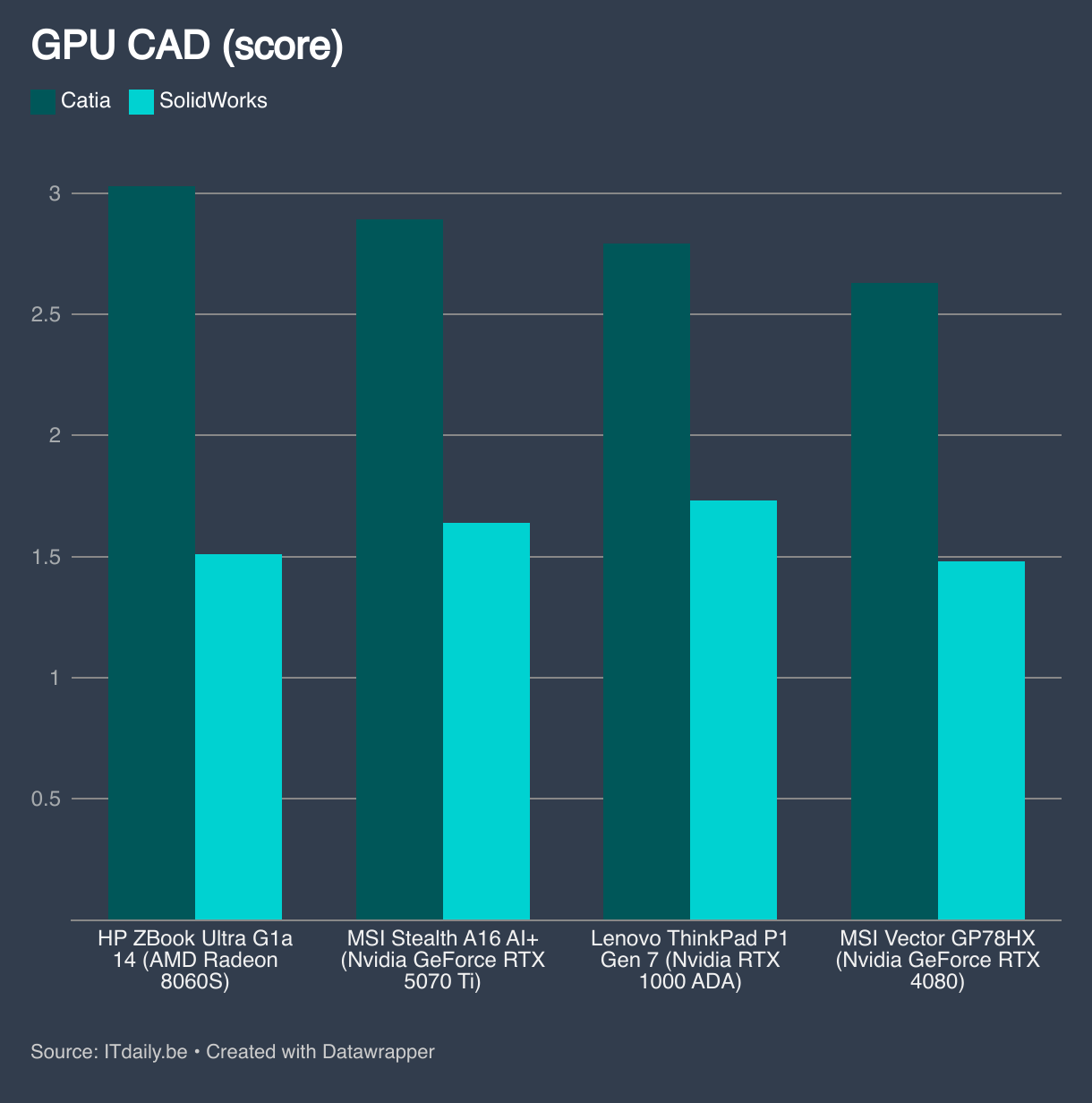
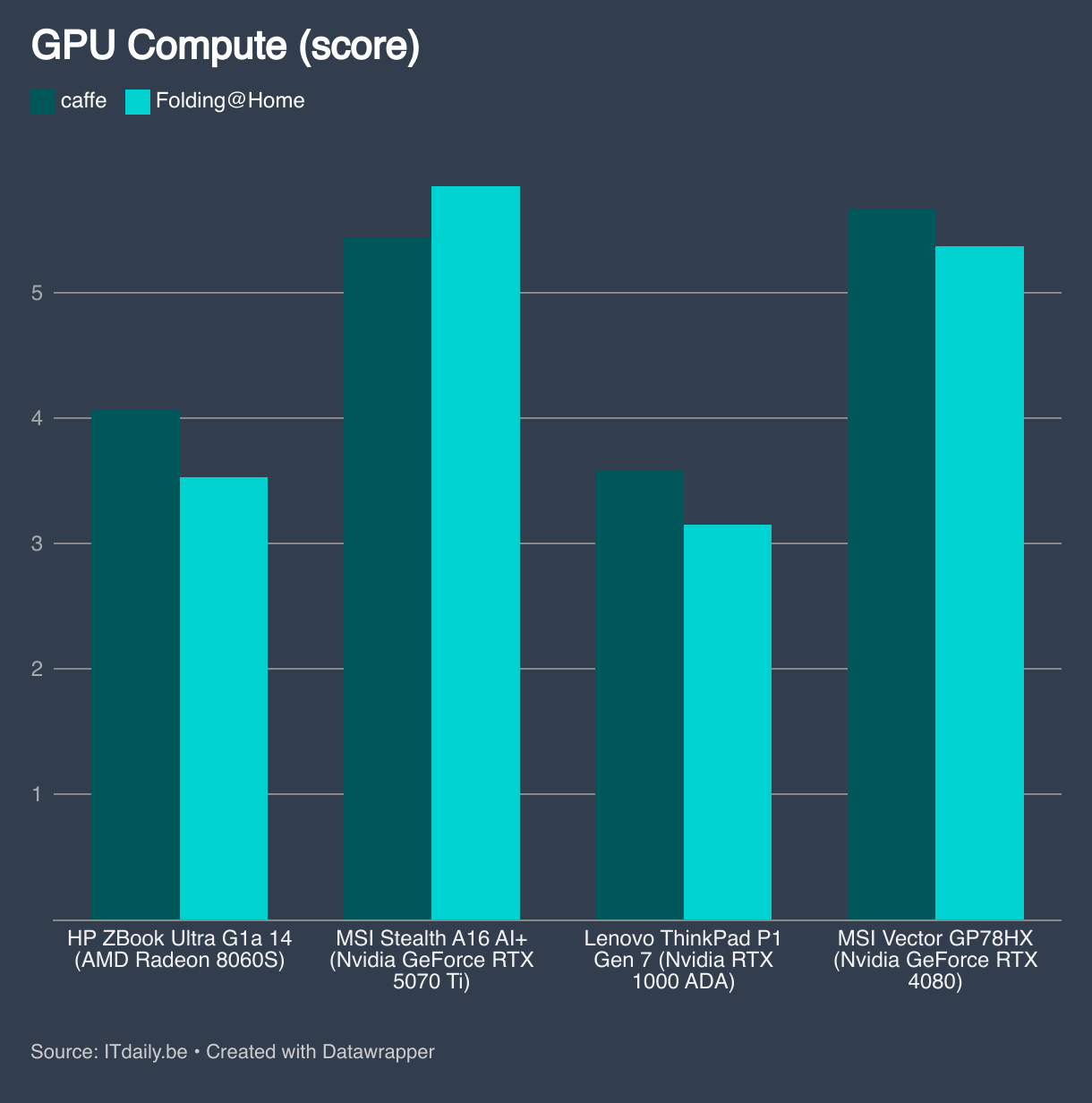
The integrated AMD Radeon 8060S GPU is approximately at the same level as a mobile Nvidia RTX 4070 or RTX 5070. The Nvidia RTX 5070 Ti is still a level higher. All integrated GPUs from Intel leave AMD Strix Halo far behind in this top configuration.
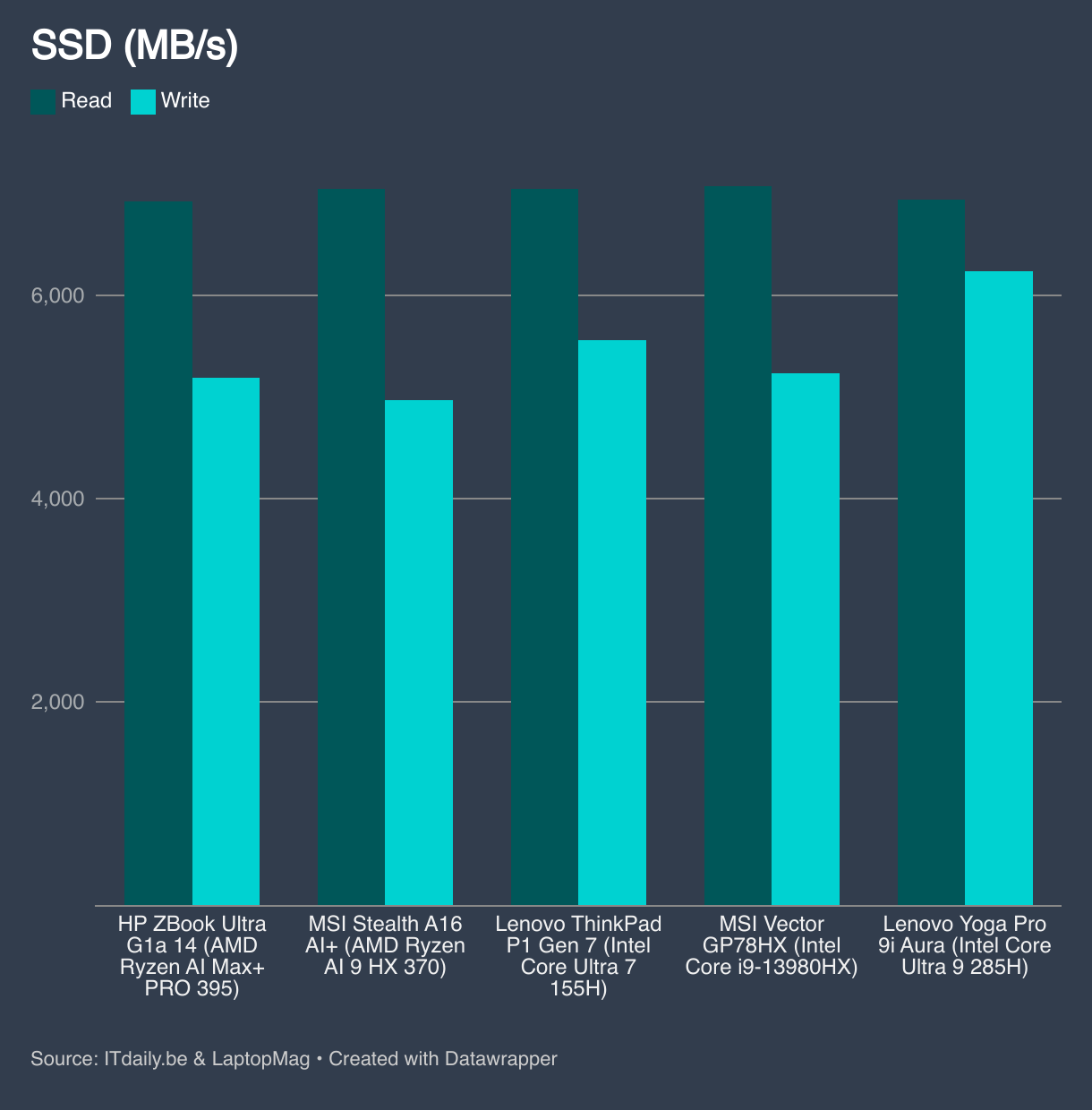
The included storage, 2 TB NVMe in our test model, performs as expected within the workstation segment.
AI performance
A strong CPU and GPU in a compact housing is rare within the Windows 11 laptop segment, but those who seek will find competition. What makes the HP ZBook G1a 14 interesting is the 128 GB LPDDR5X RAM. Thanks to the new AMD architecture, the GPU uses the same memory pool and you can allocate up to 96 GB of VRAM.
A compact 14 inch laptop, portable, with a GPU that has 96 GB VRAM, that makes this laptop unique. Because whoever says a lot of VRAM, says large LLMs that you can run locally. For example, you can run Deepseek-R1 70b directly on this device. That opens up a lot of potential to experiment with local models.
In a world where no one can keep quiet about AI laptops, this Zbook is actually a rare device that is worthy of the name. You can load models into memory that are close in complexity to the online AI models. Something like that is completely impossible with a classic laptop with separate DDR5 memory and an integrated NPU. Note: just because you can run complex models on this workstation, does not mean they run quickly.
It goes without saying that the memory and the fairly solid GPU capabilities are also relevant for complex 3D renders. This laptop performs at a level that you usually associate with considerably larger and heavier machines.
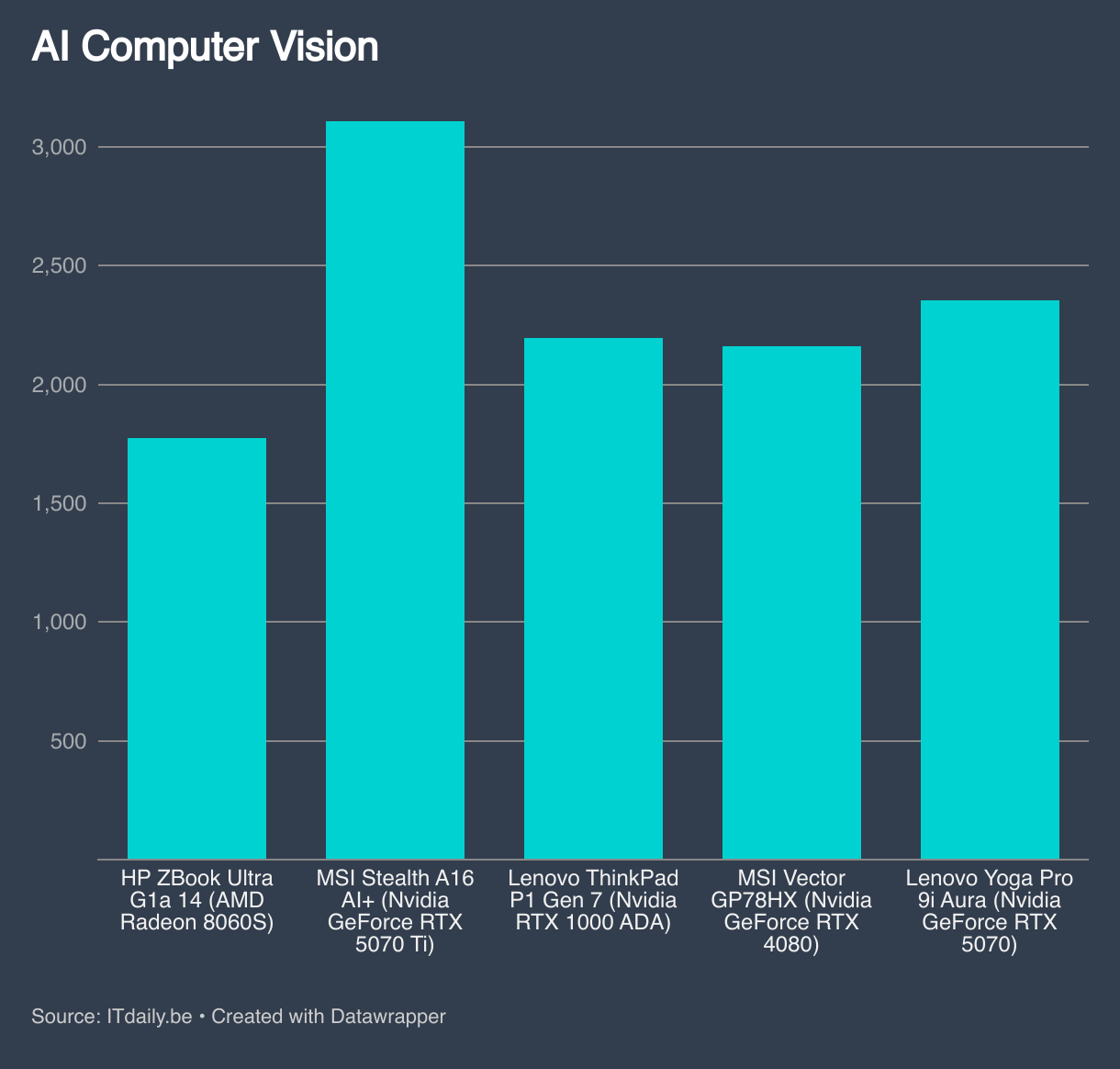
A lot of VRAM has many advantages for users and (AI) developers, but you have to take into account that the GPU is still the limiting factor for speed of output. For example, the memory determines whether you can load a model, but the GPU is responsible for the speed of processing.
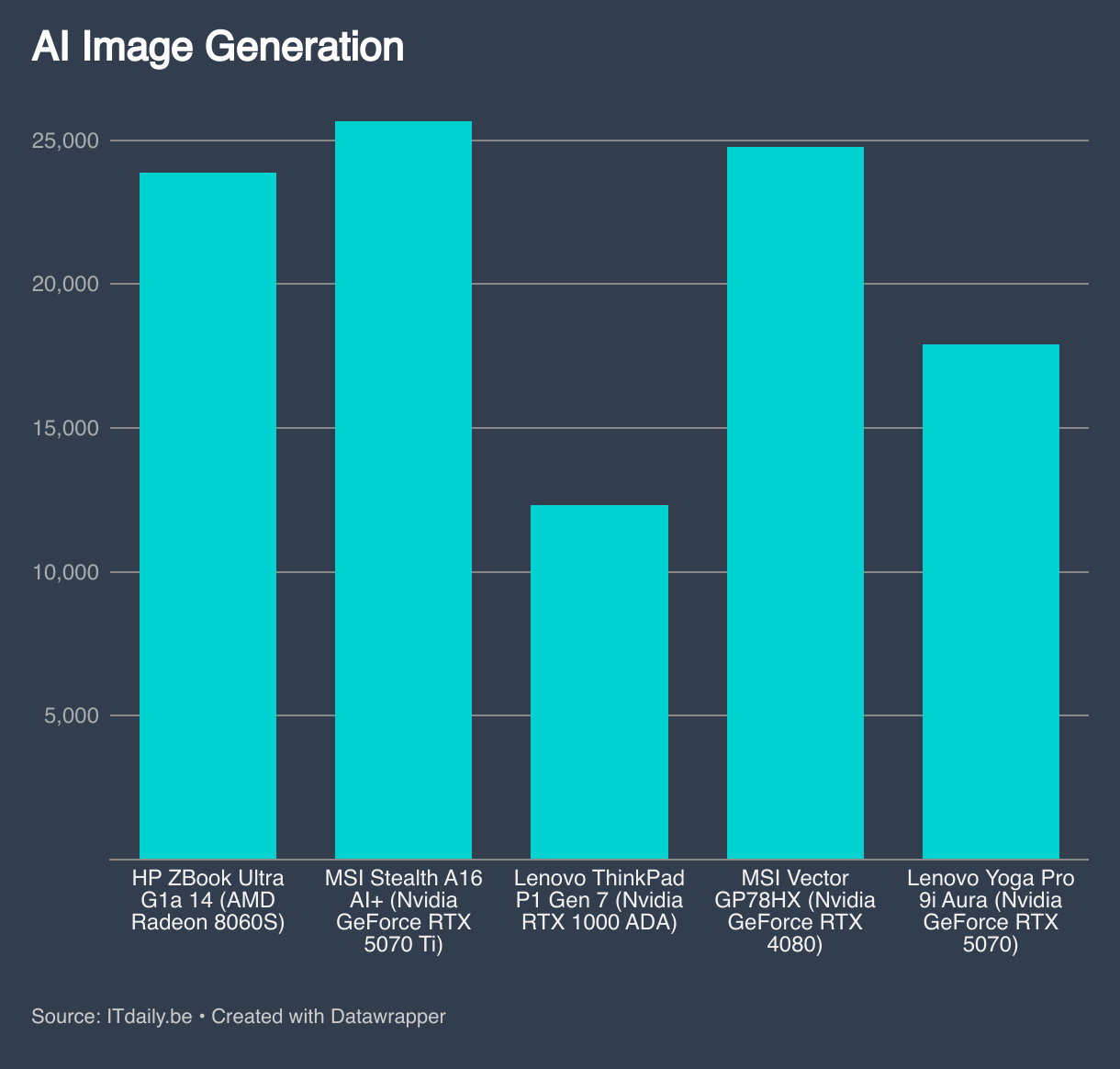
If you are considering the HP ZBook G1a 14, first think carefully about what the most important workloads are that you are working on. Do they focus on the GPU, on VRAM, a mix of both? This laptop is the VRAM king, but scores below average on GPU level compared to devices with discrete GPUs. Those who prefer more GPU computing power may be better off looking for an alternative.
Battery and charging
HP has really used every milliliter of volume in the chassis. Despite the hefty cooling, there is still room for a 74 Wh battery. The included 140 watt charger pumps energy into the laptop at lightning speed. Charging up to 50 percent takes just 20 minutes, up to 80 percent just under 40 minutes. Those are very fast charging times, ideal for quickly refueling in between when your battery runs out.
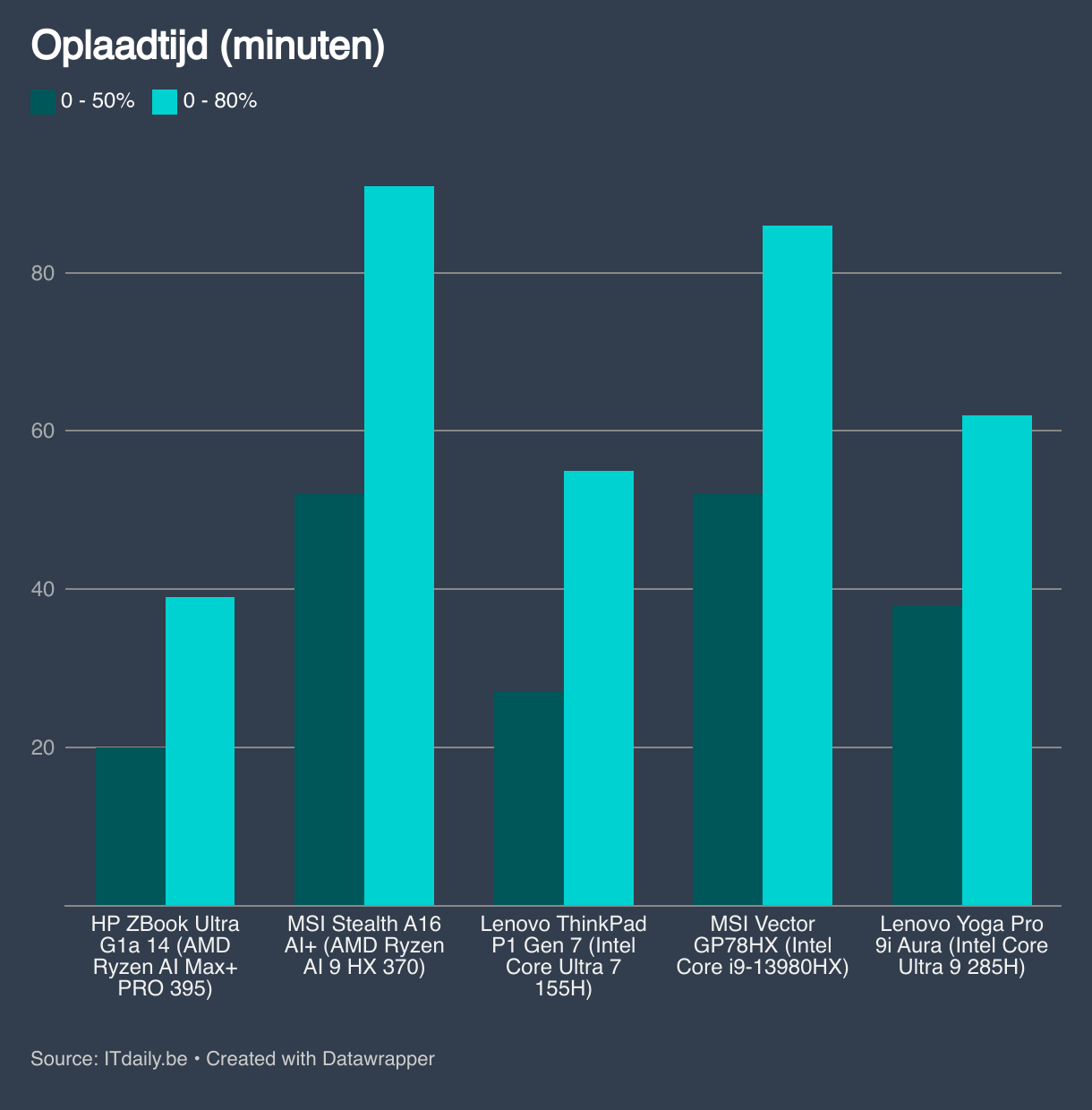
You will need that fast charging with this laptop. The AMD Strix Halo is not the most economical chip, even when the load is low. Getting through a full working day is only possible when you do very light work and limit the screen brightness. We almost never manage to bridge a full working day.
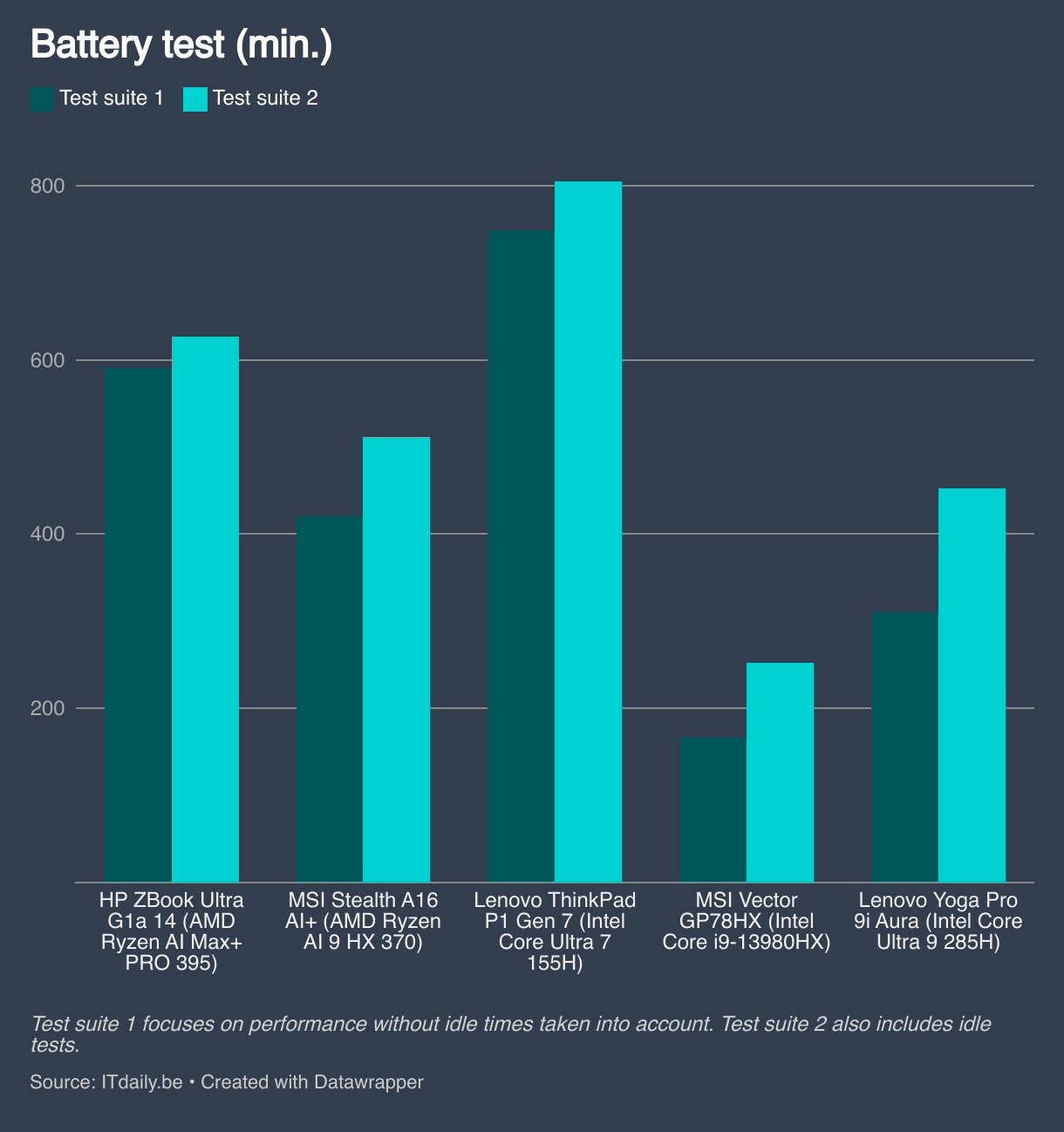
We would have preferred to see it differently, especially because the latest Intel chips are economical (not to mention the ARM chips from Qualcomm). If we look in the context of a workstation, the battery life is fine. If you view this laptop as a traditional laptop, it is disappointing.
Conclusion
The HP ZBook G1a 14 (from 2,357.90 euros excl. VAT) is the odd one out. It is the only Windows-based workstation where you can allocate so much VRAM to the GPU, which is useful for LLM purposes or 3D renders. That alone may be enough to convince someone to bring this device home.
Are you looking for something with a powerful CPU or GPU in a compact chassis? Then you have also come to the right place, but it is not the only address. The top model that we tested is very pricey. On the other hand, you almost have to configure it that way to get the most out of the asset of AMD Strix Halo. Are you perfectly in the sweet spot? Then this is a dream machine. Do you fall a little outside of that? Then this is still a dream machine, but with competition.
Tested configuration: HP ZBook Ultra G1a (model A3KZ2ET) – AMD Ryzen AI Max+ PRO 395, AMD Radeon 8060S, 128 GB RAM, 2 TB NVMe SSD, 14 inch glossy OLED screen (2,880 x 1,800 pixels), Windows 11 Pro – 3,643 euros excl. VAT
.pro’s
- AI machine with up to 96 GB VRAM configurable
- AMD Strix Halo with Zen 5 cores
- Compact and light as a workstation
- Lightning fast charging
- Solid chassis
.contra’s
- Battery life could be better with light use
- OLED panel not suitable for everyone
- Memory is permanently soldered
- Priced spicy