

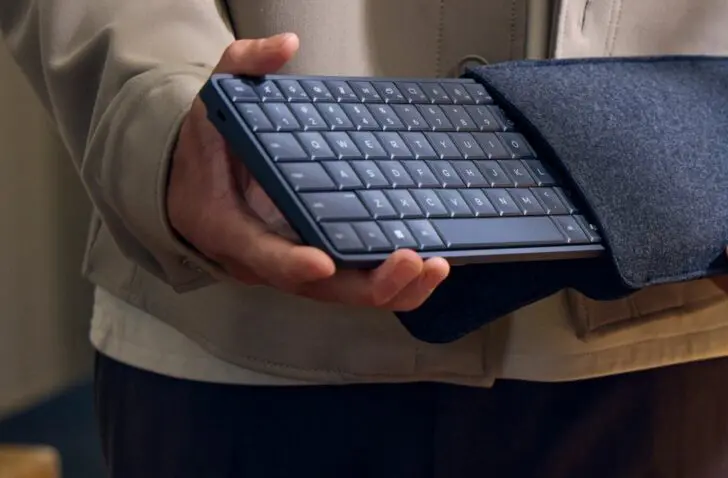
HP hides a full-fledged PC inside a portable keyboard, which is also equipped with a battery. The beautifully finished product is technically impressive, but we suspect there is a reason why keyboard PCs are not ubiquitous.
The HP EliteBoard G1a Desktop is charming. After all, we don’t come across a keyboard that turns out to be a full-fledged computer upon closer inspection every day. Moreover, we can immediately see that HP has put a lot of love into this product. The manufacturer delivers it with a high-quality fabric carrying case that closes neatly with a hidden magnet, and offers space for any cables or the included wireless HP 675M mouse.
Mediocrely equipped
The device exudes premium quality, and rightly so. Our test version of the disguised desktop costs 1,257 euros excl. VAT. For that money, you buy a computer that scores no higher than average on the specification list. Inside is an AMD Ryzen AI 7 Pro 350, supported by an adequate but not exuberant 16 GB of RAM and a 1 TB SSD. The graphical power comes from the Radeon chiplet built into the CPU die.
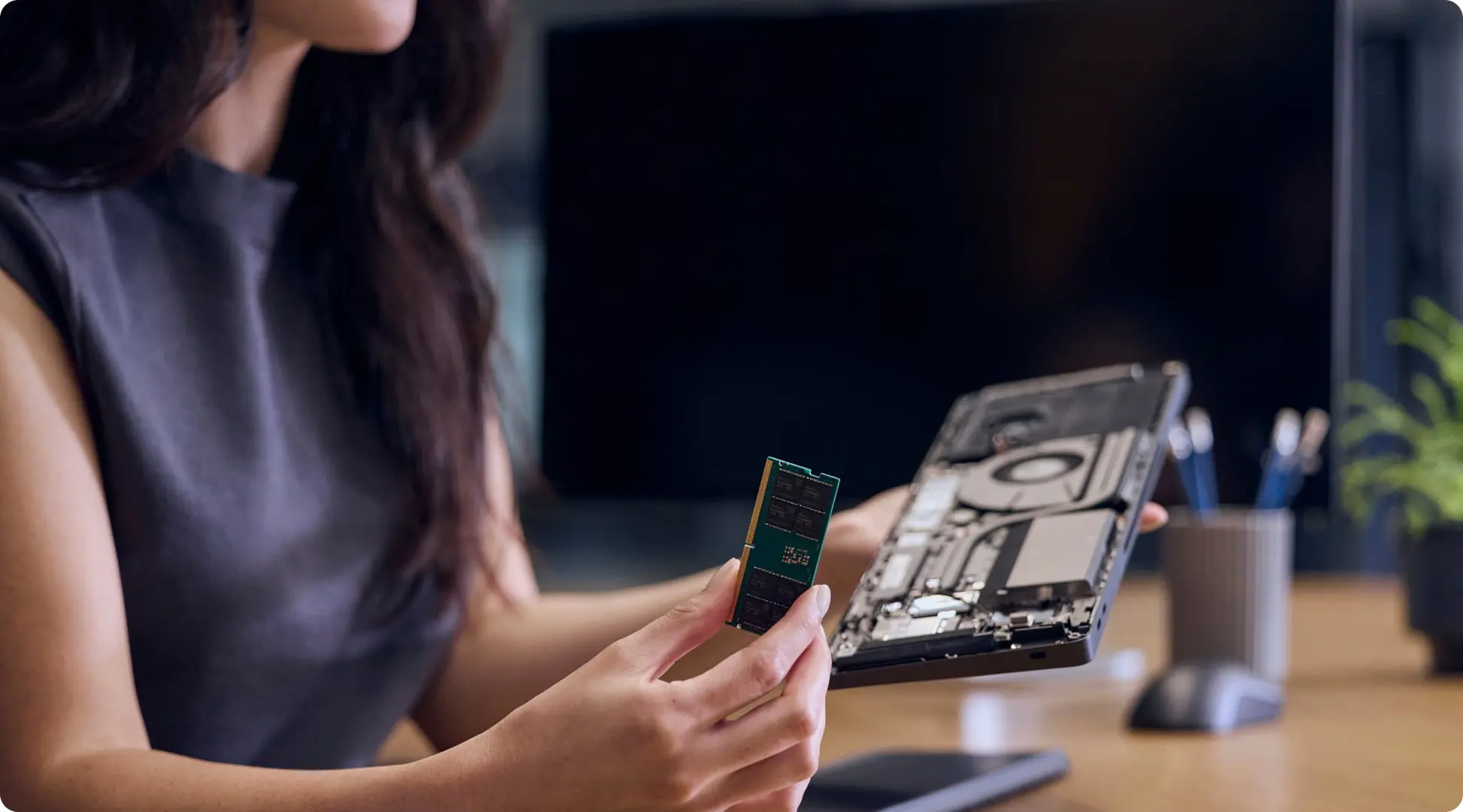
Those are laptop specifications, as the form factor suggests. The space that the HP EliteBoard G1a Desktop offers for components is, after all, even more limited than with a classic laptop. Yet HP still finds room for a 32 Wh battery.
Benchmarked
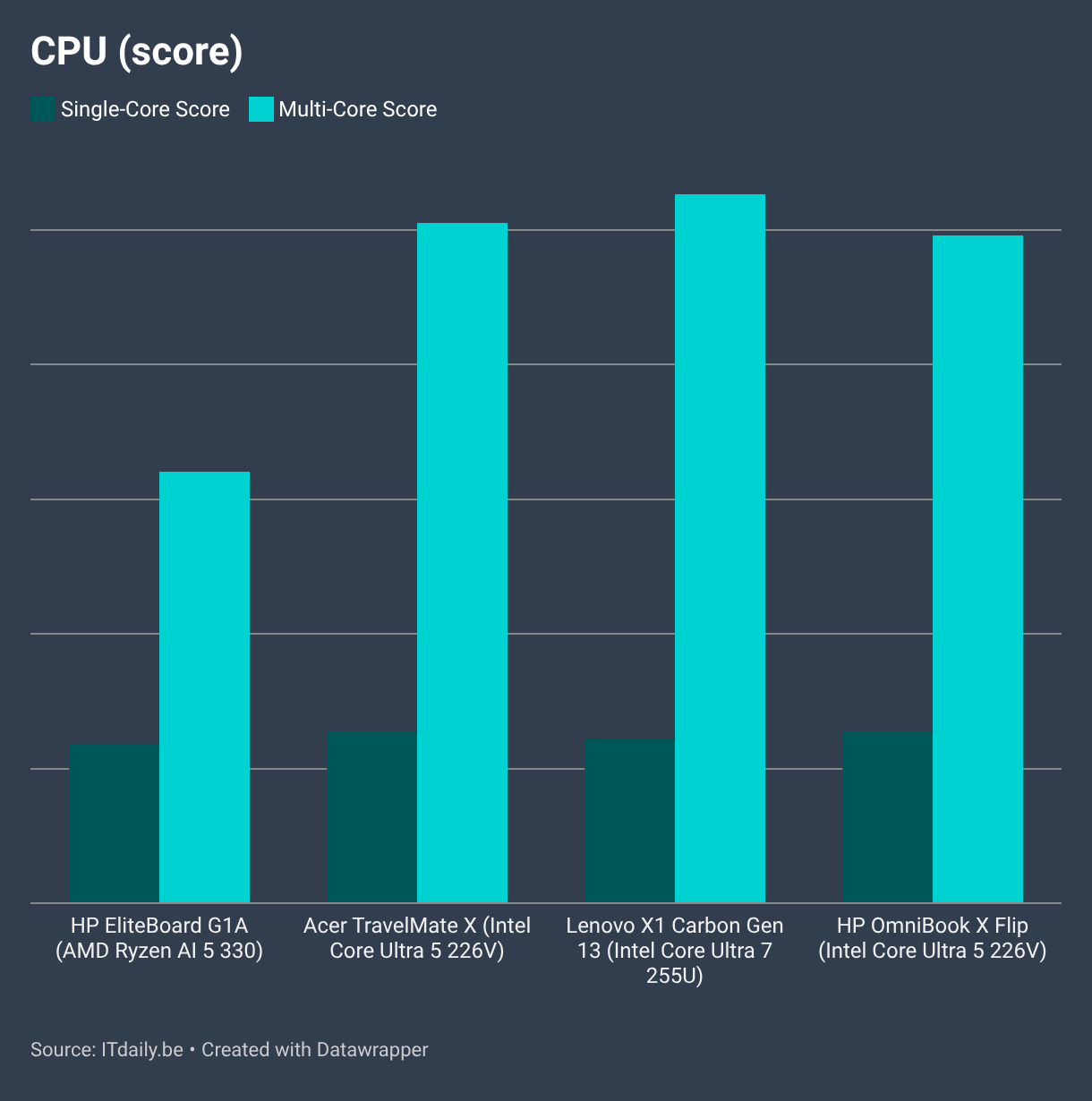
The performance does not blow us away. The AMD Ryzen AI 5 Pro 330 is not the most modern or the most powerful chip. With four Zen 5 cores, the chip can hold its own, but average CPUs from Intel’s previous generation perform a lot better in a traditional laptop chassis. Core for core, AMD does no worse, but four cores and eight threads is simply not that many.
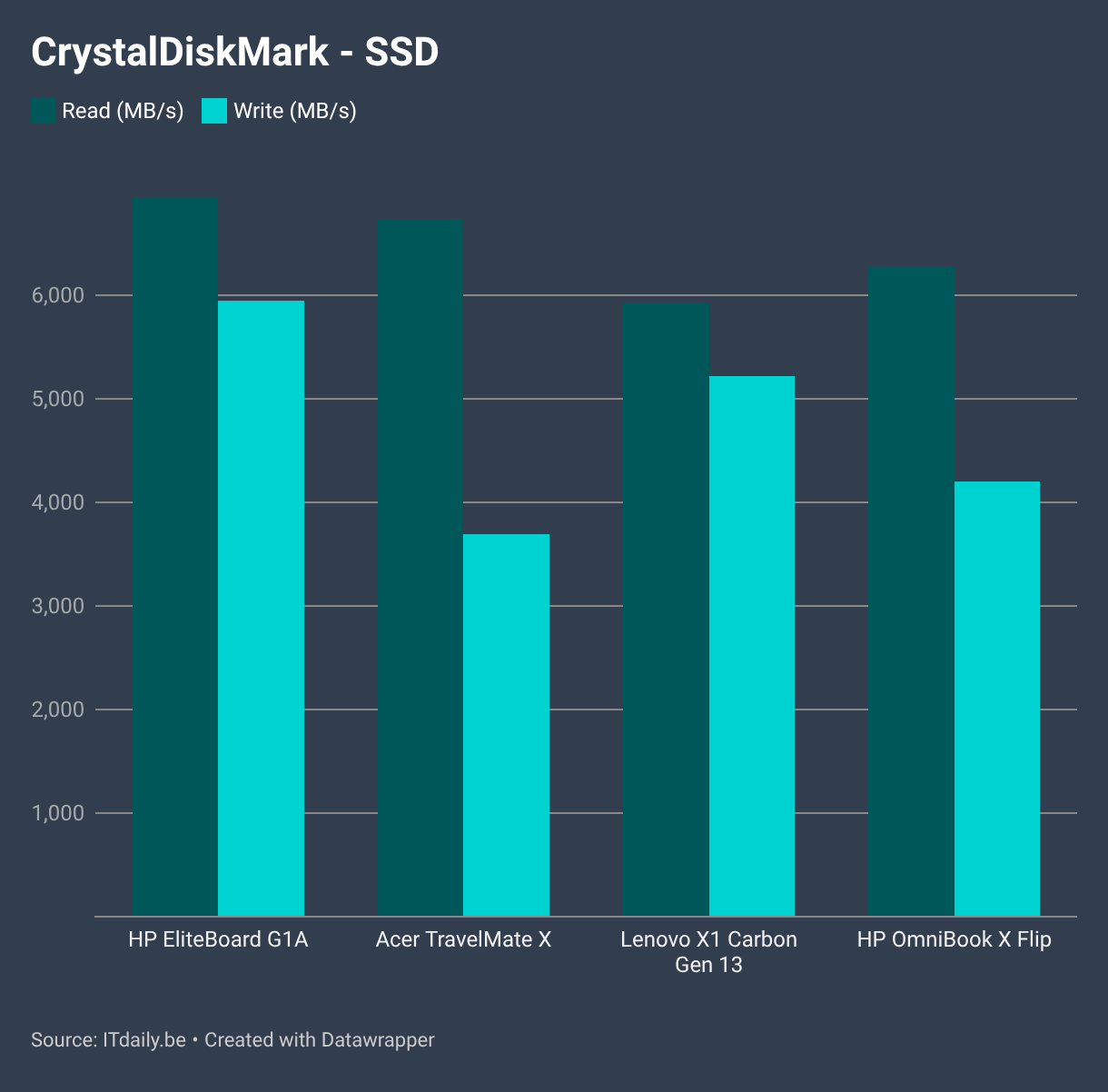
HP partially compensates for this by building in a fast SSD. It is more capable in both read and write performance than the ones in the laptops we are comparing it to.
The 16 GB of RAM is sufficient for regular office work. The Acer TravelMate X, Lenovo X1 Carbon, and HP OmniBook X Flip have the same amount on board. Together, the components ensure smooth performance as long as you stick to relatively modest work. Browsing, opening (slightly heavier) Excel files, going through your mailbox, video calling: it all went smoothly during our test.
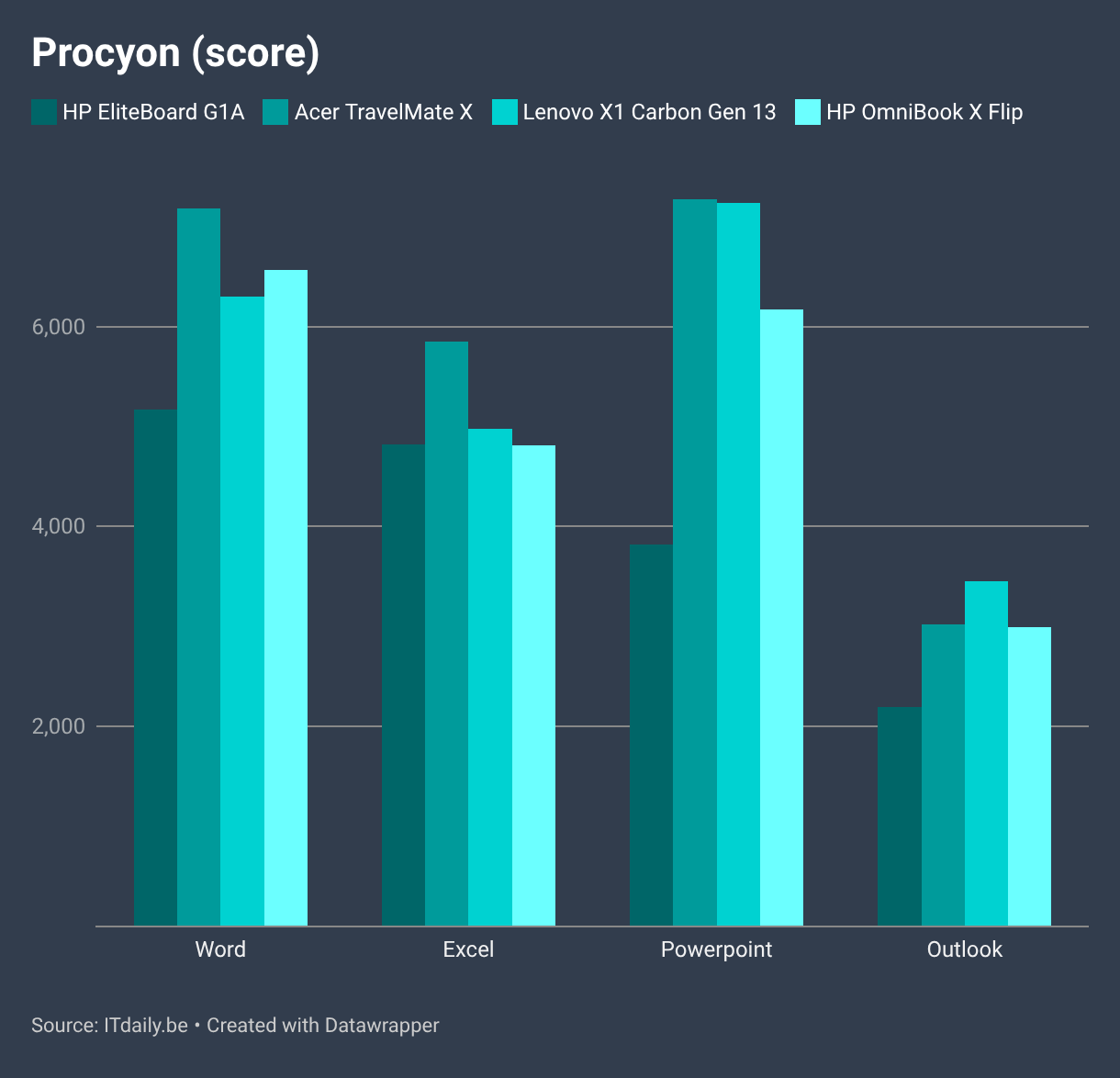
It should be clear that the other laptops in the tests perform somewhat faster. The Acer TravelMate X, for example, outclasses the HP EliteBoard G1a Desktop across the board, but costs significantly less with a suggested retail price of 726 euros excl. VAT. Moreover, you get a screen with that.
Small battery, great autonomy
The fact that this desktop-in-keyboard has no screen is good for its autonomy. The 32 Wh battery is more than enough to give the computer a lot of endurance. The HP EliteBoard G1a Desktop performs better than laptops with a battery twice as large, but of course, that comparison isn't entirely fair.
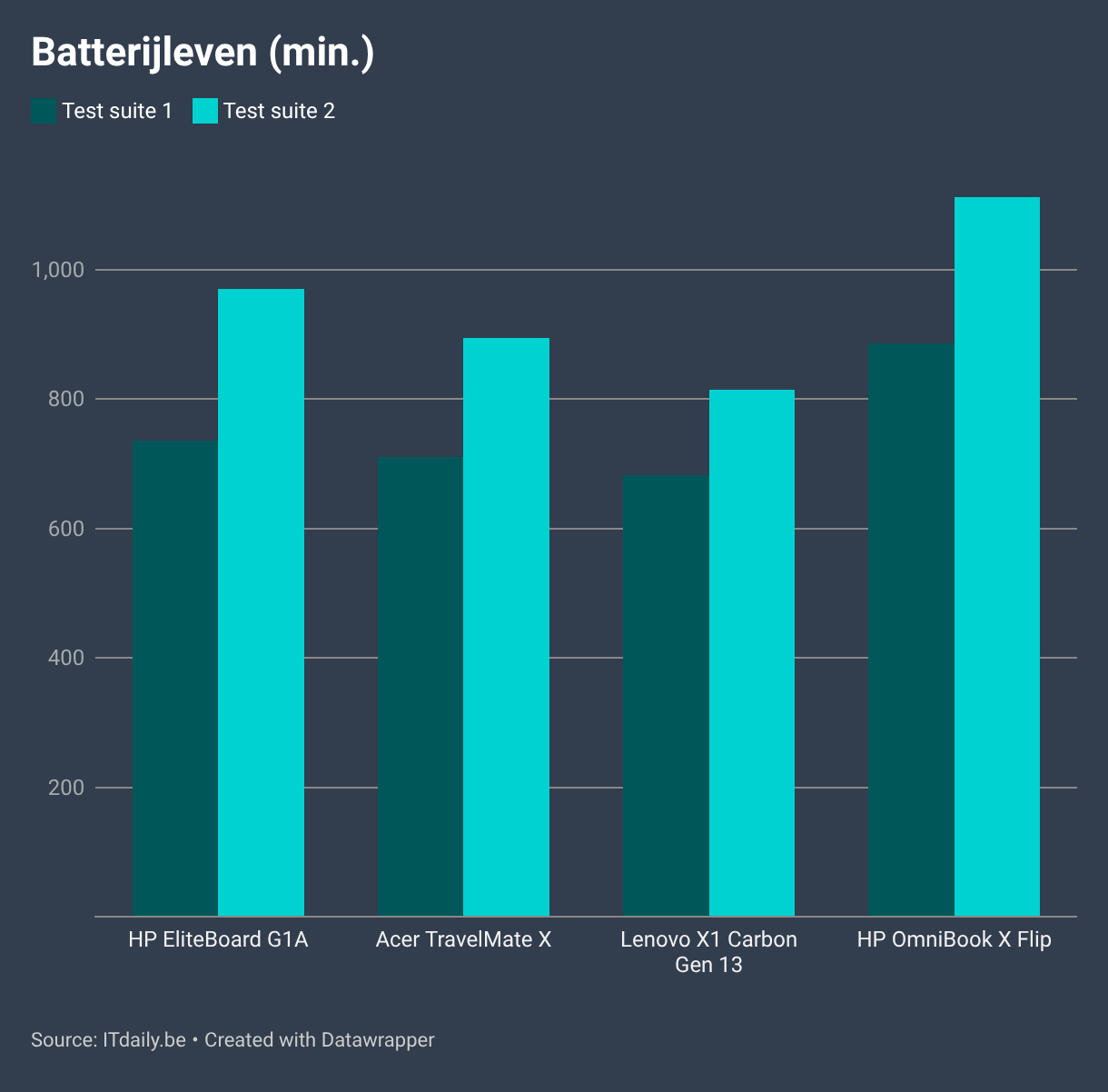
Charging is also unsurprisingly fast: a small battery is filled up quite quickly. Yet HP lets its EliteBoard struggle here compared to traditional laptops.
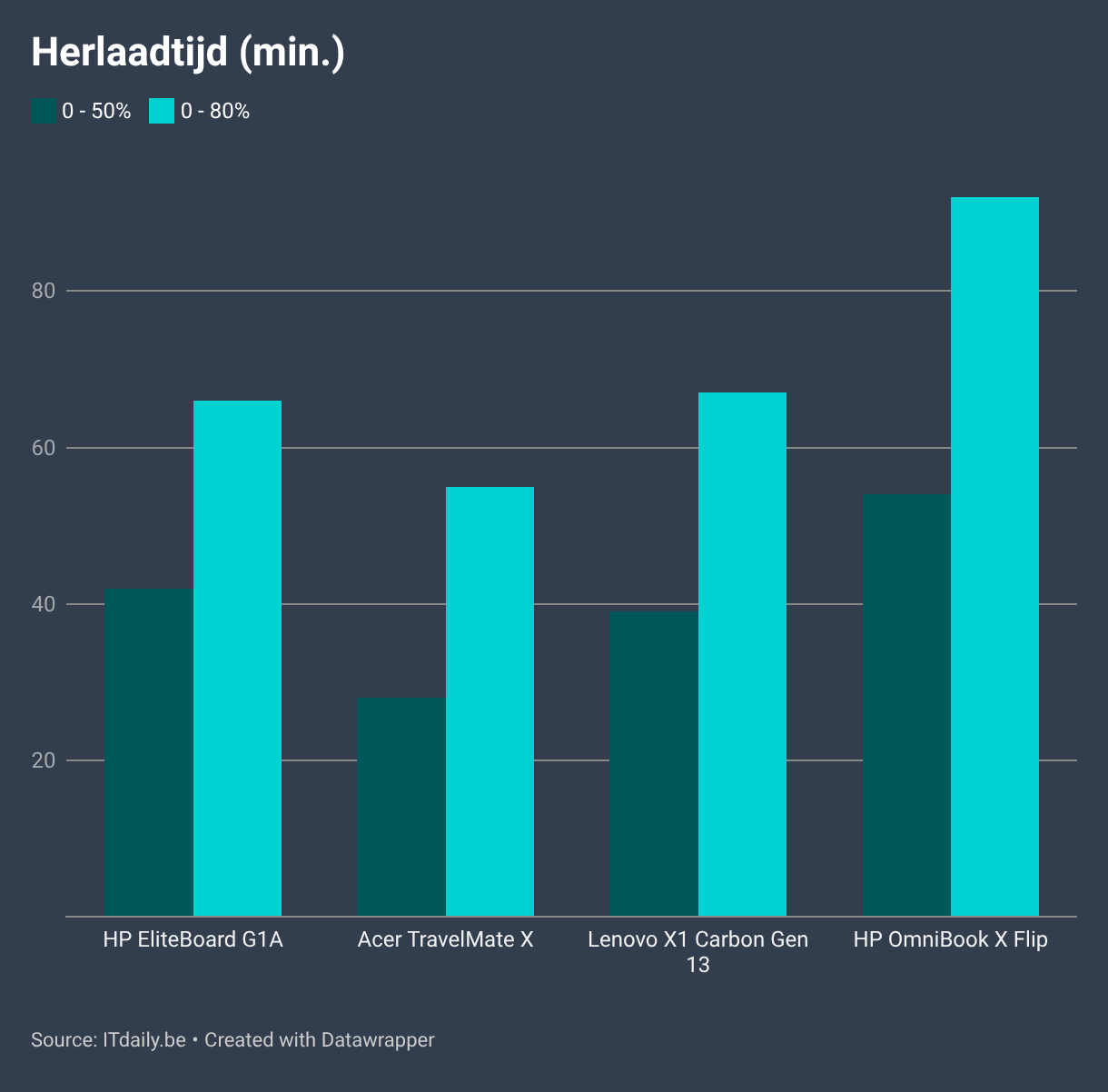
In terms of specifications, the HP EliteBoard G1a Desktop scores a passing grade. Our extensive testing confirms that the system is powerful enough for office work. However, the desktop generally scores a lot lower than traditional laptops, without being significantly cheaper.
Form above all else
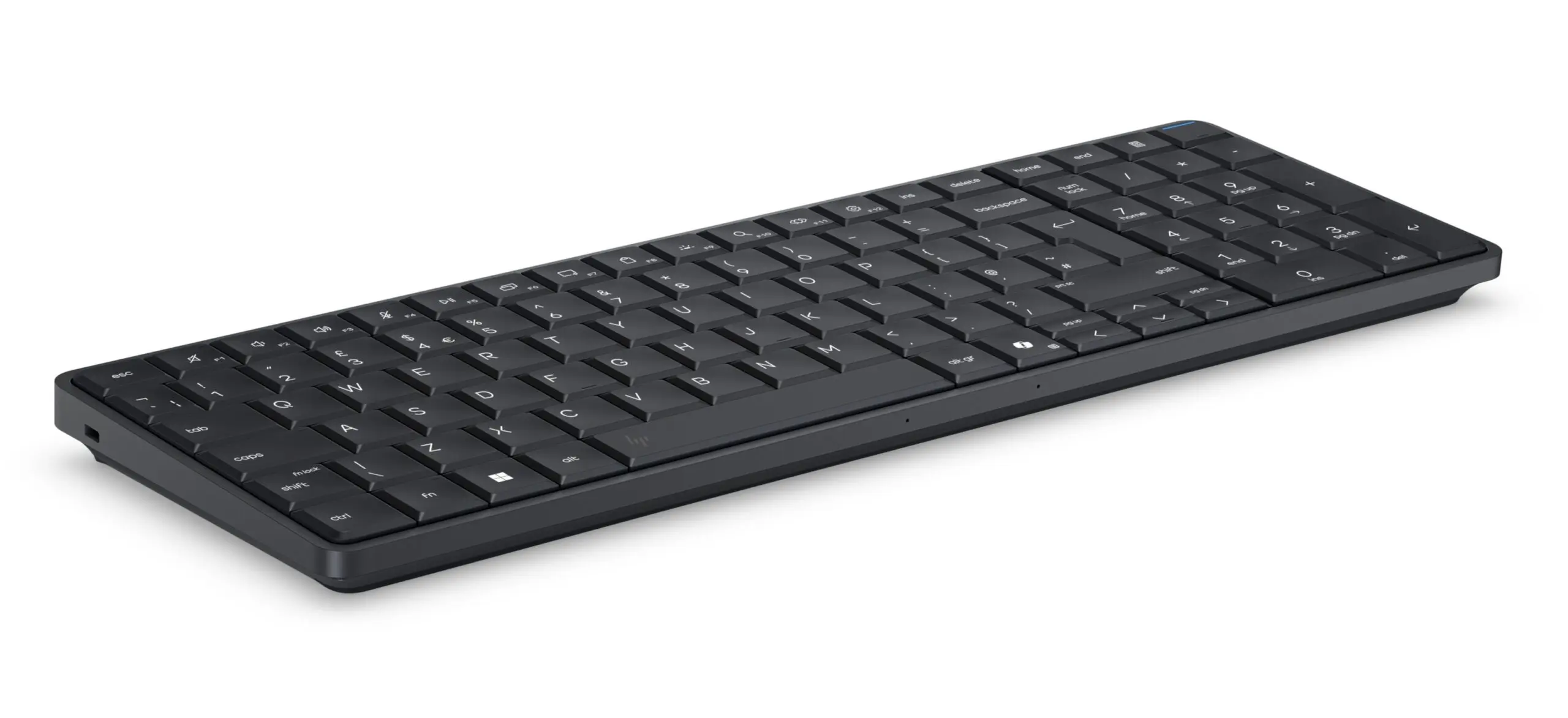
The trump card of the HP EliteBoard G1a Desktop is, of course, not the specifications. It is the form factor that is meant to sell this PC. In this regard, the quality of the keyboard is of paramount importance: you don't want to attach an external keyboard to this EliteBoard.
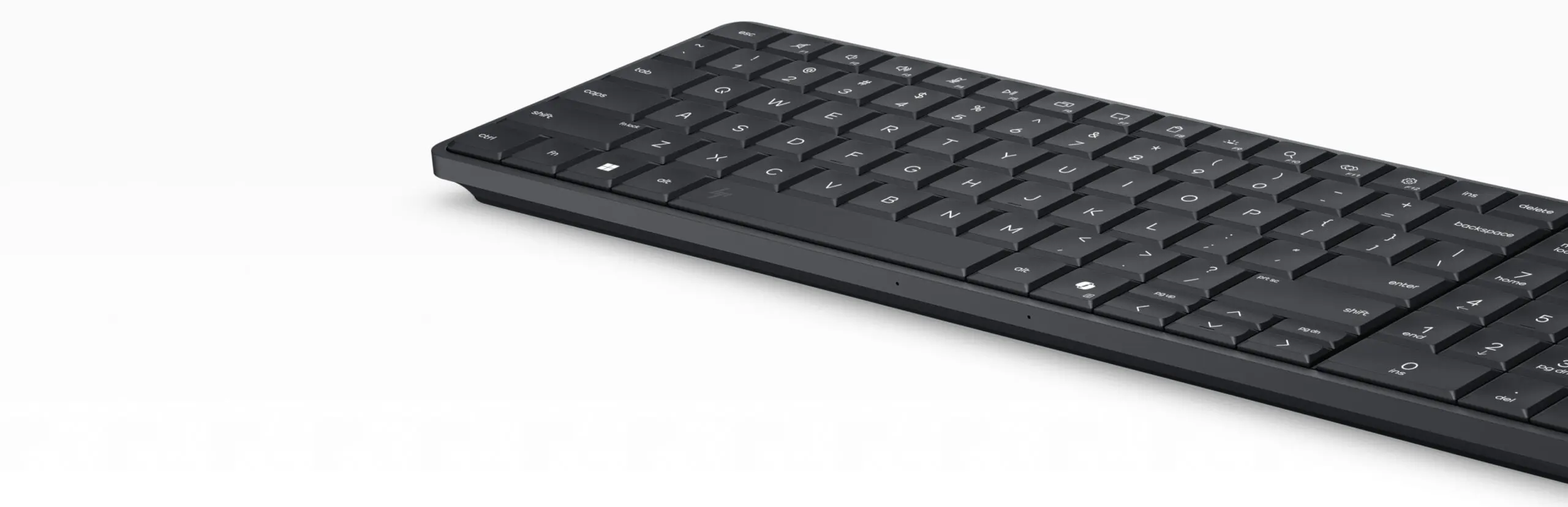
Fortunately, it is of very high quality. The texture of the keys is pleasant, as is their size. HP has provided the perfect resistance for every keystroke, and the depth to which the keys travel is also well-tuned. There is enough space for a full numeric keypad, which is always an added value, especially for AZERTY users.
We find this to be one of the best keyboards we have ever typed on. That's saying something: HP's laptops also have high-quality keyboards, not to mention Lenovo's devices. For this EliteBoard G1a, however, HP has surpassed itself and the competition.
A bit lukewarm
Under heavy load, the keyboard does get a little warm. It's not really distracting while working, but it is noticeable. The fan also becomes audible, although the volume is manageable.
During regular office work, however, the device never gets that warm, and the fan remains very quiet. It is only when the CPU is fully loaded for an extended period that heat begins to play a small role.
HP is stingy with the connections. The EliteBoard G1a Desktop is equipped with two USB-C (Thunderbolt) ports and space for a Kensington lock. That's where it ends: no USB-A, not even HDMI.
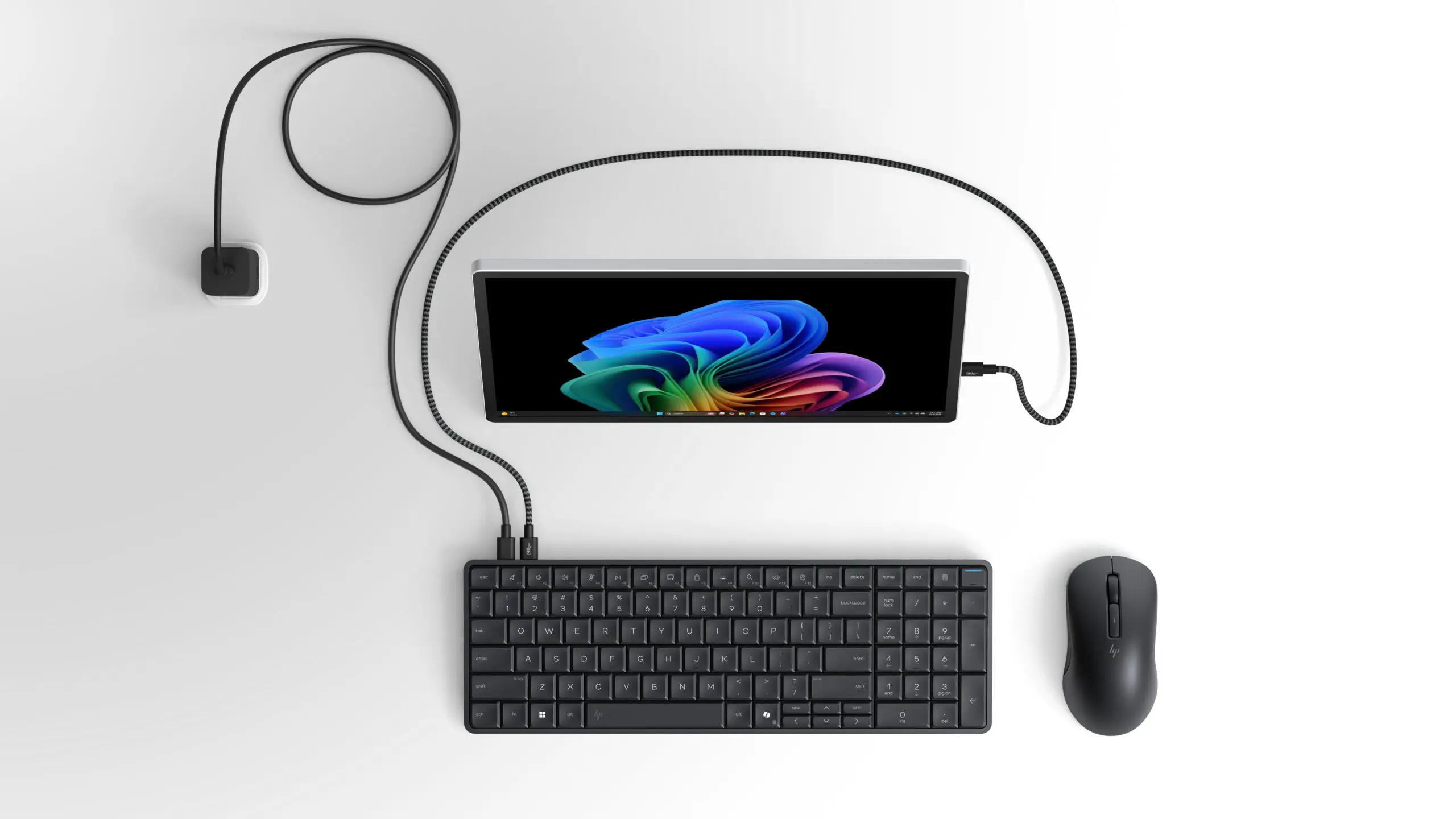
This is not a loss when you connect the HP EliteBoard G1a Desktop to a screen with USB-C and power delivery. One cable then handles the connection and the power supply. This way of working is clearly preferred for this device.
With an adapter, you can also connect older screens. In that case, you must connect the HP EliteBoard G1a Desktop to power via the other USB-C port.
Why, and for whom?
All of that works well, but it brings us to the most important question of this review: in what context does this form factor really offer added value?
We are struggling to provide an answer to this. The keyboard fits well with a very neat USB-C monitor. One cable is enough to connect everything, and a desk certainly looks neater than if you were to use a laptop.
Except that in that context, a mini PC is even neater. You can hide that behind the screen, or possibly just under the desk. To connect the HP EliteBoard G1a Desktop, one cable must run across your desk; with a mini PC and a wireless keyboard, you can hide all cables.
With an older screen, the advantage of the HP EliteBoard G1a Desktop in terms of neatness disappears completely: an adapter and extra power cable then mar the whole setup. For a short period, a power cable is not necessary: the battery will support you sufficiently then. The context in which you temporarily pass by a suitable screen with your keyboard PC to work there for a while without extra power also seems rather niche to us.
You shouldn't do it for the price either. As mentioned, you can buy a more high-performance laptop for less money. Mini PCs are also no more expensive.
Very mobile
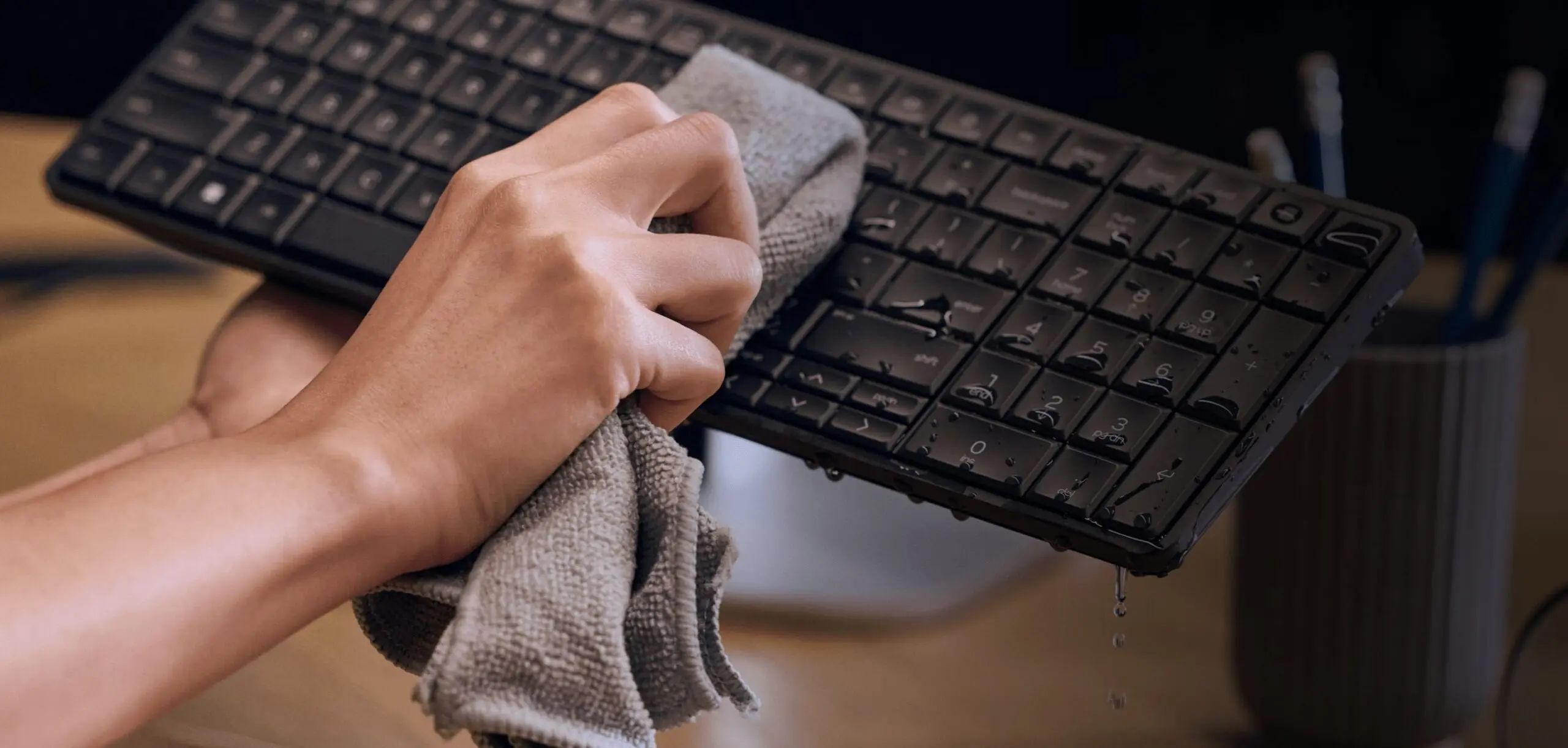
The HP EliteBoard G1a Desktop is definitely a mobile thing. At 758 grams, the computer is very light. You unplug one cable, put it in the case, don't forget your mouse, and you can head out. But, to where? This way of working is useful when you commute between two neat desks where you don't want to leave a laptop. In that case, there is an added value compared to the laptop. Moreover, the keyboard then fits into a smaller bag, such as a handbag.
Note: as soon as meetings are part of the task list, you run into the limitations of the form factor again. Taking notes won't be possible; presenting might be, if the meeting room has a USB-C connection and you want to share the entire PC with everyone. To work on the go, you could bring an external mobile USB-C screen, but then you've just made a kind of laptop yourself.
Microphone (but no camera)
HP still builds microphones into the keyboard. This allows you to participate in meetings. For video meetings, you need a camera. If that is built into your screen, it certainly already includes microphones.
Admittedly, the quality of the ones in the EliteBoard desktop is high. We suspect that most people in practice will simply use the audio from their webcam, as that is the default setting in Microsoft Teams.
Beautiful, but hard to justify
Although we find the HP EliteBoard G1a Desktop to be a beautifully finished product and like to encourage originality from established manufacturers, we struggle in this case to find a clear justification for the form factor. We can't really think of a clear scenario for which this device is the best option, other than commuting between two neat desks with USB-C screens.
With a strict objective eye, we therefore cannot recommend the HP EliteBoard G1a Desktop: we wouldn't quite know to whom. For the most common business scenarios, there are better, neater, more high-performance, or better-priced options. Only commuting between two fixed workplaces, where you never have to go to a meeting and never want to work on the go, sounds to us like a niche where this product has a place.
Perhaps we lack imagination and are overlooking something. We don't want to discourage anyone looking for this form factor. As mentioned, the HP EliteBoard G1a Desktop may not be the most powerful device, but HP delivers a good computer with a very good keyboard. Are you convinced by that? Then feel free to let us know what you will use the HP EliteBoard G1a Desktop for, because we are genuinely curious.
Tested: HP EliteBoard G1a Desktop, AMD Ryzen AI 5 330, 16 GB RAM, 1 TB SSD, Windows 11 Pro, 1,257 euros excl. VAT.
Pros
- Original
- Very well finished
- Fantastic keyboard
- Lightweight
Cons
- Few connections
- Unclear for whom