


The Acer TravelMate X4 14 AI is a professional, attractive, and above all capable laptop that, upon closer inspection, feels slightly less premium than competing models, but offsets this with a significantly more manageable price tag.
The Acer TravelMate X4 14 AI is a fairly understated 14-inch laptop. At first glance, the device can perfectly compete with light and portable premium models from HP, Dell, or Lenovo. That is not a given, considering its price tag of 726 euros excl. VAT. VAT. this laptop is quite a bit cheaper than, say, a Lenovo X1 Carbon or even an HP OmniBook X Flip.
Affordable premium experience
Acer has a clear goal with this device: the Acer TravelMate X4 14 AI must provide a premium laptop experience to freelancers and SMEs who don’t have overwhelming budgets. It succeeds grandly: the TravelMate is a very pleasant and balanced laptop that handles all the important tasks for a mobile office laptop.

Naturally, Acer makes compromises in finish, materials, and component selection, but all the choices make sense. Perhaps most importantly: when you use this laptop, you never feel like you’re working with a budget choice. This is partly because the TravelMate X4 14 is not a budget laptop by Acer’s standards. The laptop sits more towards the top of the Taiwanese manufacturer’s business segment, as they focus even more on the entry-level segment with the TravelMate P series.
Robust (but flexible)
Acer also knows what makes a laptop suitable for the business market, and the manufacturer makes no compromises there. This device is strong and has passed the same MIL-STD 810H tests as laptops from Lenovo or HP, for example. Vibrations, temperature fluctuations, and even falls from a desk should, in principle, not cause any problems.
That is a reassurance, as the chassis of this TravelMate is just a bit more flexible than we are used to from business devices. If you pick up the laptop by the corner while it’s open, the casing flexes slightly.
During this review, we had the chance to ask product lead Darren Su about this, after which he promptly picked up a TravelMate by the corner of the screen and swung it around confidently. That screen really did flex, but Su assured us that the devices are built to withstand such abuse. This perhaps shouldn’t be surprising: Acer has a lot of expertise in the education market, where ultra-strong laptops on a limited budget are a requirement.
Connections and input
Convinced of the laptop’s sturdiness, we get down to work. It is immediately noticeable that the keyboard is pleasant and very quiet to type on. The keys are flat but offer well-balanced resistance while typing. The touchpad is spacious and responsive.
Acer provides two USB-C/Thunderbolt connections and one USB 3-A port. A USB 2-A port is handy for connecting peripherals, but we don’t see it as a major value add: just be careful not to accidentally connect external storage to this port.

There is also room for HDMI, as well as a full-sized RJ-45 Ethernet port. This is always a significant advantage in a business context. Finally, a headphone jack is also present.
Decent screen
Our laptop is equipped with a 14-inch Full HD screen. Acer opts for a matte finish, which effectively prevents reflections. That’s good news, because the maximum brightness of 332 cd/m² is on the low side. Especially in sunny offices or outdoors, this is a limitation to keep in mind.
Furthermore, we aren’t blown away by the color quality of the IPS panel. It looks a bit lifeless. The contrast ratio of 1,031:1 is also slightly lower than we’re used to. Yet Acer deserves credit here: the panel covers 119.9 percent of the sRGB spectrum and is very well calibrated for a device in this price range. We see an average color deviation of barely DeltaE 2.5, where values below two are at the level of professional graphic work. The largest deviation is found in the red tones (DeltaE 5).
The panel might not be the most vibrant we’ve encountered, but the colors you see on the Acer TravelMate X4 14 AI are very close to reality. Given the price, we actually didn’t expect that: well done, Acer.
Balanced internals
Under the hood, Acer again opts for balance. At the center is the Intel Core Ultra 5 226V. This is good news because, as the ‘V’ indicates, this is a Lunar Lake chip. With Lunar Lake, Intel delivers a very interesting chip series where the memory is integrated alongside the CPU. This results in higher performance and efficiency.

In the case of our Acer TravelMate X4 14 AI, it features 16 GB of LPDDR5X. The chip itself has eight cores, four of which are performance cores, and reaches a maximum theoretical clock speed of 4.5 GHz.
In our test laptop, we see that clock frequency appearing in short bursts that don’t last long. Under high load, the chip stabilizes at 3.6 GHz for about five minutes. During longer intense loads, the clock speed of the P-cores dips to 2.9 GHz. The E-cores remain stable around 2 GHz, in line with their specifications. Given the slim casing of this laptop, with limited space to dissipate heat, these performance levels are good.
This is also reflected in the tests. The Intel Core Ultra 5 226V delivers slightly more horsepower in Acer’s chassis than in the OmniBook X Flip.

Note also how interesting the choice of a Core Ultra 5 is in a slim laptop. Lenovo opts for a Core Ultra 7 255U in the X1 Carbon Gen 13, but it performs hardly any better. Qualcomm continues to market a very efficient CPU with its Snapdragon X1 Elite, which still manages to outclass the Lunar Lake CPU.
Acer integrates a competitive SSD (512 GB) with an above-average (sequential) read speed. The storage also performs well in terms of write speed and random performance.
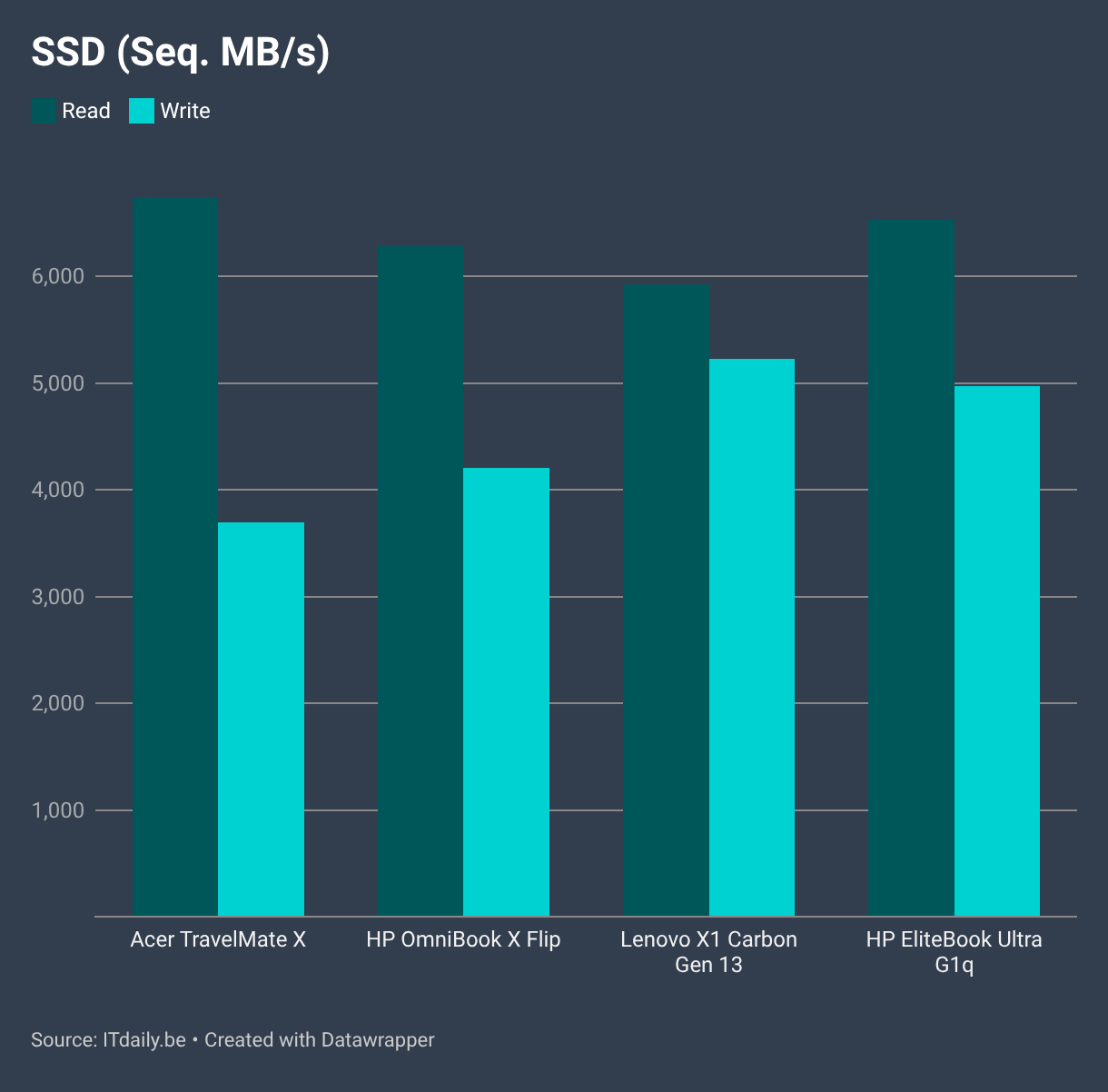
The SSD in the X1 Carbon and the HP EliteBook Ultra G1q is slightly more performant, however.
However, we don't notice this with office workloads. Our benchmark test even identifies the Acer TravelMate X as the winner for Word, Excel, and PowerPoint.

This is because the Core Ultra 7 in the Lenovo X1 Carbon is not a Lunar Lake, but an Arrow Lake processor. That chip not only lacks the integrated memory but also has a different core composition. While the Core Ultra 7 has twelve cores in total, the chip only features two full P-cores, in contrast to the four P-cores of the Ultra 5. That configuration works better.
We previously saw that the chip in the Acer laptop is slightly more powerful than the one in the HP, so it makes sense that it comes out on top. The fact that the EliteBook Ultra with its ARM-based Qualcomm processor cannot capitalize on its lead shows that Intel's x86 Lunar Lake chips are an excellent choice for office work.
A workday without recharging
The strength of ARM is efficiency, and we see that in the battery test. All laptops in our comparison have a similarly sized battery: 53 Wh for the Acer TravelMate X4 14 AI, 59 Wh for both HPs, and 57 Wh for the Lenovo. The ARM chip provides a significant advantage here.

The Acer laptop has the smallest battery but doesn't perform the worst: once again, it's clear that a Core Ultra 5 with Lunar Lake is a superior choice compared to a Core Ultra 7 with Arrow Lake. With normal office work, the Acer TravelMate X4 14 AI will certainly last you a full workday.

The advantage of a small battery is that it charges quickly. With the included 64-watt charger, you can refuel the TravelMate from empty to half full in just half an hour, and to 80 percent in less than an hour. Those are figures that even an ultrabook twice as expensive might envy.
Meetings with the webcam
We also have no complaints about the webcam and sound. Video is clear and perhaps slightly brighter than is realistic. That's not a problem: we always appear well-lit. Other devices have higher-resolution webcams, but the image from this one is good enough to join any meeting with confidence. You can close the webcam with a physical slider.
The microphone is even above average in quality. Our voice comes through clearly and undistorted, even when we position ourselves next to the radio speakers. That noise is filtered out well by the active noise cancellation. The speakers are decent, as you would expect from a laptop of this size.
From antivirus to actual virus
Regarding the software, we have both praise and criticism. Let's start with the bad news: bloatware. Years ago, McAfee evolved from an antivirus suite into annoying bloatware, and it's increasingly starting to resemble the viruses it once tried to fight. Acer has pre-installed McAfee on this device without being asked, treating us to an extremely intrusive pop-up with constantly increasing red numbers.

Its only purpose is to use fear to convince unsuspecting users to purchase an antivirus suite they don't need. It's a shame that Acer allows itself to be tempted into including this software on a business laptop.
Shred your files
More enjoyable is TravelMate Sense. This is a tool that allows you to adjust several settings on your laptop. For example, you can quickly check a box to ensure your battery only charges to 80 percent. This is useful for those who are never far from a power outlet and want to maximize the battery's lifespan.

Workflows is a nice addition where you can, for example, quickly start a focus session via a button, but we don't see ourselves using this in the long term. Encryption options, or the truly secure deletion of files via the File Shredder, are a nice addition. In the dashboard, you can also monitor parameters such as battery, SSD, CPU, and RAM, and adjust the performance mode for your device.
Punching above its weight
The Acer TravelMate X4 14 AI doesn't just punch above its weight in terms of performance; it also wins prizes in that competition. Acer makes the right hardware choices and ensures good cooling and balance. The result is a fast and responsive laptop suitable for both office work and light photo and video editing.

The laptop meets the same standards for robustness as more expensive models and is just as portable. Weighing 1.24 kg, this device is an excellent companion for on the go. The finish might be slightly simpler than on more expensive devices, with the more flexible chassis, but that's a detail you won't think about often.
The screen could have been a touch brighter, but the colors are very good. As for connections, we get everything we want. That leaves us with only one conclusion: Acer delivers a very good laptop that, with its price tag of 726 euros excl. VAT, VAT. deserves the label 'phenomenal'. We are therefore happy to add the 'Editor's Choice' label as well.
Tested configuration: Acer TravelMate X4 14 AI TMX414-51-TCO-55R3, Intel Core Ultra 5 226V, 16 GB RAM, 512 GB SSD, 14-inch matte IPS screen (1,920 x 1,200), Windows 11 Pro – 726 euros excl. VAT VAT. (price at the time of review)
Pro's
- High performance
- Decent battery life
- Quickly recharged
- Color-accurate screen
Contra's
- Limited screen brightness
- Bloatware with McAfee