

Microsoft makes it possible to manage camera, microphone, and location permissions per desktop app in Windows. Windows Insiders can now use a new privacy interface to determine in detail which traditional desktop apps gain access to sensitive resources.
Microsoft is testing new privacy features that allow Windows Insiders in Windows 11 to choose which desktop applications can access their camera, microphone, and precise location. Previously, users could only determine which desktop applications had access to their camera, microphone, or location at the device level.
The new functionality is currently only available to members of the Windows Insider Program.
Privacy per app
“Windows Insiders can now manage camera, microphone, and location permissions for individual desktop apps. Previously, access for traditional desktop applications was managed via a single device-wide setting,” Microsoft stated.
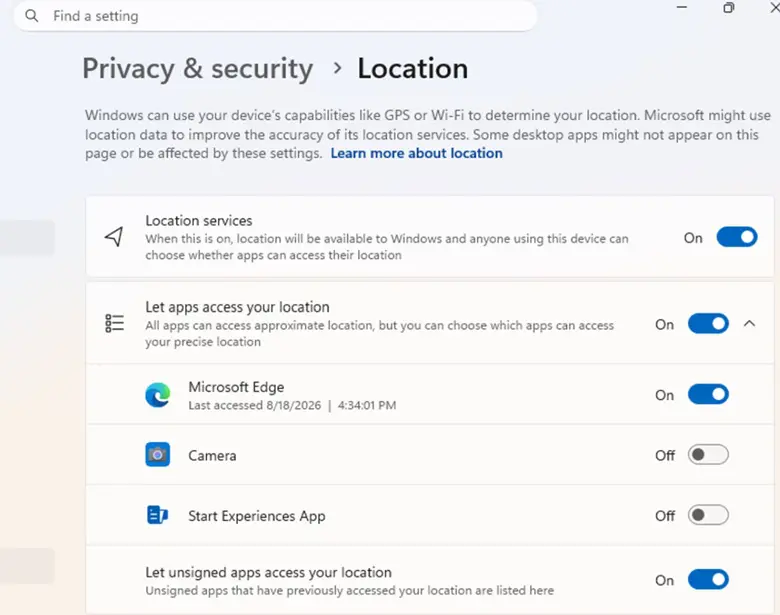
The new privacy settings can be found under Settings > Privacy & security > Camera, Microphone, or Location. There, users get an overview of all desktop apps that are requesting or already have access to these resources. Permission can be granted or revoked for each app individually, making management more granular than before.
Microsoft points out that some desktop apps may appear in the list under a different name than expected due to the use of shared system components or browser-hosted technologies. Additionally, certain apps may be shown as ‘unsigned’ if Windows cannot verify the publisher. The advice is to only grant access to apps that are trusted.