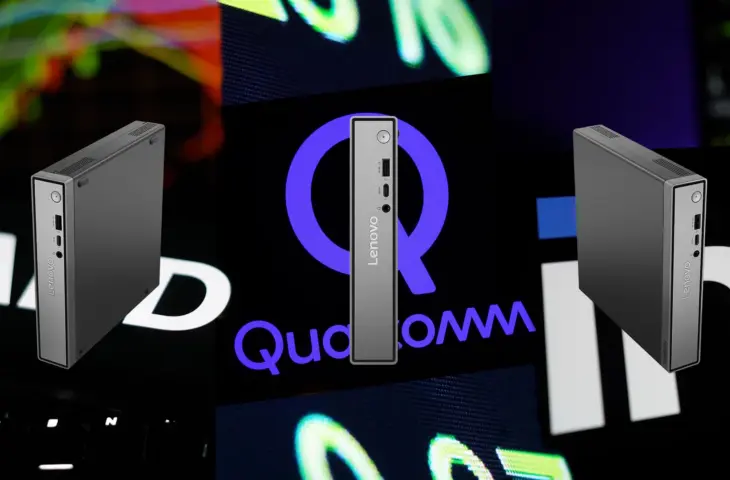
AMD, Intel, or ARM with Qualcomm? There’s no better way to discover the best chip for the occasion than by testing all three in an identical PC enclosure.
The freedom of choice in the PC world hasn’t been this great in decades. Anyone looking for a new laptop or desktop today must weigh AMD and Intel against each other. That alone is a good thing, because around 2005, Intel bought itself ten years of market dominance with unfair trade practices, sidelining AMD. A comeback with the excellent Zen architecture, now in its fifth iteration, put an end to that monopoly.
From monopoly to free choice
But there’s more: the monopoly of x86 has also been broken. After many years of half-hearted attempts, Qualcomm has succeeded in bringing ARM chips to the market with its Snapdragon X processors that feel at home in Windows PCs. Add ARM support by Microsoft to that, and the processor landscape has a third fully-fledged member. Anyone in the market today must therefore choose between x86 with Intel or AMD, or ARM with Qualcomm.
Manufacturers including Lenovo are fully embracing that choice by bringing devices to market with identical functionality, but different internals. The ThinkCentre Neo 50q is thus available in three variants: with Intel Inside, with an AMD chip, or equipped with a Qualcomm Snapdragon X.
ThinkCentre Neo times three
Furthermore, the three variants of the ThinkCentre Neo 50q are hardly distinguishable. The compact desktop computers look the same. They all have five USB-A ports, one USB-C connection, an RJ-45 port for ethernet, HDMI, and DisplayPort. A VESA adapter, which allows you to mount the compact PC behind a screen, is included in the box each time.
The Lenovo ThinkCentre Neo 50q Gen 5 has an Intel Core 5 210H on board. It is flanked by a 256 GB SSD and 15 GB RAM. Variant ThinkCentre Neo 55q Gen 6 has an AMD Ryzen 5 220 on board. Lenovo uses the last five in the model number to indicate the presence of an AMD chip. The internals of our test model are otherwise identical.

Thirdly, we are working with the ThinkCentre Neo 50q QC. It has a Qualcomm Snapdragon X X1-26-100 on board. This computer is slightly favored in our test, because Lenovo provides the test model with 32 GB RAM and a 1 TB SSD.
Intel Core 5, AMD Ryzen 5, and Qualcomm Snapdragon X
Before we put Intel, AMD, and Qualcomm against each other, we’ll take a look at the processors we’re actually comparing.
The Intel Core 5 210H is a laptop chip from Intel’s previous generation (Raptor Lake), and does not come from the Core Ultra stable. The chip rolled off an Intel 7 production line. Intel provides eight computing cores, four of which are P-cores with multithreading and four economical E-cores without, good for twelve threads in total. The maximum clock speed for the P-cores is theoretically 4.8 GHz. Intel introduced the chip at the end of 2024.
- Intel Core 5 210H, Raptor Lake, 4x P-core (4.8 GHz), 4x E-core (3.6 GHz), Intel 7, x86
The AMD Ryzen 5 220 is by no means a powerhouse. The processor does date from 2025, but is actually a reworked version of an AMD Ryzen 5 8540U. That is in turn an update of a Ryzen 5 7545U, launched in 2023. This chip has two Zen 4 cores on board that work together with four lighter Zen 4c cores. The six cores together are good for twelve threads. The maximum clock speed is 4.9 GHz.
The chip is an example of old wine in new bottles. AMD has been making CPUs with the more powerful Zen 5 architecture since 2024. The AMD Ryzen 5 220 did roll off a TSMC 4 nm band, but is not a good example of AMD’s current portfolio. The Intel Core 5 210H, on the other hand, is a recent processor: successor Intel Core Ultra Series 3 / Panther Lake has only just been announced.
- AMD Ryzen 5 220, Hawk Point, 2x Zen 4 (4.9 GHz), 4x Zen 4c (3.5 GHz), TSMC N4, x86
The third chip in the ring is the Qualcomm Snapdragon X X1-26-100. The CPU that fights for the ARM camp is also not the most modern of its kind in this comparison. Qualcomm has already launched Snapdragon X2 in September 2025.
The Qualcomm Snapdragon X X1-26-100 is the lightest Qualcomm CPU from the first generation of laptop chips, with eight ARM-based Oryon cores on board and a clock speed of up to 3 GHz.
- Qualcomm Snapdragon X X1-26-100, 8x Oryon (3 GHz), TSMC N4, ARM
A battle between entry-level models
In this comparison, in other words, we are putting entry-level processors from Intel, Qualcomm, and AMD against each other. This differs from our analysis last year of Intel Core Ultra, Qualcomm Snapdragon X Plus, and AMD Ryzen 7 in the same laptop. On paper, Intel should have the advantage, because the Intel CPU is by far the most modern chip in the comparison.
read also
Intel Core Ultra, Qualcomm Snapdragon X Plus or AMD Ryzen AI: tested in the same Lenovo ThinkBook 16
We start with a comparison of the pure CPU performance, both per core and with all cores together. It is immediately noticeable that Lenovo has made a balanced choice in its chip selection. The three processors are evenly matched and play in the same category.
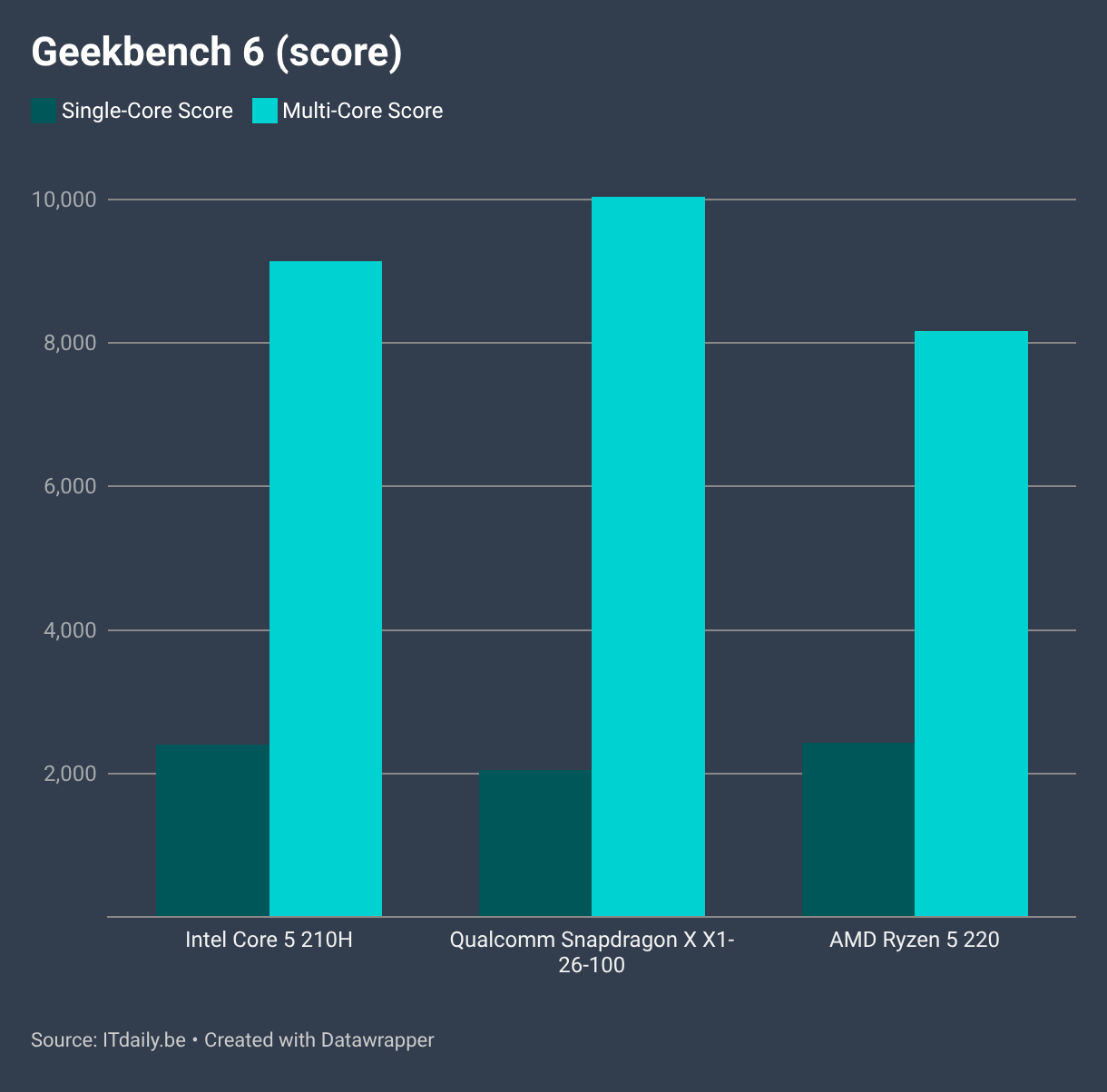
We first look at the performance per core. There we see that the ARM-based Oryon core does slightly less well. AMD manages to even narrowly outclass Intel with its now outdated Zen 4 architecture, which says something about the inherent quality of Zen.
Cores and stability
If all cores work together, the Qualcomm Snapdragon X comes into its own the most. Those eight full cores together are the strongest. Intel follows in second place. With the help of the E-cores, the four P-cores can outclass the AMD Ryzen 5 220. That is not illogical: AMD has only put two performance cores in its chip. Although the four Zen 4c cores are no slouches, the six cores together cannot reach the same level as the competition.
The stability of the Qualcomm Snapdragon X is striking. In the compact chassis, the chip continues to perform at peak clock speed, even under heavy load. The Intel CPU can maintain 4.1 GHz for half a minute, after which the P-core drops to a stable and very respectable 3.8 GHz. The AMD chip comfortably settles at 3.2 GHz for eight minutes, but then starts to sweat and has to drop to 3.1 GHz. The AMD Ryzen 5 220 also gets by far the warmest of the three CPUs.
Performance in practice
The question now is whether those differences mean much in practice. A direct comparison between all three chips based on figures is complex, due to compatibility differences between x86 and ARM. We therefore focus on the Procyon benchmark, which quantifies performance in Microsoft’s Office office suite. It is available for all chips.

Here we immediately see that the pure CPU test does not tell the whole story. In fact, although the ThinkCentre Neo 50q QC has twice as much RAM on board than the other two variants, that does not translate into higher performance. For all office tasks, the Qualcomm Snapdragon X X1-26-100 does slightly worse than the x86 chips.
AMD is making a comeback here. The lightest chip consistently outclasses the most powerful. Only the Intel Core 5 processor from Intel delivers slightly better results.
What about AI?
For the sake of completeness, we also include AI performance. First of all, we note that none of these chips are suitable for real AI workloads that are reminiscent of what you can consume in the cloud. You need other hardware for that, such as a discrete graphics card, or an AMD Strix Halo processor with 128 GB of shared RAM.
In fact, the Intel Core 5 and the AMD Ryzen 5 do not have an NPU on board. They have to fully rely on their light GPU to perform simple AI tasks and you can see that.

The results for the x86 chips are understandably low. Qualcomm is the only one to integrate an NPU into the processor. It has 45 TOPS, and can therefore handle light AI-related tasks. In this way, Qualcomm still has a trump card in hand, for those who find that important. AI-driven functions in, for example, graphic applications, or background blur in video calls, will work better with the ThinkCentre Neo based on Qualcomm.
No laptops, no trump card
For this test, we are examining mini-PCs and not laptops. That is to the disadvantage of Qualcomm. The Snapdragon X PCs excel in efficiency and performance per watt. This usually results in an above-average battery life for laptops. In the context of these desktops, Qualcomm cannot play the trump card.
There is therefore little reason to choose Qualcomm in this case. Although the compatibility of most software on Windows with the ARM architecture is excellent today, not everything works perfectly on ARM. There is no clear reason why you would choose Qualcomm in your search for a desktop today, except for the modest added value of the NPU. Those who often call via Teams may therefore still prefer the Snapdragon X.
Choosing,…
This test of light processors teaches us that Intel, AMD, and Qualcomm play in the same class. All CPUs have their strengths and weaknesses, but all in all the difference is not that great. That is a good thing: even in the entry-level segment of CPUs there is clear competition today. No manufacturer can afford not to give a segment its full attention and the end user can only benefit from that.
All CPUs have their strengths and weaknesses, but all in all the difference is not that great.
Should you now choose Intel, AMD, or Qualcomm? As you can see, it doesn’t matter that much. Have an unsuspecting employee work alternately with the three PCs in Office, and he or she will not notice any difference.
Based on this specific test, our preference goes to the Lenovo ThinkCentre Neo 50q Gen 5 with Intel on board, because it best converts the available performance into speed in daily use, and we can be completely sure of x86 compatibility.
…not lose
However, that choice does not take into account one important variable: the price. The ThinkCentre Neo 55q Gen 6 with AMD costs 657.73 euros incl. VAT, The Neo 50q QC with Qualcomm (and 16 GB RAM, not 32 as our test model) costs 689.01 euros incl. VAT, and the Intel ThinCentre Neo 50q Gen 5 with Intel costs 903.22 euros incl. for an inexplicable reason. VAT. Why you would pay 250 euros extra for the Intel model is something we cannot understand from our test. So we choose the cheapest: with price taken into account, AMD wins.