


The HP EliteBook Ultra G1i is a strong, high-performance, ultra-mobile office laptop that, as the spiritual successor to the Dragonfly series, is just a bit less exciting.
With its Dragonfly series, HP built a premium brand within its already premium collection of office laptops. The dark blue device represented the pinnacle of the EliteBook series, with high performance, a beautiful display, a luxurious-looking dark blue magnesium casing, and a very low weight.
Casing: Following the Original
Last year, HP decided to simplify its naming: farewell to Envy, Pavilion, and also Dragonfly. The HP EliteBook Ultra G1i is thus primarily the spiritual successor to the Dragonfly G4. Unfortunately, HP has not only simplified the naming but also aligned the design of the new laptops more closely. That’s never a bad thing, but just like with a movie sequel, we can’t shake the feeling that the original was better.
Keyboard and Touchpad
We look somewhat skeptically at the keyboard of the HP EliteBook Ultra G1i. HP also opts here for the new design language it introduced with the OmniBook X 14. The keys now have light blue-gray accents and feature large capital letters. It reminds us both of the 1980s and a Chromebook.

The keys themselves are flatter and offer less feedback when typing. Where HP almost matched keyboard champion Lenovo with typing experience in the previous generation of devices, this feels more like a step backward.
The large touchpad is fantastic. You can no longer press it to click, which initially fills us with skepticism, but HP integrates haptic feedback so well that we can’t feel the difference from a real click.
Finish and Connections
The finish of the HP EliteBook Ultra G1i’s screen is not a step backward. The screen edges are not thinner but are more neatly finished. The webcam (with Windows Hello) is also more subtly integrated. To slide a cover over the lens, you need to move a slider at the top. That’s fine, but less fancy than the button on the keyboard that snapped the cover shut in the previous Dragonfly.
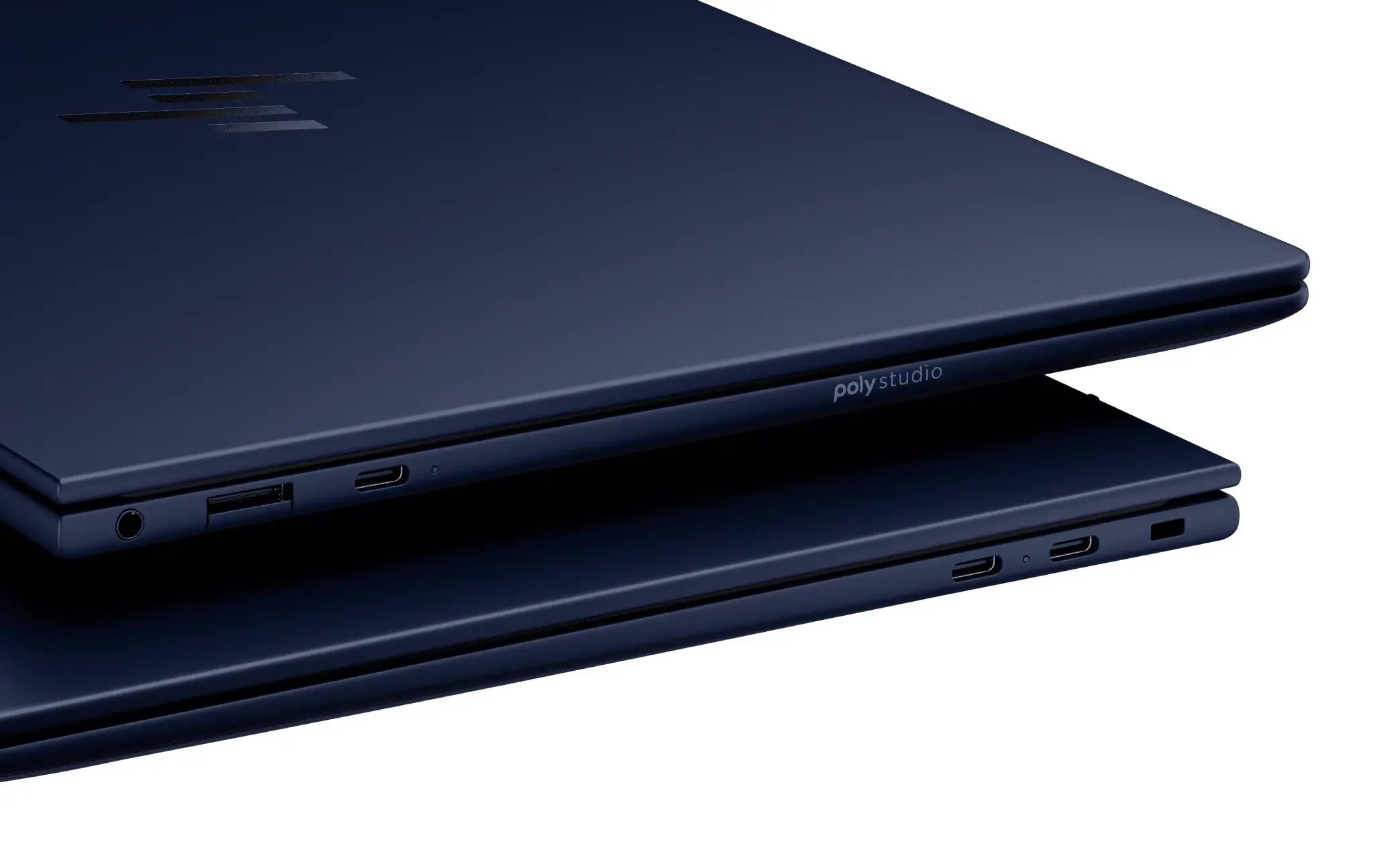
In terms of connections, HP is generous. On the left, we find two USB-C/Thunderbolt ports, and on the right, a third. This allows you to connect a charger or external display on either side. A subtly integrated USB-A port is also present, as well as a 3.5 mm audio jack. We have to say goodbye to the HDMI port, which was still present on the Dragonfly, on the HP EliteBook Ultra G1i.
Lightweight
This laptop, like its predecessor, is very light. Our configuration weighs 1,192 grams: barely more than the Dragonfly G4 at 1,183 grams. In terms of build quality, we have no complaints. Everything is sturdy, robust, and neatly finished, including the keyboard. We personally find the slightly brighter blue of this device a bit less classy, making it look somewhat cheaper, especially in combination with the keyboard, but tastes differ.

Performance: in Top Form
The “i” in HP EliteBook Ultra G1i reveals that HP has equipped this laptop with an Intel processor. The beating heart is an Intel Core Ultra 7 258V. This latest-generation chip has four P-cores with multithreading and eight efficient E-cores without, totaling sixteen threads.
HP further includes 32 GB of RAM in the laptop, alongside a 1 TB SSD. The graphics power comes from the built-in Intel Arc 140V chiplet on the CPU.
Fast enough
In theory, this combination of hardware promises powerful office performance, and our tests confirm that. HP even extracts slightly more computing power from the chip than Lenovo with the ThinkPad X9 Aura. It is noticeable that the performance of the EliteBook Ultra with Qualcomm ARM processor is still higher.

The pure CPU horsepower translates into reality with high scores for everyday use of Office. The HP EliteBook Ultra G1i scores more than high enough. We attribute the high scores of its predecessor more to an anomaly with the tests.

We reinforce this analysis with the graph below, which again assigns scores based on a multitude of office tasks, including Office but also light photo editing and video conferencing.

In summary, the HP EliteBook Ultra G1i is a powerful office laptop that fulfills its role with distinction.
Battery and charging
HP targets this device at the mobile office worker, which implies that the laptop must have solid autonomy. The device scores effectively high with the 64 Wh battery. This shows that the Intel chip of this generation is much more efficient than its predecessor.

Dell remains the champion with the Dell Pro 13 Premium. It has a lighter chip on board and lasts much longer. The laptop even surpasses the HP EliteBook with Qualcomm Snapdragon on board.
Charging goes as expected quickly. With the included 65-watt charger, you can charge the battery halfway in half an hour.

HP earns extra points for that charger. You can disconnect the USB-C cable and use it with another charger, or even as a cable to connect a USB-C display. That's a handy extra that other manufacturers could learn from.
AI (or not)
HP also can't resist emphasizing AI with the HP EliteBook Ultra G1i. Not only is there a small logo on the casing, but during startup, you're treated to an AI logo, Powered by AI Experiences. Below that, HP adds a Wolf Security logo, turning the startup screen into a billboard. A shame.
Regarding AI: the CPU has a small NPU chiplet on board, just like almost all other CPUs in comparable laptops. This NPU supports very light AI tasks. As you can see in the graph below, the laptop performs well compared to other ultrabooks. The HP EliteBook Ultra G1q has only one score because the NPU of the ARM processor is not compatible with our image generation benchmark.

Like all other laptops in this category, the HP EliteBook Ultra G1i is, of course, not a true AI laptop. The NPU can accelerate a few simple functions, such as background blurring in Teams.
HP does install the HP AI Companion software on this device, but you need an online HP account for that. The AI software doesn't work entirely locally, and the local performance is not really comparable to AI in the cloud. If you want such performance, you need internal components of a different magnitude. Think of the HP Zbook Ultra G1a with AMD Ryzen AI Max+ PRO 395 with 128 GB shared memory, or a workstation with a suitable GPU.
HP Wolf Security
The AI advertising on the casing and startup screen is somewhat misplaced. The Wolf Security advertising on that same screen is also unnecessary for us, but that security suite does offer real added value. A Wolf Security license is included with the purchase of the laptop and can be extended by three extra months after registration. You can register or log in with an HP ID or a Microsoft Entra ID.
We previously analyzed Wolf Security. The suite includes additional security capabilities that complement Microsoft's built-in Defender security. Think of protection against malware at startup and micro-VMs to safely open attachments.
Beautiful screen
The 14-inch screen of the HP EliteBook Ultra G1i has a resolution of 2,880 x 1,800 pixels. With 411 nits, the display remains readable even in challenging conditions. The minimum brightness of 22 nits is quite high, especially in dark rooms. Furthermore, we notice that the software for adjusting brightness is not well-calibrated, sometimes resulting in large jumps.

The colors are reasonably well-calibrated. We measure a DeltaE of 3.1: more than what graphic professionals would wish for but sufficiently accurate for an office laptop. The biggest deviations are found in the blue tones.
Video Calling
That leaves us with the discussion of the audio and video capabilities. Video calling is traditionally a strength of HP's business laptops, and the HP EliteBook Ultra G1i is no exception. The webcam captures clear and sharp images, even in challenging lighting conditions such as limited lighting or backlight.
The noise suppression sometimes takes a few seconds to calibrate, but we can hold a meeting next to the radio without the other party hearing anything. In other words, image and sound are excellent.
An Adequate Sequel
The HP EliteBook Ultra G1i is a powerful, sturdy, lightweight, and thoughtfully designed premium laptop. For 1,999 euros (excl. VAT), you get an office laptop that you can proudly show off. HP does nothing wrong: this device has all the necessary bells and whistles on board and comes with a compromise-free balanced configuration. Based on the benchmark tests, this HP EliteBook Ultra G1i is better in all respects than the predecessor Dragonfly G4 with an older Intel chip.
Yet we are not unreservedly enthusiastic. Like many sequels, this one struggles to rekindle the enthusiasm of the original. The laptop is cheaper than the Dragonfly G4 (2,596 euros excl. VAT), and we notice that a bit. With the phasing out of the Dragonfly brand name, the soul of the Dragonfly series has also perished. The HP EliteBook Ultra G1i is what the name suggests: a very good EliteBook. Those looking for that can confidently open their wallets.
Tested configuration: HP EliteBook Ultra G1i B69D3ET - Intel Core Ultra 7 258V, 32 GB RAM, 1 TB SSD, 14-inch OLED display (2,880 x 1,800 pixels), Windows 11 Pro – 1,999 excl. VAT.
Pro's
- Balanced performance
- Excellent battery
- Beautiful OLED display with high maximum brightness
- Nice charger with detachable USB-C cable
- Sufficient USB ports
Contra's
- Worse keyboard than previous generations
- Startup screen downgraded to advertising panel
- No HDMI
- Strange screen brightness calibration