

Microsoft now enables retrieving print jobs from any printer within an organization thanks to Universal Print Anywhere.
Microsoft has made the new feature “Universal Print Anywhere” generally available for organizations using Universal Print in Microsoft 365. The feature adds so-called “pull print” functionality to the existing platform. This allows users to print a document without having to select a specific printer in advance. They can then retrieve their print job from any compatible printer in the network, after verification.
Less Risk and Waste
With the addition of pull-print, Microsoft increases control and security around print jobs. The document is only printed when the user physically logs in at the printer. This prevents confidential documents from being left unattended on printers. At the same time, the feature reduces the number of forgotten or uncollected prints, which can contribute to lower paper and toner consumption.
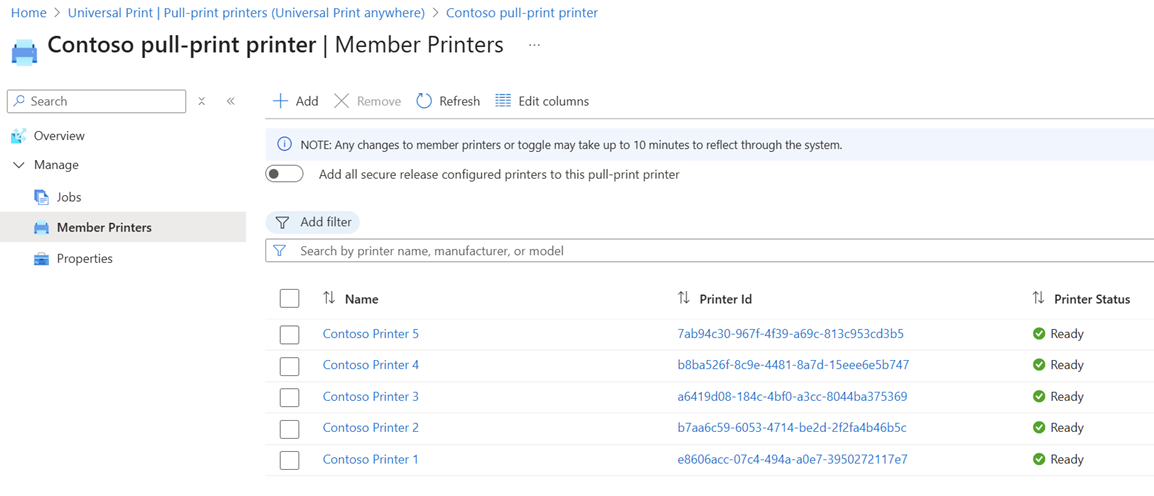
The feature works on Windows and macOS devices. For administrators, Universal Print Anywhere also offers additional control options. They can determine which printers are part of the pull-print group and which print settings are visible to end users. The rollout requires no major adjustments. Printers are connected via the existing Universal Print infrastructure.