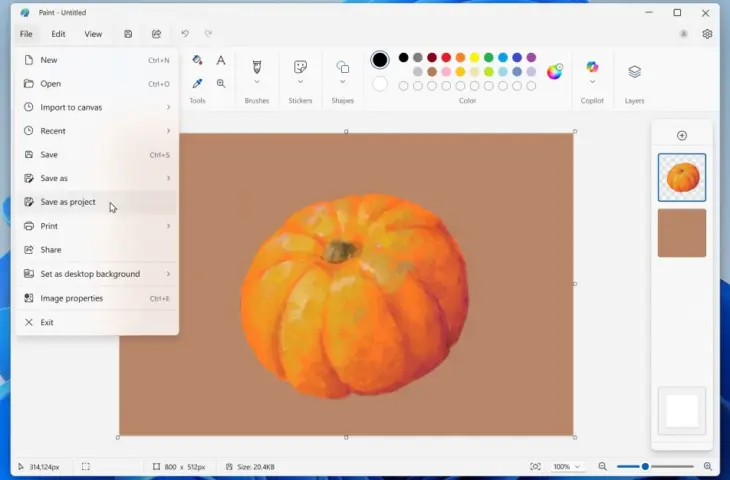
Soon you’ll be able to save creations in Microsoft Paint as an editable Paint project file.
Microsoft announces an update (version 11.2508.361.0) for its photo editing app Paint. Soon, users will be able to save creations in Paint as a project. This project file will have the .paint extension, comparable to Photoshop’s .psd extension. “You can now save your creation as an editable Paint project file and seamlessly continue where you left off,” explains Dave Grochocki, Principal Group Product Manager for Microsoft’s Windows Inbox apps. This new feature is currently in the testing phase for Windows Insiders in the Dev and Canary Channels.
Photoshop-like Projects
Just as you can save projects in Photoshop with the .psd extension, Paint now also gets its own extension to save files. You save your creation as a .paint file and can then seamlessly continue working on your project.
read also
Microsoft Paint, Photos, and Snipping Tool get new features in Windows 11
To save the file as a project, click the File menu and select the Save as project option. Then you can select a location in your Explorer where the .paint file will be saved. When you subsequently open the file in Explorer, you’ll see the project in Paint and can seamlessly continue working.
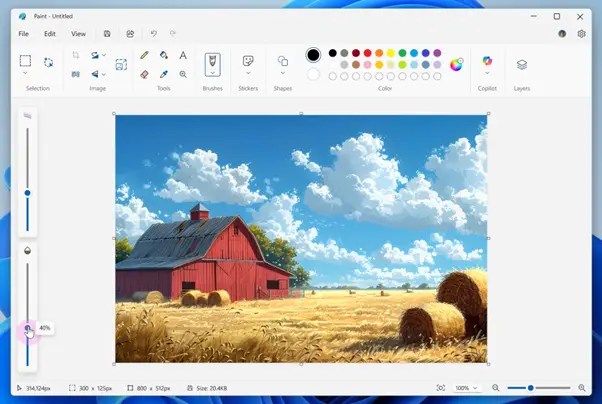
Additionally, Microsoft is also adding a new opacity slider. When you select one of the tools, a slider will appear on the left where you can adjust the opacity as desired.
The new updates for Paint are now available for Windows Insiders in the Dev and Canary Channels.