

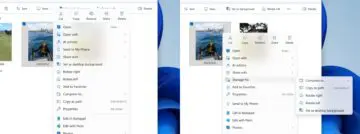
Microsoft is working on some adjustments for File Explorer in Windows 11. The context menu is changing, and the application will load faster.
Microsoft is focusing on File Explorer. The application should soon load faster and become clearer. For fast loading, Microsoft is providing preloading. This means that File Explorer is already loaded in the background before you open the application for the first time. If you click on it, File Explorer is immediately ready.
Microsoft is already applying the same technique to Office applications. Preloading is useful for applications that you use a lot, but unnecessary in other cases. You can go to Options and View to disable the function.
Context Menu
Furthermore, Microsoft will adjust the context menu. The menu that appears when you right-click on a file should become clearer. Microsoft will group less frequently used functions under a submenu Manage file. The name of this may still change as Redmond continues to develop the adjustment. This should shorten the list.
Microsoft is placing functions such as Use as desktop background, Compress to… and Rotate Right/Left under the submenu.
The adjustments are currently being developed for Insiders and, in principle, will be rolled out to the general public at the beginning of 2026.